Solved

GRN Error

  • December 30, 2025
  • 3 replies
  • 38 views

Forum|alt.badge.img+5

HI,

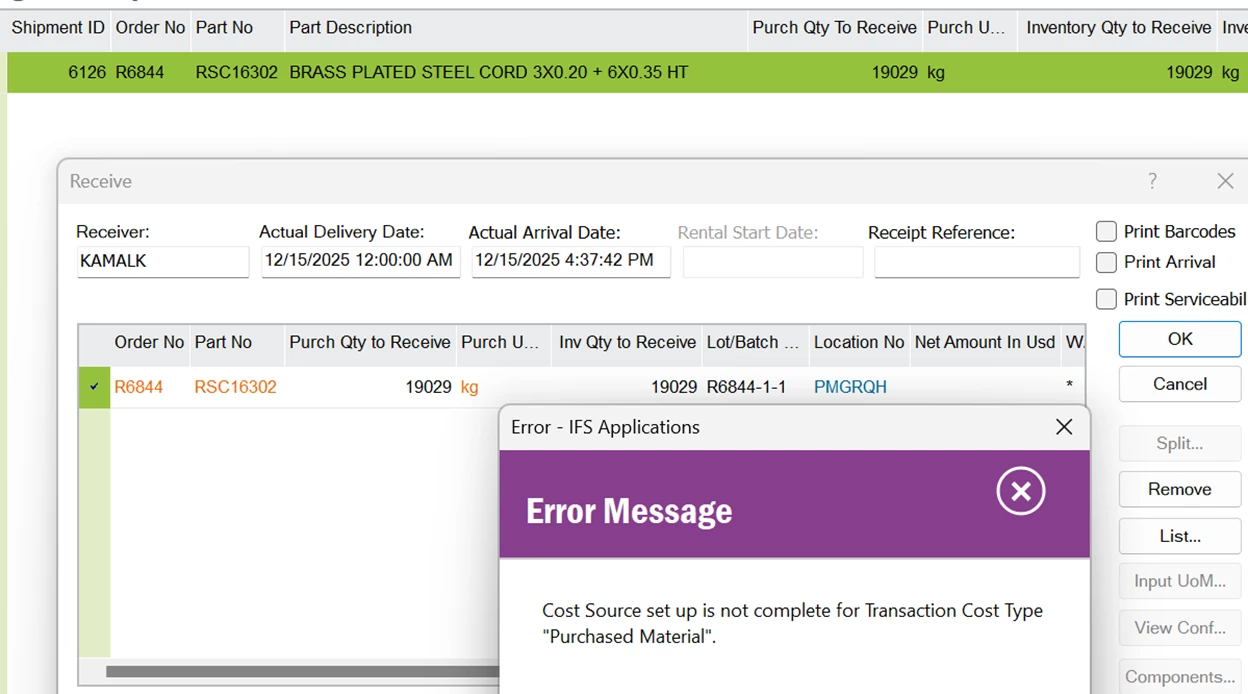
I’m getting he following error while doing the multisite shipment arrival. I checked the postings and the cost types. All are updated properly. Please advise.

 

Best answer by Furkan Zengin

Hello

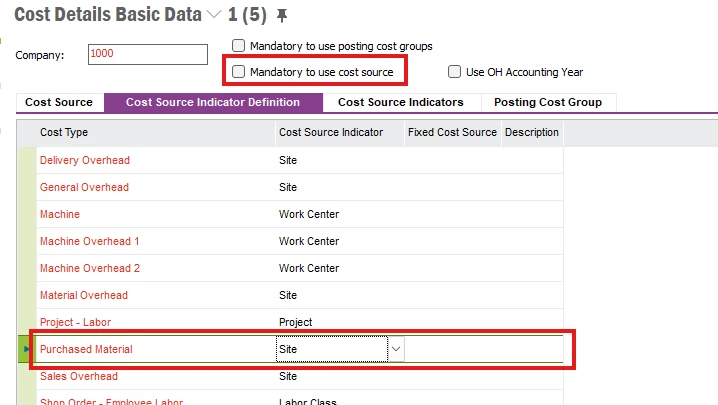
Probably you have Cost Source mandatory on the cost details basic data but have not set the source for the cost.

Check the source indicator for Purchased Material. If it is fixed value then just enter in the next column.
 

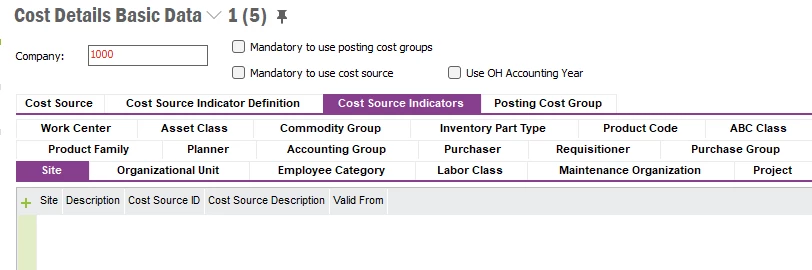
If it is Site or something else then go to Cost Source Indicators tab and select the indicator. In my case it is Site so i selected the Site tab. The source must be defined here.
 

Hope this helps

3 replies

Furkan Zengin
Ultimate Hero (Partner)
Forum|alt.badge.img+21
  • Ultimate Hero (Partner)
  • Answer
  • December 30, 2025

Hello

Probably you have Cost Source mandatory on the cost details basic data but have not set the source for the cost.

Check the source indicator for Purchased Material. If it is fixed value then just enter in the next column.


If it is Site or something else then go to Cost Source Indicators tab and select the indicator. In my case it is Site so i selected the Site tab. The source must be defined here.


Hope this helps


Forum|alt.badge.img+5
  • Author
  • Sidekick (Customer)
  • December 30, 2025

Hello

Probably you have Cost Source mandatory on the cost details basic data but have not set the source for the cost.

Check the source indicator for Purchased Material. If it is fixed value then just enter in the next column.


If it is Site or something else then go to Cost Source Indicators tab and select the indicator. In my case it is Site so i selected the Site tab. The source must be defined here.


Hope this helps

Yes. This is really help me. Many Thanks. I will go through this.

Regards,

Tharaka.


Forum|alt.badge.img+5
  • Author
  • Sidekick (Customer)
  • January 6, 2026

Hello

Probably you have Cost Source mandatory on the cost details basic data but have not set the source for the cost.

Check the source indicator for Purchased Material. If it is fixed value then just enter in the next column.


If it is Site or something else then go to Cost Source Indicators tab and select the indicator. In my case it is Site so i selected the Site tab. The source must be defined here.


Hope this helps

Yes. This is really help me. Many Thanks. I will go through this.

Regards,

Tharaka.

Hi,This is solved. Many thanks for the guidance.


Thanks,

Tharaka Nawarathna