Solved

External File Template Control

  • December 24, 2025
  • 6 replies
  • 51 views

Forum|alt.badge.img+7

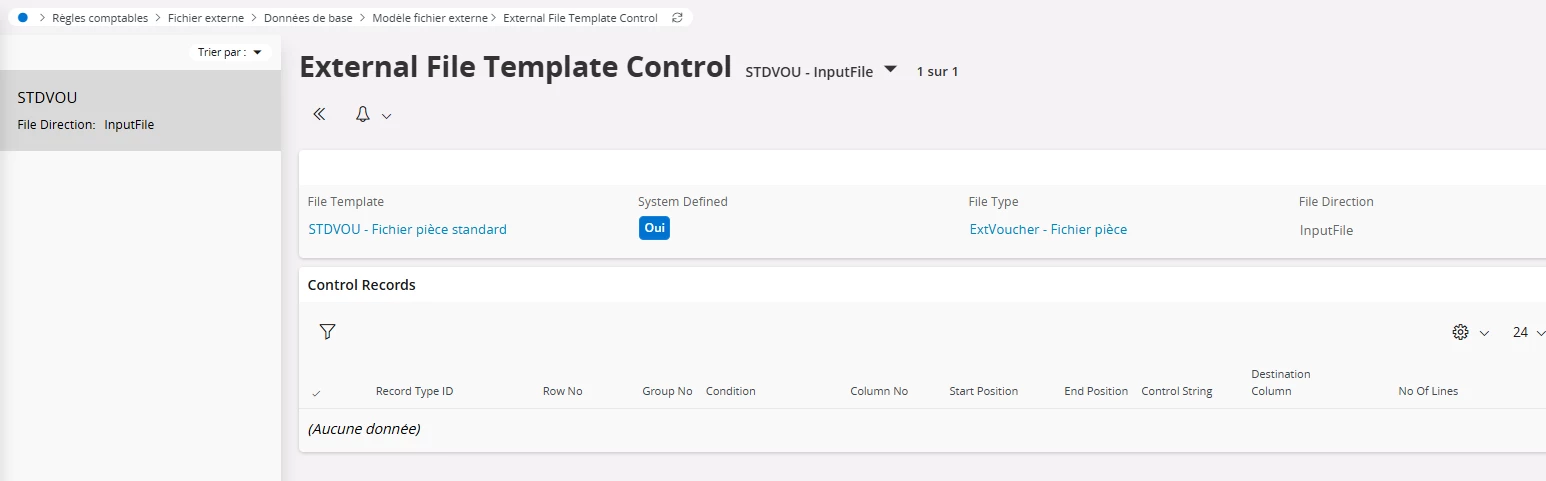
When defining a an STDVOU template, there is an option to define a template control.

Is there any documentation on how those control works please?


Kind regards

Best answer by Furkan Zengin

Hello ​@N.GEORGI 

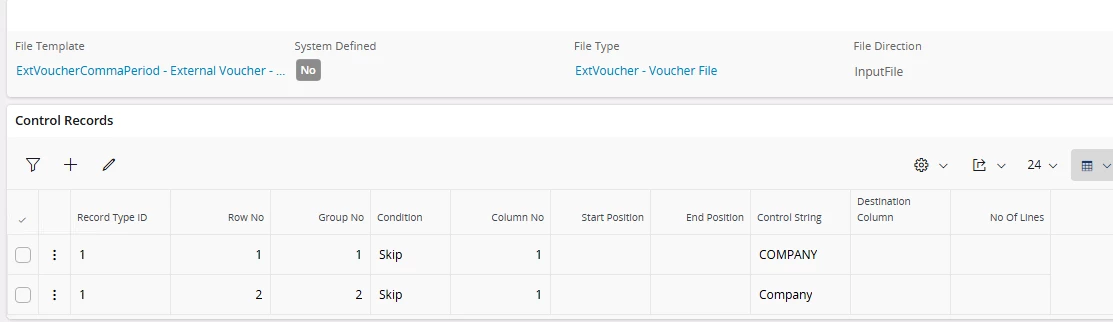
For system defined templates, you cannot add control line. For user defined template you can add something as below.

Basically, IFS will check in value in column 1 and if it equals to control string then it will skip. By this function, you can skip the file header in case of need.


Here is link to documentation


https://docs.ifs.com/ifsclouddocs/25r2/lang/en/?openpage=https://docs.ifs.com/ifsclouddocs/25r2/lang/en/DefineFinancialsBasics/ActivityAccrulDefInputExtFileTemplateCtrl.htm


Hope this helps

6 replies

Furkan Zengin
Ultimate Hero (Partner)
Forum|alt.badge.img+21
  • Ultimate Hero (Partner)
  • Answer
  • December 29, 2025

Hello ​@N.GEORGI 

For system defined templates, you cannot add control line. For user defined template you can add something as below.

Basically, IFS will check in value in column 1 and if it equals to control string then it will skip. By this function, you can skip the file header in case of need.


Here is link to documentation


https://docs.ifs.com/ifsclouddocs/25r2/lang/en/?openpage=https://docs.ifs.com/ifsclouddocs/25r2/lang/en/DefineFinancialsBasics/ActivityAccrulDefInputExtFileTemplateCtrl.htm


Hope this helps


Forum|alt.badge.img+19
  • Superhero (Employee)
  • January 5, 2026

Hi, 

Very good answer.

FYI, if using skip, the character string is an exact match.  For example, Company does not = COMPANY.  I’ve seen a number of clients make that assumption, then can’t figure out why it did not work. 


Forum|alt.badge.img+7
  • Author
  • Sidekick (Customer)
  • January 6, 2026

@Thomas Peterson ​@Furkan Zengin  thank you for the insight. 

Is there a way to make the control string Value dynamique ?


Furkan Zengin
Ultimate Hero (Partner)
Forum|alt.badge.img+21
  • Ultimate Hero (Partner)
  • January 6, 2026

Hi ​@N.GEORGI 

There is not a such functionality but why would you need it? The first column is already in your file template. And you defined a rule to be skipped when the control value matches. Just share with the users the template they should use with the correct column structure. That should work without any problem.

Hope this helps


Forum|alt.badge.img+7
  • Author
  • Sidekick (Customer)
  • January 6, 2026

@Furkan Zengin 

a user has formulated the need to verify a value in a column based on another (if column A start with FR then column B should have the same value as column A other wise skip ).


My idea was to define two line with the same groupe no 
first line to verify that column A Start with FR
second line is verify in someway that colimn B has the same value as Column B


Forum|alt.badge.img+7
  • Author
  • Sidekick (Customer)
  • January 6, 2026

or maybe, if it’s complicated, 

If column A start with FR then Column B start with FR