
Solved

depreciation proposal for object partially depreciated

  • Nov 16, 2022 3:23 PM UTC
  • 4 replies
  • 226 views

Forum|alt.badge.img+12

Hi 

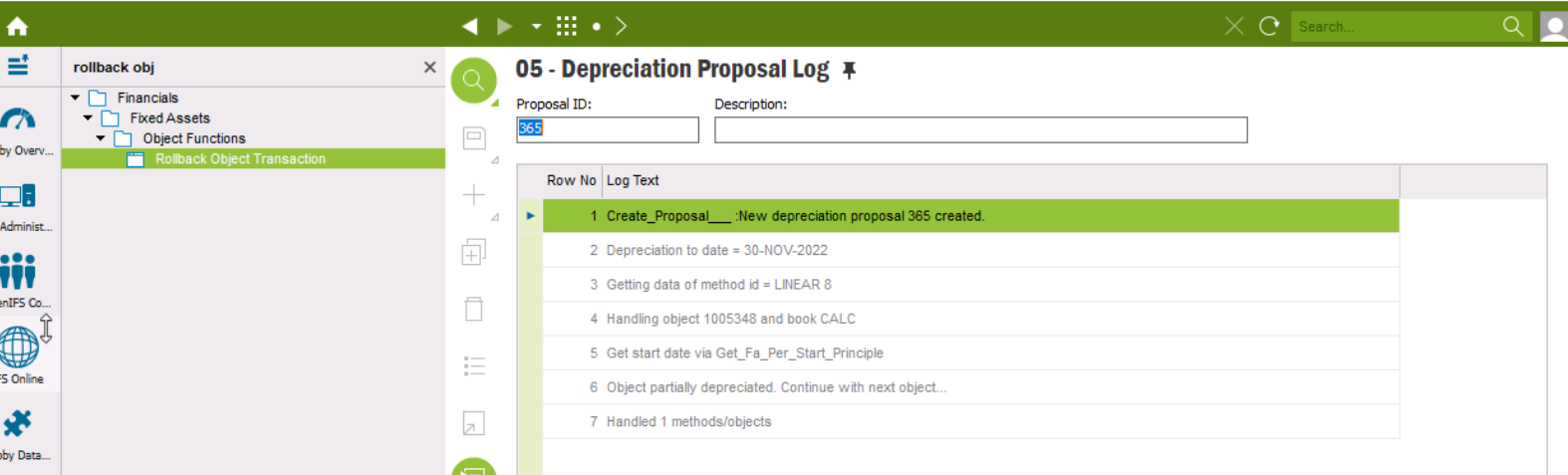
I try to run a depreciation Proposal for a object but it will never fetch the object due to the error that it is partially depreciated. How can I change the status of the object or whats the next process?
 

Best Regards

Sophal

Best answer by Narmada

Hi @bytsophan,

I’m suggesting below workaround to you. Hope this will help you.

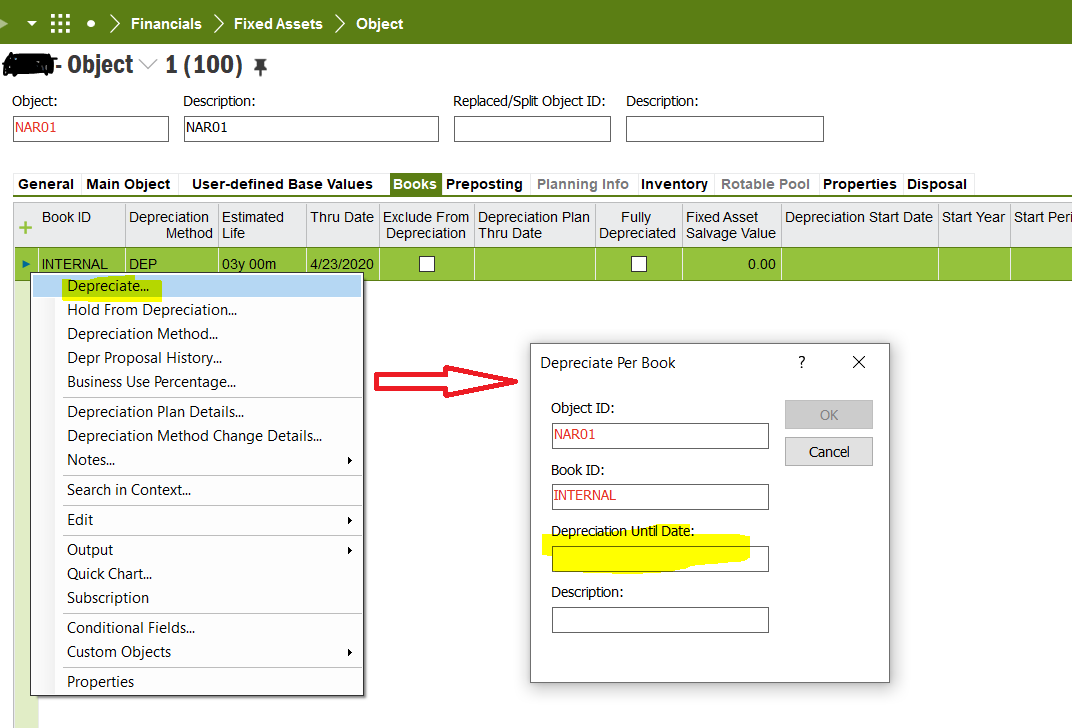
  1. Go to books tab of the object window, RMB & select ‘Depreciate’ action.
  2. Then put the month end date in ‘Depereciate until date’ field
  3. Depreciate propasal will be created and post it to GL.
  4. Then your FA object will pick for next depreciation proposal & in a normal way.

Refer below screen preview for easier reference.
 

Best Regards / Narmada

View original

4 replies

Ieva Rituma
Superhero (Employee)
Forum|alt.badge.img+16
  • Superhero (Employee)
  • Nov 16, 2022 3:28 PM UTC

Against the object, can you see if it already has depreciation for this period by looking at object transaction analysis window?

If an asset has already been depreciated in this period, you might need to roll-back that period’s depreciation to re-create it.


Forum|alt.badge.img+12
  • Author
  • Hero (Partner)
  • Nov 17, 2022 6:48 AM UTC

Against the object, can you see if it already has depreciation for this period by looking at object transaction analysis window?

If an asset has already been depreciated in this period, you might need to roll-back that period’s depreciation to re-create it.

Hi Ieva

No it has no depreciation for this period and object. the last depreciation of the object is in march 2022. I must say the object was splitted is maybe this the reason?


Best Regards


Forum|alt.badge.img+13
  • Hero (Employee)
  • Answer
  • Nov 17, 2022 8:52 AM UTC

Hi @bytsophan,

I’m suggesting below workaround to you. Hope this will help you.

  1. Go to books tab of the object window, RMB & select ‘Depreciate’ action.
  2. Then put the month end date in ‘Depereciate until date’ field
  3. Depreciate propasal will be created and post it to GL.
  4. Then your FA object will pick for next depreciation proposal & in a normal way.

Refer below screen preview for easier reference.


Best Regards / Narmada


Forum|alt.badge.img+12
  • Author
  • Hero (Partner)
  • Nov 17, 2022 9:25 AM UTC

Hi @bytsophan,

I’m suggesting below workaround to you. Hope this will help you.

  1. Go to books tab of the object window, RMB & select ‘Depreciate’ action.
  2. Then put the month end date in ‘Depereciate until date’ field
  3. Depreciate propasal will be created and post it to GL.
  4. Then your FA object will pick for next depreciation proposal & in a normal way.

Refer below screen preview for easier reference.


Best Regards / Narmada

Perfect this solved the issue. After the Depreciation i was able to create a normal depreciation proposal. Thanks for the solution.


Best Regards

Sophal