Solved

Change Acquisition acc on Fixed Asset

  • October 5, 2026
  • 4 replies
  • 14 views

Forum|alt.badge.img+9
  • Sidekick (Partner)

Hi Community.

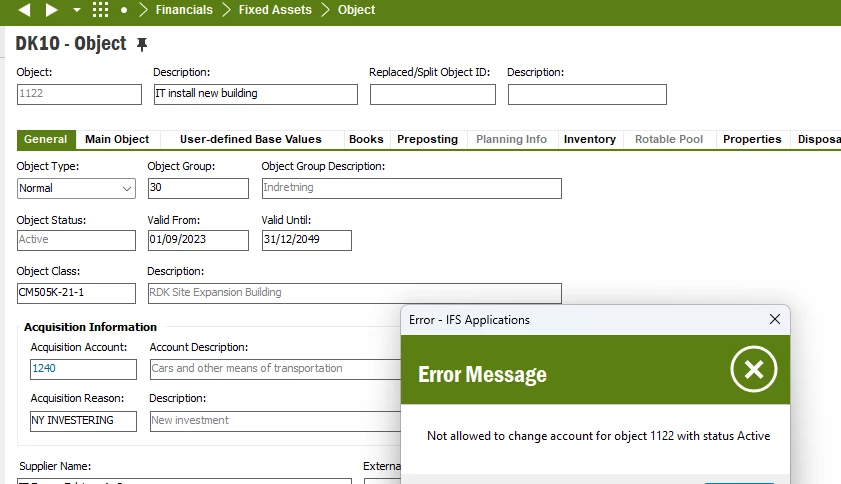
We are trying to change the acquisition account on an Active Fixed Asset by using the “Move Object” function. However, it does not succeed and the account will just go back to the original account. Can anybody help?

Best answer by Furkan Zengin

Hi

I tested your it with move object in IFS10 and works as expected. Steps
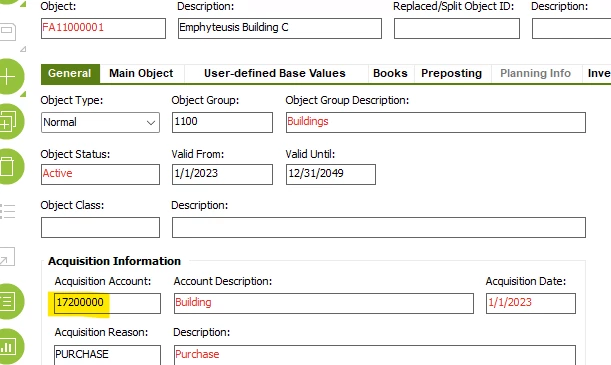
  1. Go to fixed asset and RMB move object
  2. Change the Move Date (in my case period September is open) and select User group and voucher type (if not populated by default)
  3. Select new acquisition account in the new values section
  4. Save your record


Acquisition account before move


Move Object from one to another Acquisition Account


New Acquisition Account


Hope this helps

4 replies

Furkan Zengin
Ultimate Hero (Partner)
Forum|alt.badge.img+21
  • Ultimate Hero (Partner)
  • October 5, 2026

Hello ​@BRSA 

First change acquisition account on the fixed asset window. Then perform move object from old acquisition account to new acquisition account.

Hope this helps


Forum|alt.badge.img+9
  • Author
  • Sidekick (Partner)
  • October 5, 2026

Hello ​@BRSA 

First change acquisition account on the fixed asset window. Then perform move object from old acquisition account to new acquisition account.

Hope this helps

Hi Furkan

Thanks for your reply.  I am not able to change the Acquisition Account or the Preposting account on the Object. 

Are there any workaround?


Regards Brian


Furkan Zengin
Ultimate Hero (Partner)
Forum|alt.badge.img+21
  • Ultimate Hero (Partner)
  • Answer
  • October 5, 2026

Hi

I tested your it with move object in IFS10 and works as expected. Steps
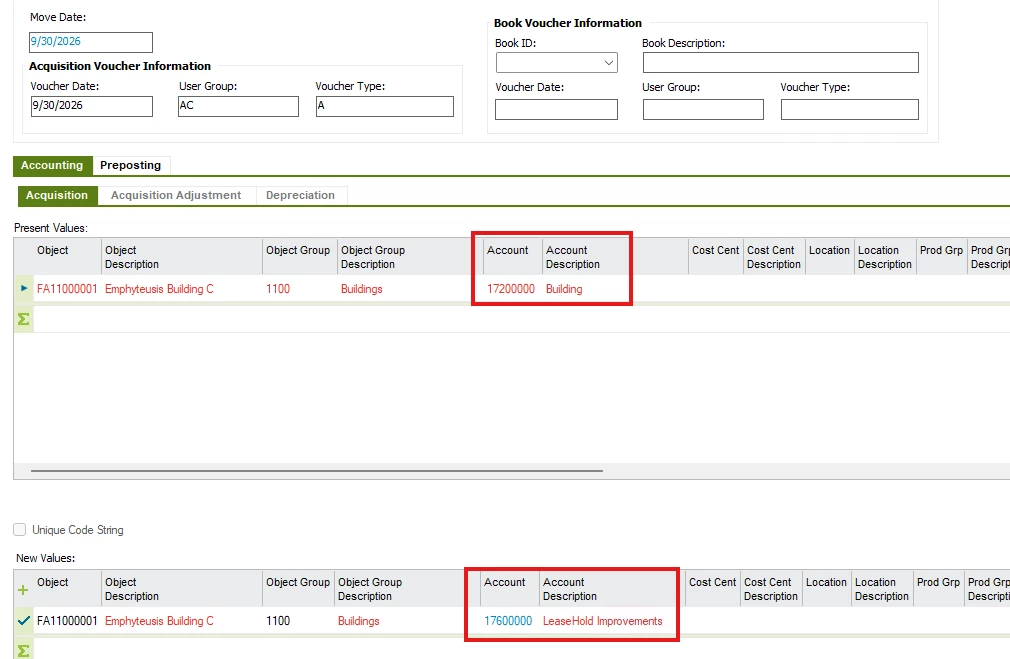
  1. Go to fixed asset and RMB move object
  2. Change the Move Date (in my case period September is open) and select User group and voucher type (if not populated by default)
  3. Select new acquisition account in the new values section
  4. Save your record


Acquisition account before move


Move Object from one to another Acquisition Account


New Acquisition Account


Hope this helps


Forum|alt.badge.img+9
  • Author
  • Sidekick (Partner)
  • October 5, 2026

Hi

I tested your it with move object in IFS10 and works as expected. Steps
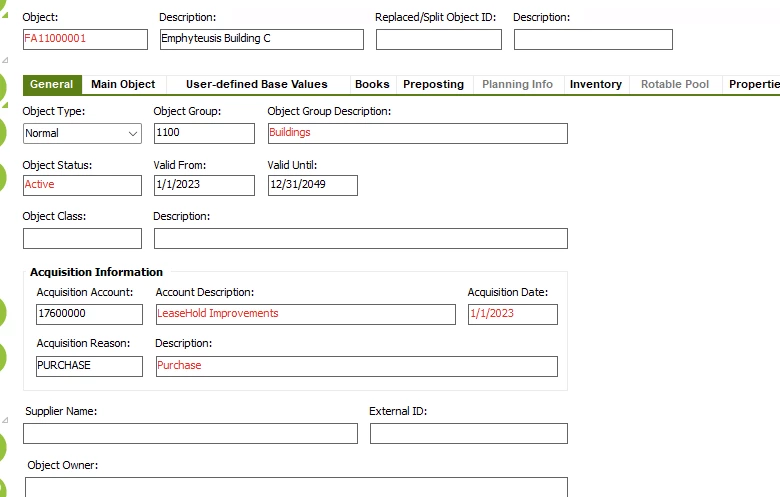
  1. Go to fixed asset and RMB move object
  2. Change the Move Date (in my case period September is open) and select User group and voucher type (if not populated by default)
  3. Select new acquisition account in the new values section
  4. Save your record


Acquisition account before move


Move Object from one to another Acquisition Account


New Acquisition Account


Hope this helps

Hi Furkan

Thanks for your reply. I know the standard functionality and have tried the above procedure.  However, It did not work. It just returned back to the old account. After adding the info under Book Voucher Information it did work out. So I guess that was the reason.

Thanks for the help and response


Regards

Brian