Question

Block manual vouchers to revenue accounts

  • July 20, 2026
  • 9 replies
  • 42 views

Forum|alt.badge.img+5

Hello,

My client has a requirement to prevent manual voucher to revenue accounts. I think this can be achieved through posting controls.

Since I am new to IFS Finance, can anyone guide me through how this requirement can be achieved?

thank you in advance.

/Imalka

9 replies

  • Do Gooder (Partner)
  • July 27, 2026

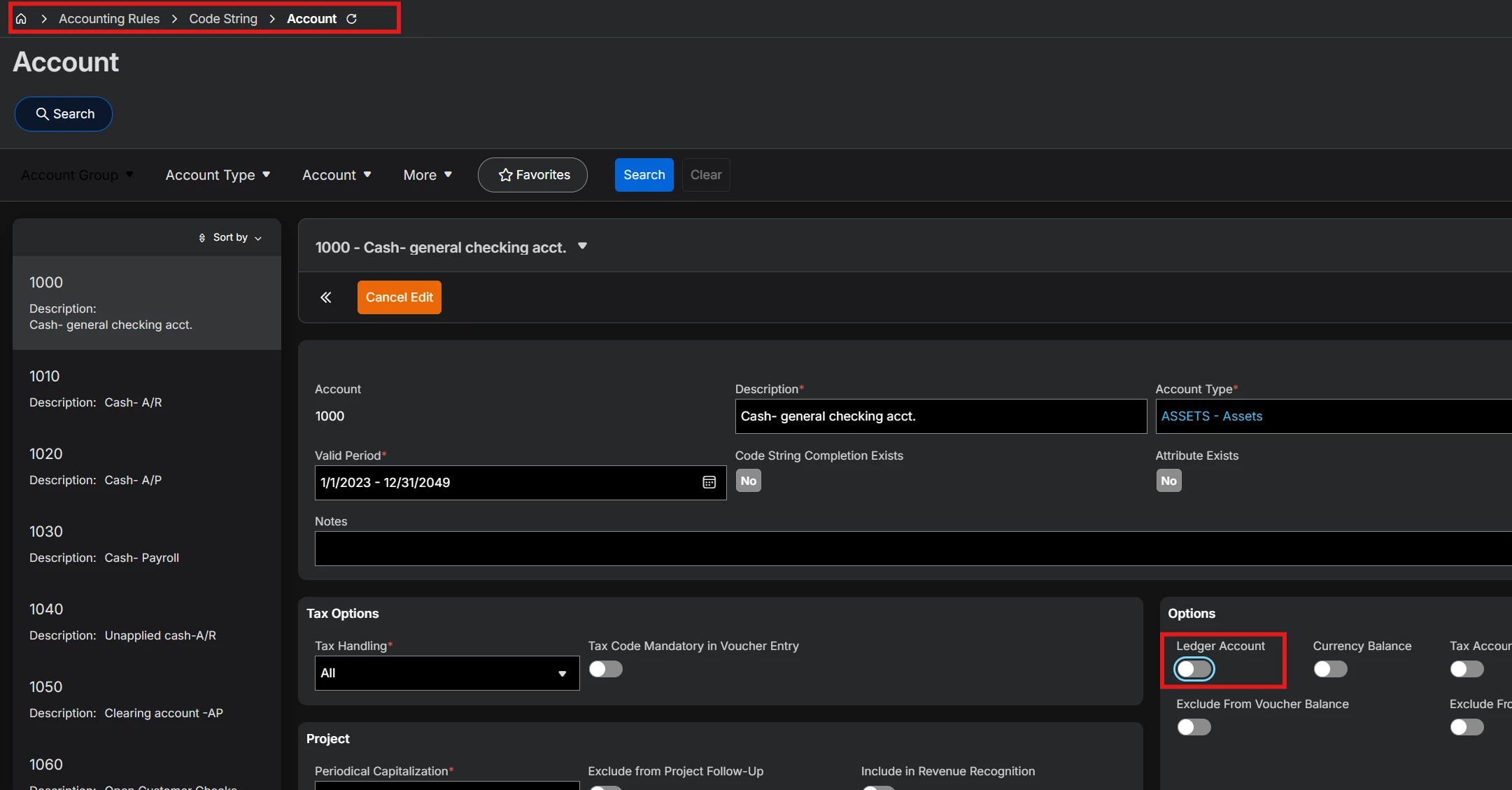
Manual vouchers do not use posting controls.  Generally, if you want an account to prevent manual voucher entries, you need to make it a ledger account.  You can only set this to a new account that has not had anything booked to it yet.


Forum|alt.badge.img+5
  • Author
  • Sidekick (Customer)
  • July 28, 2026

Thank you ​@ddecker  for the reply. we already have vouchers for these accounts. it seems like there is no other way of blocking it now.


Forum|alt.badge.img+20

Hi, 

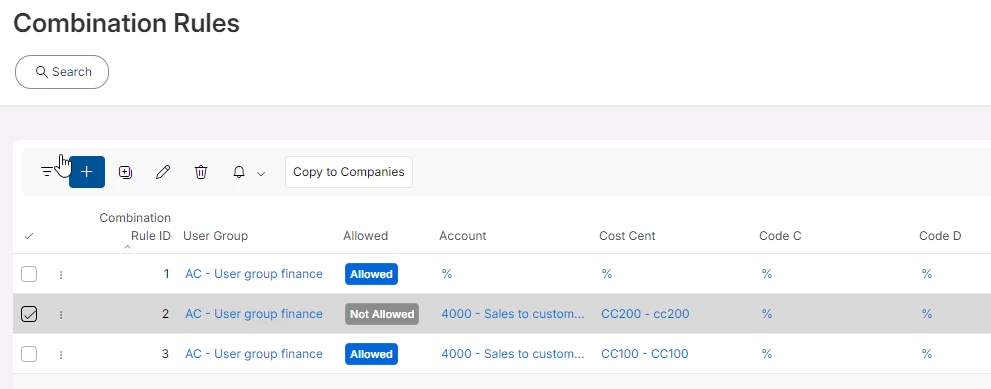
You can always block account access via the combination rules. Combination rules establish the allowed / blocked combination of code part values for a given user group.  


Forum|alt.badge.img+5
  • Author
  • Sidekick (Customer)
  • July 29, 2026

Hi ​@Thomas Peterson , it seems like we can’t block specific account via combination rule. it applies to all for that user group.


Forum|alt.badge.img+8

It is possible to set specific account as ‘Not allowed’ for a user group


Forum|alt.badge.img+20

Hi ​@Thomas Peterson , it seems like we can’t block specific account via combination rule. it applies to all for that user group.

In combination rules you can block access to an account, accounts, or even combinations such as rev 1 with cost center 1, is blocked but rev with CC2 is OK for a given user group.  I’ve used this for countless clients.  The not allowed rule always wins over any allowed settings. Such as allow all, but not allow account 123 or combinations.  

Best regards, 

Thomas


Forum|alt.badge.img+20

Example.   

You can set any number of combinations, allowed / not allowed. 


Forum|alt.badge.img+5
  • Author
  • Sidekick (Customer)
  • July 30, 2026

Hi ​@Thomas Peterson & ​@Himarshi Gunathilaka 

thanks for the explanation.

is there a way only to prevent entering M vouchers/ specific voucher type. we have some revenue accounts which should be blocked for M vouchers as vouchers only should come from invoicing. but it seems some accountant post M vouchers for easy work. 


Forum|alt.badge.img+20

Usually, a consultant would craft a solution based on requirements. For example, the user groups would be structured such that you can control what needs to be controlled. 

The people doing the manual vouchers would be in a different user group than the people who create the sales postings from an invoice. 

If the people doing the manual vouchers were in a different group, then you can place additional controls on that group such as blocking the entry.  

Another way to manage this could be to require additional authorizations such that when a voucher is entered it must be approved by another person. Assuming you had a policy, no postings to rev, even if a voucher was entered it would require a second approval.     

See voucher approvals or consider using the option for a manual voucher type where the same user cannot enter and approve. It’s a simple check box. Given current state, that is probably the easiest way to control and force another user to review the postings.