We have processed an Advance invoice right through to payment. We have then received the VAT invoice and attached the Advanced invoice, but we have noticed something is incorrect, so we need to unpick the Advanced invoice. I cannot see anywhere this is possible, please help!!
Best answer by Furkan Zengin
Follow the steps below. Your issue should be resolved.
Go to supplier analysis and find the supplier 53925
Find 73106 PROFORMA invoice and go to Payment per Invoice/Prepayment
You should see U voucher with Payment Type Supplier Offset. Copy the voucher number
Go to Supplier Payment Rollback and search for voucher type U and voucher no you just copied
Click Rollback Complete Payment
Go to VAT invoice and select cancel and new invoice
If you already know offset voucher details, use Customer Payment Rollback window to cancel matching.
If you don’t know offset voucher then go to Customer Analysis for the customer, find the invoice and select Payments Per Invoice/Prepayment. There you should see offset voucher details. Rollback the voucher on Customer Payment Rollback window.
The VAT invoice should be opened for a new transaction
If I use the offset this will roll back the payment. Everything is fine with the Advanced invoice. When we entered the VAT invoice then attached the advanced one, we noticed the VAT was wrong, so we need to amend it but because we attached the advance it won't allow us to cancel it or un attach the advance invoice.
You need to rollback payment that is matched against VAT invoice. It won’t cancel the advance invoice but set status of VAT invoice to PostedAuth, which allows you to cancel it and create again with correct values.
The steps I provided are correct. You did not mention whether it is customer or supplier. If it is about supplier invoice then rollback on Supplier Payment Rollback and go to Supplier Analysis to find matching details.
So, I need to finish the process on the VAT invoice then post it and then roll it back is that correct. Will I then be able to cancel the VAT invoice to correct our error ?
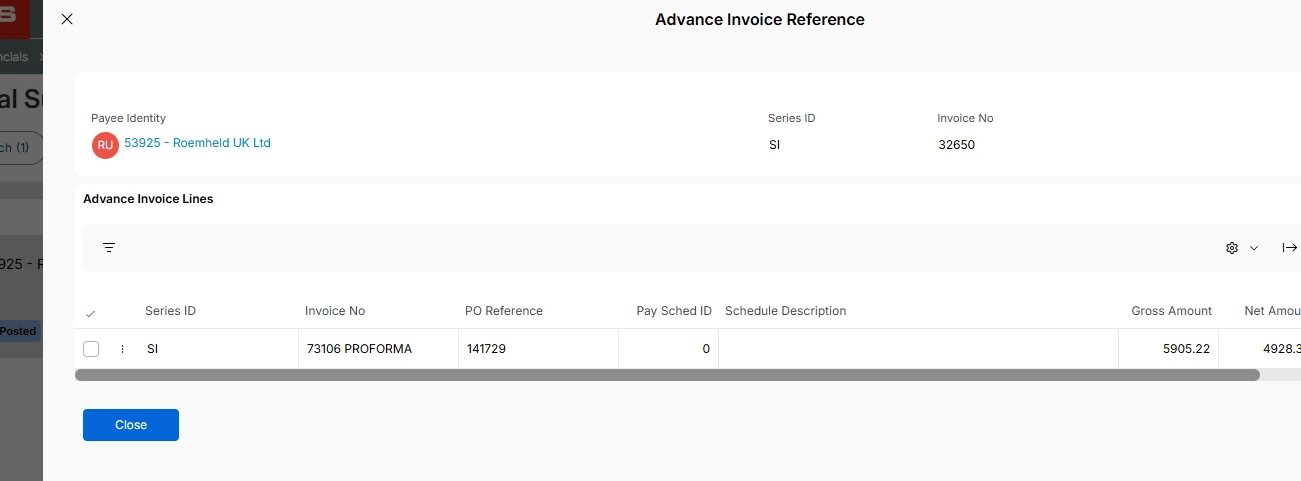
The process for paying the advance has been done and paid. We have now received the VAT, once we enter the info on the front screen, we then attached the advance. This is what we see,
Next, we attached the stock and finally post the invoice. I need to remove the above or be able to cancel the whole invoice without effecting the paid advance.