Question

Add a Material Handling Overhead to the Purchased Inventory Value (using Weighted Average or FIFO)

  • July 30, 2026
  • 1 reply
  • 17 views

Forum|alt.badge.img+7

Hi,


In IFS Cloud 25r1 Is there a way to add a Material Handling Overhead to the cost of Inventory when it is purchased and received into stock - not using standard costing. For example a PO is raised for Qty 1 @ £100. When we receive the goods we want it to be received at £100 + 5% Material Handling Overhead. Therefore it should be received into inventory at £105. The GRNI Accrual should be £100 to pay the Supplier. A £5 CR Material Handling Recovery will be posted (to offset against the costs of the Material Handling Department).


DR Inventory £105

CR GRNI Accrual £100

CR Material Handling Recovery £5


A supplier invoice will be received for £100 and get atched against the GRNI Acrual.

Good will be issued from Inventory to Projects and Work Orders at £105.00.


Delivery Overhead Cost elements etc work OK for Standard Costing but do dot do anything if you are using Weighted Average or FIFO.

Purchase Charges line can add a %age charge on to the Inventory Value - but these are looking for a subsequent Supplier Invoice to be matched against the Purchase Charge lines.


Thanks for any help.

Cheers,

Graham

1 reply

Forum|alt.badge.img+20

Hi, 

Sorry, disagree with a couple statements. 

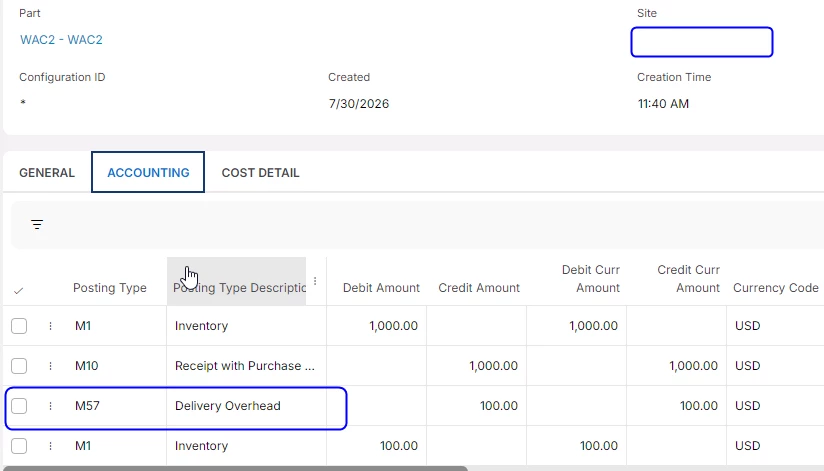
This is a copy of postings from my new WAC part where I set up a delivery OH.  In my example the OH is defined as delivery OH (the one reported that does not work with average cost) but for 10%. 

See the postings.  As shown, the delivery OH does work for average cost parts. 

The process for average cost can be nearly the same for STD cost.   The primary difference is we don’t necessarily use the values from cost set 1, but we do use the costing process - in other words, IFS needs to know “how” to calculate the average cost.  In the simplest way, IFS calculates the material part of the cost, but the template drives (can drive) other aspects of the cost. 

Per my example I have a new template (essentially P110 was copied) and I then added the 110 bucket and the new cost bucket that calculated the delivery overhead.  Provided that template is used, you will have delivery OH on a weighted average part.  I feel the easiest way to assign the correct template is use part cost, and for cost set 2, use the new template. Calculate, then use the traditional STD cost process to copy the results to cost set 2.  In all reality, you don’t even need to perform the calculate from cost set 2, but make sure you copy to cost set 1. That process assigns the template. Then when you receive the part from a PO, you get PO line cost as bucket 110, but then also you get the delivery overhead. 

Hope this helps. 


Best regards, 

Thomas