


Hi Team,
Iam using IFS cloud & PSO
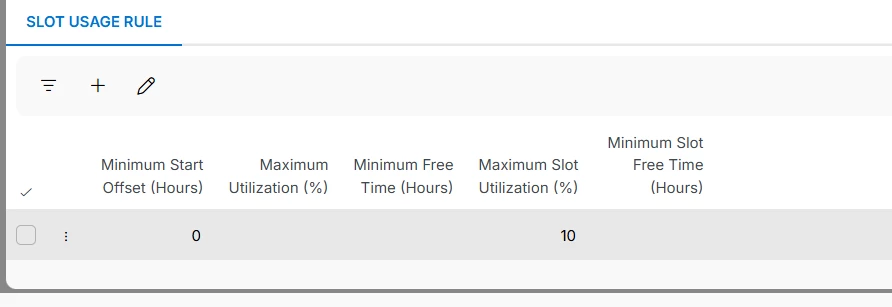
I have a query regarding the Slot Usage Rule configuration, specifically the difference between Maximum Utilization (%) and Maximum Slot Utilization (%).
I tested both scenarios by setting the utilization to 10%, but in both cases I am getting the same output. I would like to understand how these two fields are expected to behave differently.
Current Scenario
I have 4 FTs with the same skill, and each FT has 8 hours of availability:
4 FTs × 8 hours = 32 FT-hours total availability
With a 10% utilization target:
32 × 10% = 3.2 FT-hours
My expectation is that the system should allow up to 3.2 FT-hours of booking utilization across the overall available capacity, irrespective of which slot the booking falls into.
I have two slots:
- 7:00 AM – 11:00 AM
- 11:00 AM – 3:00 PM
Current Behavior
When the utilization reaches approximately 1.6 hours in the 7:00–11:00 AM slot, the system stops showing the first slot and only shows availability in the 11:00 AM–3:00 PM slot.
This appears to indicate that the 10% utilization is being evaluated at the individual slot level:
- 7:00–11:00 AM → 16 FT-hours capacity
- 10% of 16 = 1.6 FT-hours
- Once this limit is reached, the first slot is blocked, even though the overall utilization has not reached the desired 3.2 FT-hours.
Expected Behavior
I want the utilization to be calculated across the overall FT availability rather than independently for each slot.
For example, if there are 4 tasks/bookings and sufficient capacity is available in the 7:00–11:00 AM slot, the system should continue showing the available 7:00–11:00 AM slots until the overall 3.2 FT-hour utilization limit is reached.
The booking utilization should therefore be distributed across both slots:
7:00–11:00 AM + 11:00 AM–3:00 PM = 32 FT-hours total capacity
and the system should allow up to:
32 × 10% = 3.2 FT-hours total utilization
regardless of whether those 3.2 hours are consumed entirely in the first slot, entirely in the second slot, or distributed across both.
Questions
- What is the exact functional difference between Maximum Utilization (%) and Maximum Slot Utilization (%)?
- Why do both fields produce the same result when configured with 10%?
- Is there a configuration that allows Maximum Utilization to be calculated against the overall 32 FT-hour capacity, rather than independently against each 4-hour slot?
- How can I configure the rule so that the 7:00–11:00 AM slot is not blocked at 1.6 hours, provided the overall utilization has not yet reached 3.2 FT-hours?
- If this behavior is not supported by the current Slot Usage Rule configuration, what is the recommended configuration or approach to achieve 10% overall utilization across all slots?
The key requirement is: 10% utilization should be calculated at the overall FT-capacity level, not at the individual slot level.
Regards,


