Solved

Service Request - Delivery Material Direct to Site from Supplier

  • May 31, 2026
  • 10 replies
  • 72 views

Forum|alt.badge.img+2

I have created a Service Request and trying to process where material will be delivered direct to the WO/customer site, direct from the supplier.

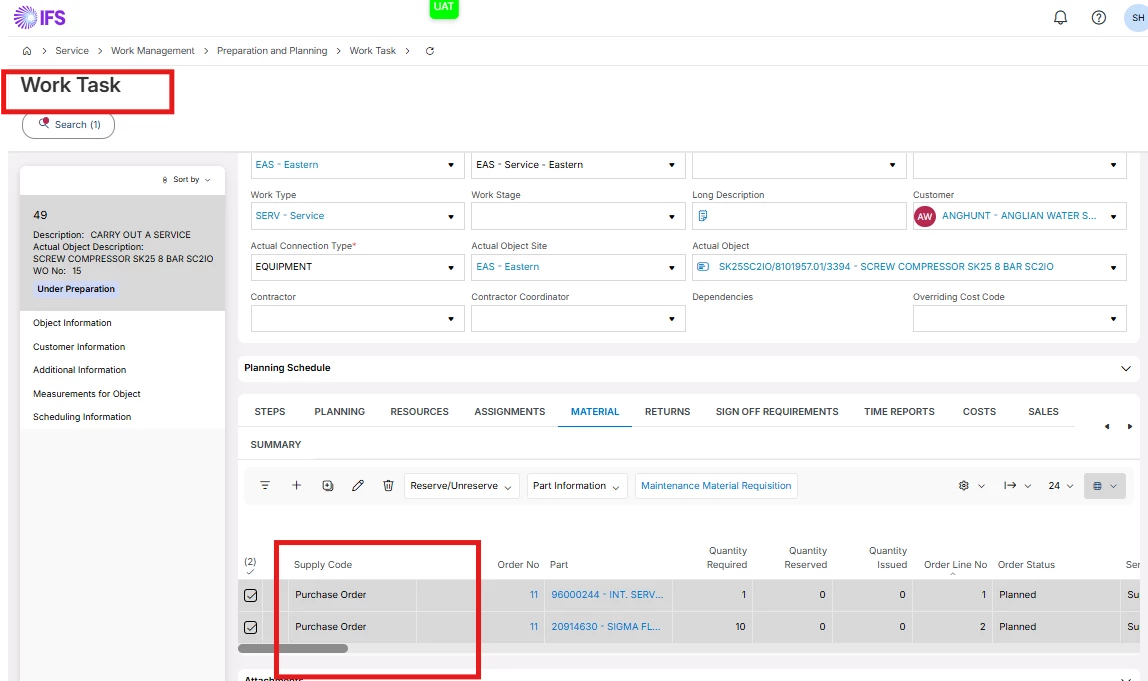
I have an address on the task and can set the Supply code to “Purchase Order” , but I cannot se in either the work Task or Material Request a field “Delivery Method” or any other field with “Delivery” in it to tell the PO to send direct to the customer.

I have looked at this and various other link to no avail.

https://docs.ifs.com/ifsclouddocs/25r2/lang/en/RequestManagement/AboutMaterialPreparation.htm
 

Best answer by Abdul

Hi ​@SteveHutchison,

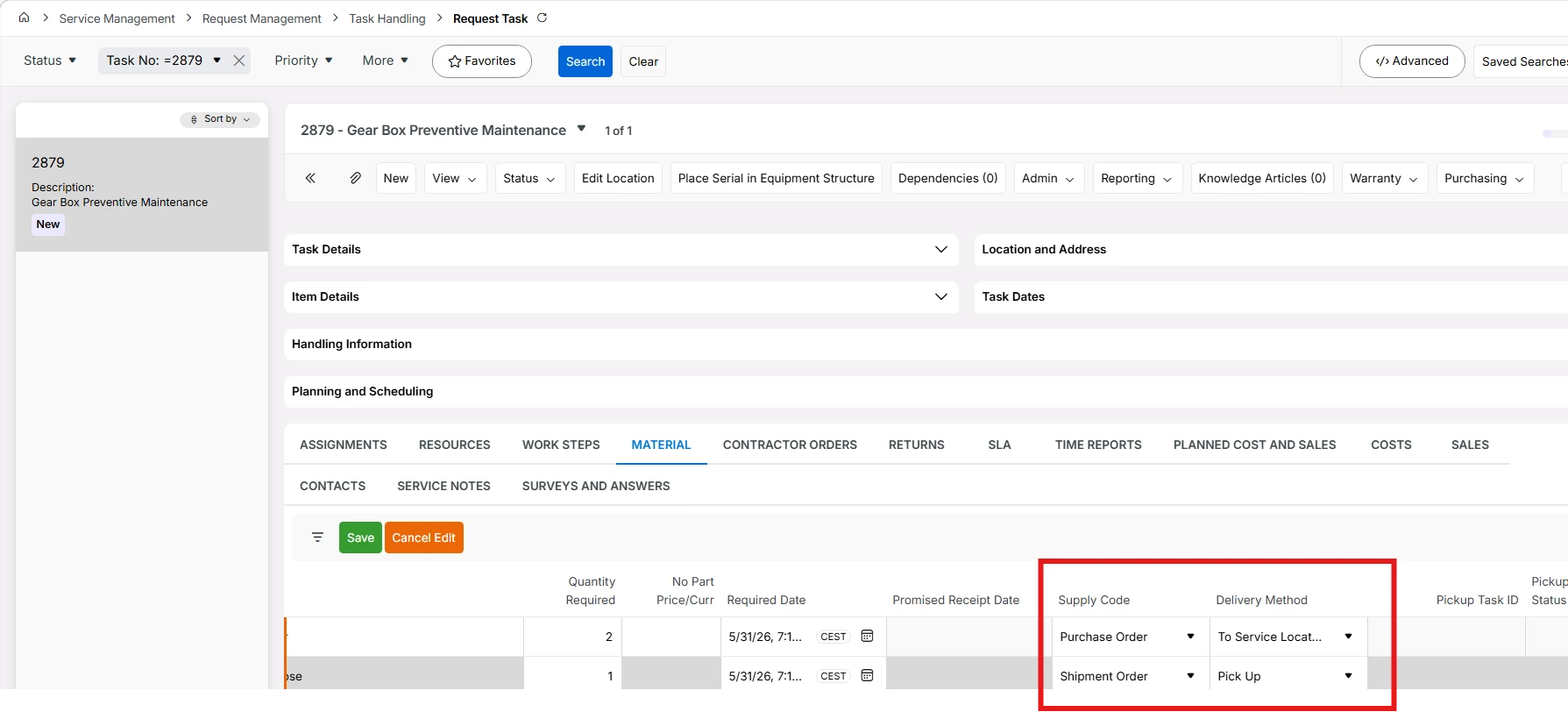
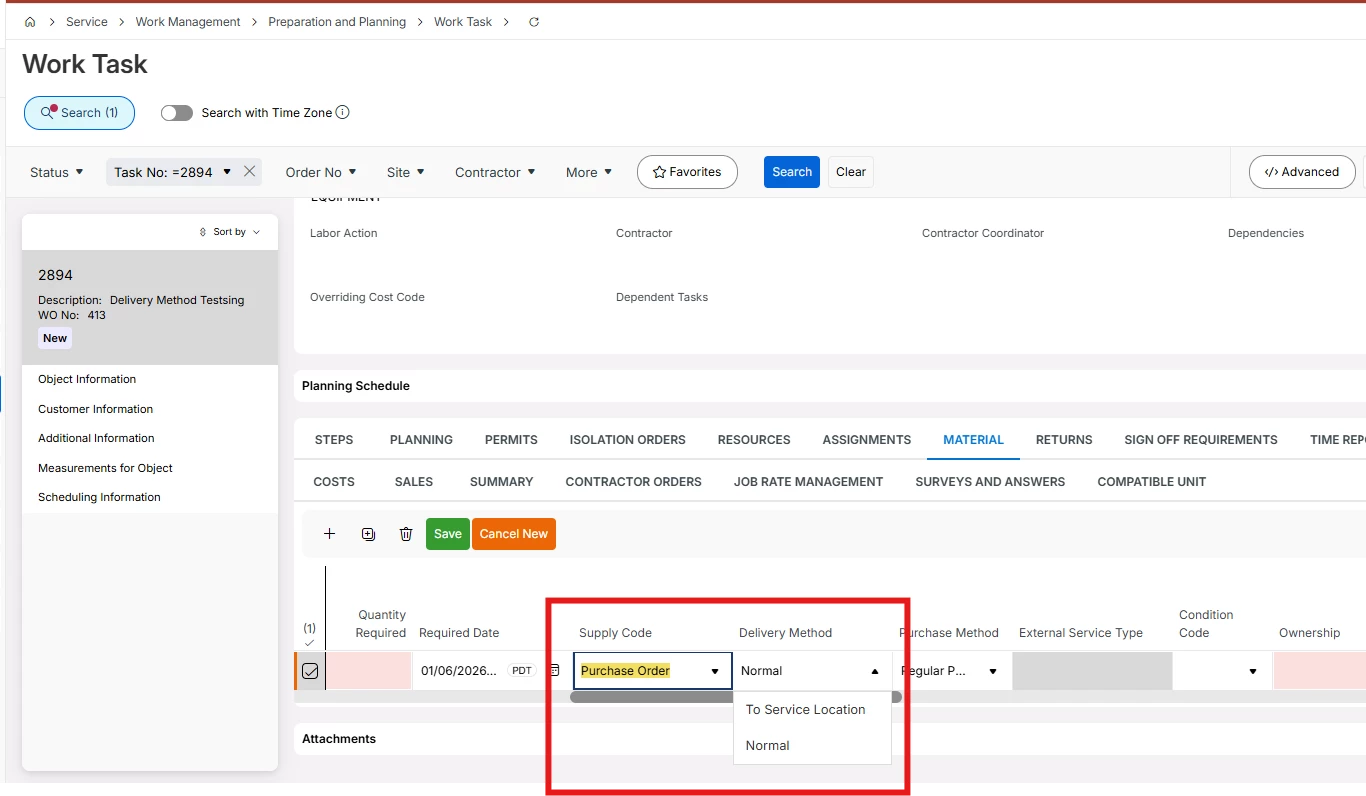
I checked in 26R1, Delivery method option is available for New Service Request. Please refer to the screenshot below.

However, Delivery Method option is not available in 25R1, and I believe the same for 25R2 as well.

Let’s come to your question, direct delivery to service location is not possible with available options in 25R2.


10 replies

Forum|alt.badge.img+2
  • Author
  • Do Gooder (Customer)
  • May 31, 2026

Just to add, I have set Inventory Location Group and Inventory Part Availability Control against the sites i and working with and set the supplier for purchase part receive case to “Receive into Inventory” which appear to be pre reqs.


At this stage I cannot get the “Delivery Method” field to appear either under the Work Task or Material Req.


Abdul
Superhero (Partner)
Forum|alt.badge.img+20
  • Superhero (Partner)
  • May 31, 2026

Hi ​@SteveHutchison,

Please refer to screenshot below, Request Task/Material tab has option to set Supply Code and Delivery Method. 

Hope I understood your question correctly.


Regards

Abdul Rehman


Forum|alt.badge.img+2
  • Author
  • Do Gooder (Customer)
  • May 31, 2026

That field is not available, Ive checked column chooser and then carried out all the things I have mentioned above, but none of which have enabled it.


Abdul
Superhero (Partner)
Forum|alt.badge.img+20
  • Superhero (Partner)
  • June 1, 2026

Strange!

Can you please share screens’ full screenshot where you are trying to locate these fields?


Forum|alt.badge.img+2
  • Author
  • Do Gooder (Customer)
  • June 1, 2026

Differnet place to where you have shown, but from what I have read it should be possible from here.


Abdul
Superhero (Partner)
Forum|alt.badge.img+20
  • Superhero (Partner)
  • June 1, 2026

Hi ​@SteveHutchison,

Service Module and Service Management module are different. 

Delivery Method options are available for Service Management module. 

Work Task and Request Task screen belongs to Service module and Service Management respectively.

You are on wrong screen 😊


Forum|alt.badge.img+2
  • Author
  • Do Gooder (Customer)
  • June 1, 2026

Am I just in the wrong screen, or is what I’m trying to do not achievable through EON and “New Service Request”?


Abdul
Superhero (Partner)
Forum|alt.badge.img+20
  • Superhero (Partner)
  • Answer
  • June 1, 2026

Hi ​@SteveHutchison,

I checked in 26R1, Delivery method option is available for New Service Request. Please refer to the screenshot below.

However, Delivery Method option is not available in 25R1, and I believe the same for 25R2 as well.

Let’s come to your question, direct delivery to service location is not possible with available options in 25R2.


Forum|alt.badge.img+2
  • Author
  • Do Gooder (Customer)
  • June 3, 2026

Hi Abdul


So, the question for now is how can we achieve this with 25R2?


Thanks


MFW-58
Sidekick (Former Employee)
Forum|alt.badge.img+4
  • Sidekick (Former Employee)
  • June 5, 2026

Hi ​@SteveHutchison,

I checked in 26R1, Delivery method option is available for New Service Request. Please refer to the screenshot below.

However, Delivery Method option is not available in 25R1, and I believe the same for 25R2 as well.

Let’s come to your question, direct delivery to service location is not possible with available options in 25R2.


To clarify - it’s available in 25R1/R2 within Service Management (NGSM), but not available when using Work Orders/Work Task. Not sure if this changes in 26R1.

Thanks