

We are using PSO 6.16.0.61 with FSM Smartclient. We deploy distribution (delivery) drivers as well as technicians to customer locations. Only technicians are being scheduled in PSO. All active technicians have assigned shifts in PSO and are in rotas. However there are times when technicians are driving delivery trucks (random days) on days when they also have their normal tech shifts in the PSO rota - as desired, they aren’t getting any service work because the truck selection they make at logon via mobile to FSM relates to a non-tech skill (techs must have the appropriate technician truck skills in order to get work assigned through PSO).
The problem is that in the scenario above the team that oversees review of the PSO Scheduling Resource Gantt just sees technicians with schedulable shifts, logons and logoffs, but no assigned work when the tech is driving a delivery truck (since delivery work not assigned through PSO without appropriate truck skill).
What is a good way to change the visibility of the technician’s daily shift when the technician is driving a delivery truck? We’ve considered using an FSM “unavailability” type but not the best solution - would need creative updating and still looks like a normal unavailability (color-wise) with different text description. Not sure that the color of unavailabilities can be set for different unavailability types?
Someone has asked if a visualization can be created based on Vehicle ID, but we currently don’t pass vehicle ID to PSO (if that’s the solution then how to pass that info to PSO from FSM). Wondering about use of Vehicle ID (which is a display option in PSO Scheduling Resource list), categories, Vehicle class, etc. and how to get the data from FSM to PSO via automation. Important note: Resources select truck at mobile logon, and that changes (truck) skill in FSM (through to PSO) for that shift.
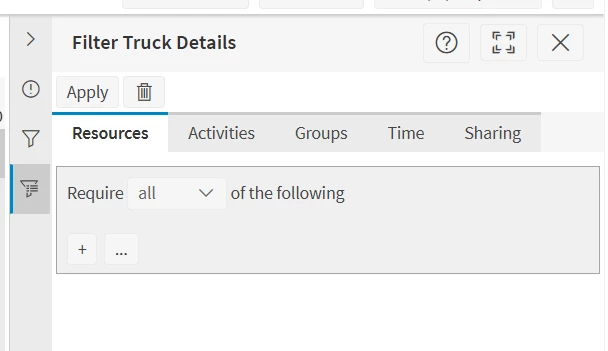
Also thinking one simple temporary solution would be to filter based on truck skill, at least until a better solution comes along. How to create a filter for Skill, don’t see anything obvious in the filtering options?
Here is what we see in Filter creation, don’t see any Skill options:
Other ideas or creative solutions? We don’t want to do a major ‘redesign’ of FSM/PSO to accommodate this but the visualization would be very helpful to the PSO team. Also note, technicians who are driving delivery trucks might need to be assigned service work even though they’re in a delivery truck (emergencies do happen), so that needs to be considered as well - they can’t just have their shifts removed for days when they’re doing deliveries.
Thanks in advance for your thoughts and suggestions!
Here is an example, where the tech logged on very early due to doing deliveries, but not all are that obvious based on logon times (the yellow section is a default Admin Time unavailability for all shifts):
