We are experiencing an issue related to PSO manual changes (drag & drop rescheduling in the PSO gantt).
We are on 6.14.0.27 as of Saturday Feb 01 2025.
What we are seeing is as follows:
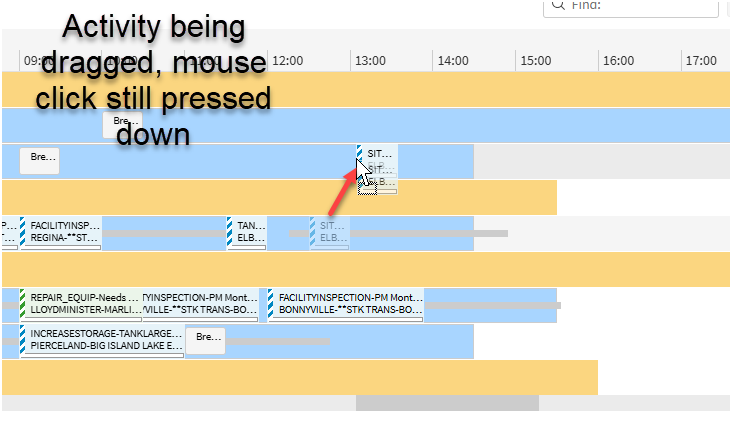
A user will drag the activity to a new location (either same resource, different time or a different resource & different time)
Then when the activity is “dropped” (manual change initiated), the manual changes side bar / pop out box will be opened
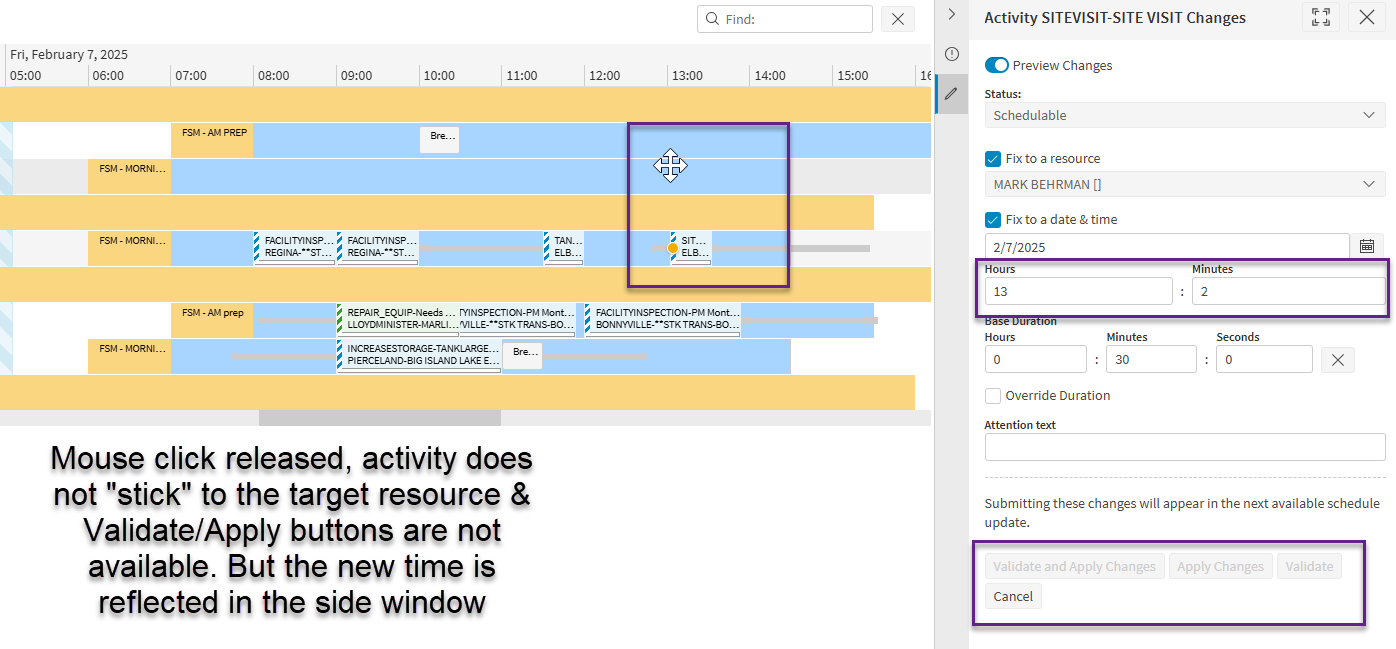
However, the “Validate and Apply Changes” & “Apply Changes” & “Validate” buttons will be greyed out., The option is Cancel
This is the case with Preview Changes applied or not applied
The target (updated) date & time field will be reflected in the manual changes box, but PSO is not detecting that changes have been made
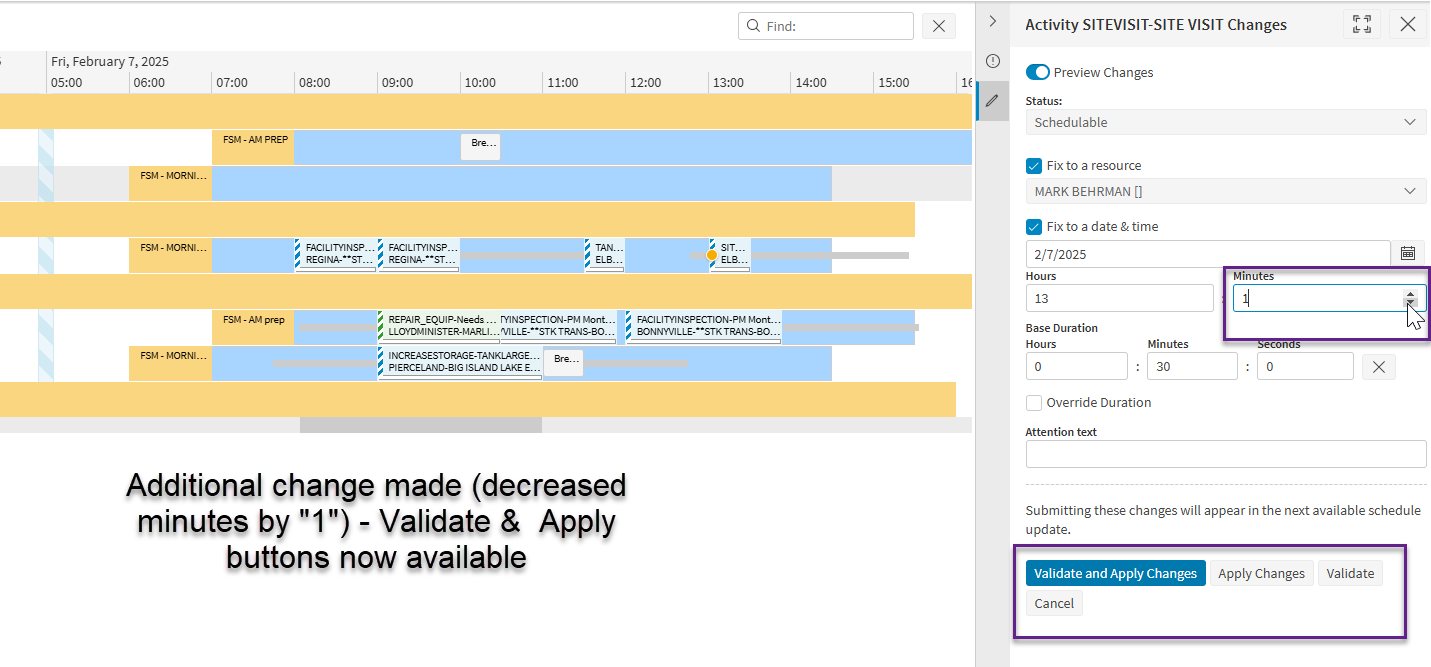
If the user then makes a subsequent change to any field in any of the fields in the manual changes side bar / pop out window or drags the activity icon a second time, only then are the change buttons available to select.
Could the issue be related to any of the following updates in the release notes?
CS0328702 - Fixed issue with resource selection not being populated correctly for manual changes of activities that are fixed to a resource.
CS0313356 - Fix activity labels not displayed in gantt issue
CS0273285 - Fix the bulk manual changes issue
CS0293757 - Fixed an issue where an activity could not be manually fixed to a resource with zero preference when we had another resource with zero preference with an availability.
PSO-3797 - Fixed issue with buttons being disabled when a manual change is made to fix the time to the start of the shift.
PSO-223 - Fixed an issue in setting date time fixed value for an activity, when manual changes are applied from the scheduling workspace with commit activity with route option
PSO-747 - Fixed an issue in populating fixed resource for an activity in manual change page in the scheduling workspace.
PSO-245 - Fixed an issue in manual change validation where an existing failed validation stopped successful validation from applying a manual change
Best answer by Heraghty123
Hello,
We are experiencing an issue related to PSO manual changes (drag & drop rescheduling in the PSO gantt).
We are on 6.14.0.27 as of Saturday Feb 01 2025.
What we are seeing is as follows:
A user will drag the activity to a new location (either same resource, different time or a different resource & different time)
Then when the activity is “dropped” (manual change initiated), the manual changes side bar / pop out box will be opened
However, the “Validate and Apply Changes” & “Apply Changes” & “Validate” buttons will be greyed out., The option is Cancel
This is the case with Preview Changes applied or not applied
The target (updated) date & time field will be reflected in the manual changes box, but PSO is not detecting that changes have been made
If the user then makes a subsequent change to any field in any of the fields in the manual changes side bar / pop out window or drags the activity icon a second time, only then are the change buttons available to select.
Could the issue be related to any of the following updates in the release notes?
CS0328702 - Fixed issue with resource selection not being populated correctly for manual changes of activities that are fixed to a resource.
CS0313356 - Fix activity labels not displayed in gantt issue
CS0273285 - Fix the bulk manual changes issue
CS0293757 - Fixed an issue where an activity could not be manually fixed to a resource with zero preference when we had another resource with zero preference with an availability.
PSO-3797 - Fixed issue with buttons being disabled when a manual change is made to fix the time to the start of the shift.
PSO-223 - Fixed an issue in setting date time fixed value for an activity, when manual changes are applied from the scheduling workspace with commit activity with route option
PSO-747 - Fixed an issue in populating fixed resource for an activity in manual change page in the scheduling workspace.
PSO-245 - Fixed an issue in manual change validation where an existing failed validation stopped successful validation from applying a manual change
Hi, I'm experiencing the same issue. Have you found a solution?
BR
We upgraded to 6.15.0.39 and the issue was resolved.
We are experiencing an issue related to PSO manual changes (drag & drop rescheduling in the PSO gantt).
We are on 6.14.0.27 as of Saturday Feb 01 2025.
What we are seeing is as follows:
A user will drag the activity to a new location (either same resource, different time or a different resource & different time)
Then when the activity is “dropped” (manual change initiated), the manual changes side bar / pop out box will be opened
However, the “Validate and Apply Changes” & “Apply Changes” & “Validate” buttons will be greyed out., The option is Cancel
This is the case with Preview Changes applied or not applied
The target (updated) date & time field will be reflected in the manual changes box, but PSO is not detecting that changes have been made
If the user then makes a subsequent change to any field in any of the fields in the manual changes side bar / pop out window or drags the activity icon a second time, only then are the change buttons available to select.
Could the issue be related to any of the following updates in the release notes?
CS0328702 - Fixed issue with resource selection not being populated correctly for manual changes of activities that are fixed to a resource.
CS0313356 - Fix activity labels not displayed in gantt issue
CS0273285 - Fix the bulk manual changes issue
CS0293757 - Fixed an issue where an activity could not be manually fixed to a resource with zero preference when we had another resource with zero preference with an availability.
PSO-3797 - Fixed issue with buttons being disabled when a manual change is made to fix the time to the start of the shift.
PSO-223 - Fixed an issue in setting date time fixed value for an activity, when manual changes are applied from the scheduling workspace with commit activity with route option
PSO-747 - Fixed an issue in populating fixed resource for an activity in manual change page in the scheduling workspace.
PSO-245 - Fixed an issue in manual change validation where an existing failed validation stopped successful validation from applying a manual change
Hi, I'm experiencing the same issue. Have you found a solution?
We are experiencing an issue related to PSO manual changes (drag & drop rescheduling in the PSO gantt).
We are on 6.14.0.27 as of Saturday Feb 01 2025.
What we are seeing is as follows:
A user will drag the activity to a new location (either same resource, different time or a different resource & different time)
Then when the activity is “dropped” (manual change initiated), the manual changes side bar / pop out box will be opened
However, the “Validate and Apply Changes” & “Apply Changes” & “Validate” buttons will be greyed out., The option is Cancel
This is the case with Preview Changes applied or not applied
The target (updated) date & time field will be reflected in the manual changes box, but PSO is not detecting that changes have been made
If the user then makes a subsequent change to any field in any of the fields in the manual changes side bar / pop out window or drags the activity icon a second time, only then are the change buttons available to select.
Could the issue be related to any of the following updates in the release notes?
CS0328702 - Fixed issue with resource selection not being populated correctly for manual changes of activities that are fixed to a resource.
CS0313356 - Fix activity labels not displayed in gantt issue
CS0273285 - Fix the bulk manual changes issue
CS0293757 - Fixed an issue where an activity could not be manually fixed to a resource with zero preference when we had another resource with zero preference with an availability.
PSO-3797 - Fixed issue with buttons being disabled when a manual change is made to fix the time to the start of the shift.
PSO-223 - Fixed an issue in setting date time fixed value for an activity, when manual changes are applied from the scheduling workspace with commit activity with route option
PSO-747 - Fixed an issue in populating fixed resource for an activity in manual change page in the scheduling workspace.
PSO-245 - Fixed an issue in manual change validation where an existing failed validation stopped successful validation from applying a manual change
Hi, I'm experiencing the same issue. Have you found a solution?
BR
We upgraded to 6.15.0.39 and the issue was resolved.