

Hi,
I need to set a column value and save changes where the field is not present in UI. I tried using setControlValue, but it is not updating the field. How can we perform setvalue for a field using client script where the field is not present in UI but in the backend.
- Community
- IFS Solutions
- Field Service Management (FSM) & Planning and Scheduling Optimization (PSO)
- Need to set column value using client script
Question
Need to set column value using client script
- February 9, 2026
- 18 replies
- 124 views
 +6
+6- Sidekick (Partner)
18 replies


- Hero (Employee)
- February 9, 2026
Hi
Have you tired setting the value using a client script sql in your client script?
Best Regards,
Morris
+6- Author
- Sidekick (Partner)
- February 9, 2026
Hi
But I tried using setDBValue.
- Hero (Employee)
- February 9, 2026
Hi
I believe that setDBValue is only for mobile. but what I am suggesting to try is use getDBValues and instead of finding a value to return, try to use an update table set xyz = ‘zyx’ where abc =’{0}’
Something like that. I know it been attempted but I don’t recall the end results. but it would be worth a try. I know you are not trying to return anything, but this might be enough to work. btw are you trying to do this in the smart client or web client.
Or another option is to put the field on the UI but make it hidden, then you should be able to update using the setControlValue option. In fact that would likely be the less cumbersome route
Morris

- Superhero (Employee)
- February 10, 2026
What Morris said - i.e. Adding the field as a hidden field (button at the top of the UI designer)...you don’t need to place it into the design, just add it as a hidden field. Then the setControlValue will work.


 +28
+28- Superhero (Employee)
- February 12, 2026
Hi
Depends on your use case.
You can apply the suggested solution above or change the update functionality to a business rule.
Cheers!
+6- Author
- Sidekick (Partner)
- February 16, 2026
Hi All,
Thanks for the above suggestions, currently I have used object literal to update the column value as mentioned below, and it was working.
columnVals = {};
columnVals.task_id = task_id;
columnVals.xyz = 'zyx';
updateRow('task', columnVals);!--scriptorendfragment-->!--scriptorstartfragment-->
+6- Author
- Sidekick (Partner)
- February 16, 2026
Hi,
In addition I need to update the same field value which is visible in mobile UI

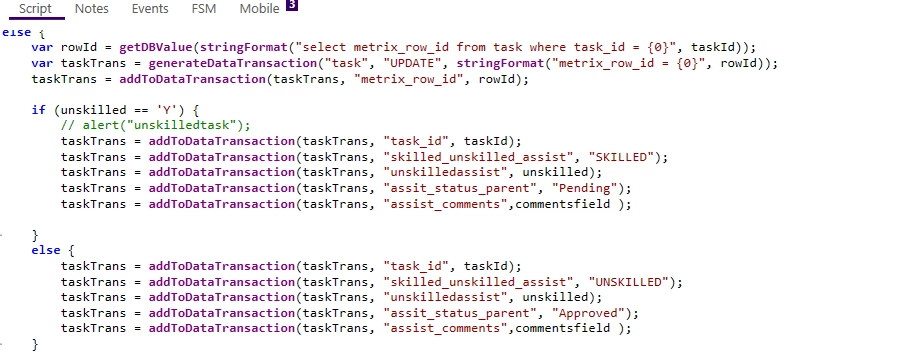
and below I have made the changes in client script, but Still I don’t see any updates happened. After making changes in client script, did re-init and refresh scripts in mobile. but still the changes are not getting synced up in mobile. How to fix this?
+28- Superhero (Employee)
- February 17, 2026
Hi
Are you using saveDataTransaction after you addToDataTransaction?
Cheers!
+6- Author
- Sidekick (Partner)
- February 17, 2026
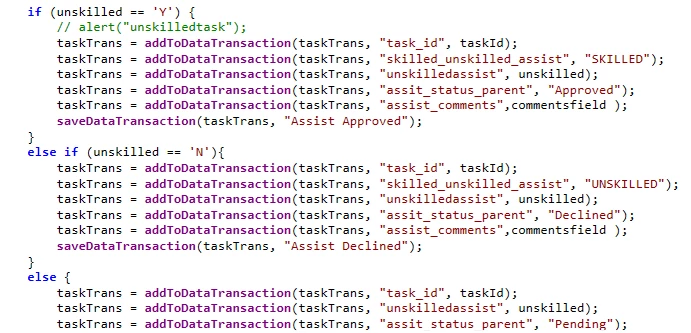
Tried using saveDataTransaction, but still it is not working if the field value is updated to declined.
+28- Superhero (Employee)
- February 18, 2026
Hi
Not sure if you have a typo there, but should it be assit_status_parent OR assist_status_parent?
Also, try removing the ‘else’ from the else if. Use only if(unskilled == ‘N’)
If the above is not relevant, I must be missing something here.
Can you please rephrase your question and provide the full workflow?
Cheers!
+6- Author
- Sidekick (Partner)
- February 18, 2026
Hi
The field name is assit_status_parent. I’m explaining the scenario below:
If I have a task created with task_id = 1276 and dispatched to tech, and in between If the tech require additional technician then he/she should submit a request from mobile “assist request”, and we can create it in 2 types which is “skilled” and “unskilled”, If he submit an assist request with skilled tech from mobile, it will create an alias task with task_id = 1277, and from that task we should click on accept in web client which will be updated in “acceptreject” field, based on that value it should update the assit_status_parent in original task(1276) in mobile(only if the task is accepted in webclient it should show as approved else it should show as pending), and if he submit a request for “unskilled”, it will again create an alias task with task_id = 1278, and from that task we should click on reject and this will parallely update “acceptreject” field, based on this it should update the assit_status_parent as declined in mobile. Currenly I’m facing issue with the below script, how to fix this to show the simultaneous updates
var rowId = getDBValue(stringFormat("select metrix_row_id from task where task_id = {0}", taskId));
    var taskTrans = generateDataTransaction("task", "UPDATE", stringFormat("metrix_row_id = {0}", rowId));
    taskTrans = addToDataTransaction(taskTrans, "metrix_row_id", rowId);
    var childTaskId = getControlValue("task", "task_id");
    if (unskilled == 'Y') {
        // alert("unskilledtask");
        var acceptReject = getDBValue(stringFormat("select ct.acceptreject from task t inner join c_task_ext ct on ct.task_id = t.task_id where t.task_id = {0}", childTaskId))
		if(acceptReject == 'ACCEPT')
		{
        	taskTrans = addToDataTransaction(taskTrans, "task_id", taskId);
        	taskTrans = addToDataTransaction(taskTrans, "skilled_unskilled_assist", "SKILLED");
        	taskTrans = addToDataTransaction(taskTrans, "unskilledassist", unskilled);
        	taskTrans = addToDataTransaction(taskTrans, "assit_status_parent", "Approved");
        	taskTrans = addToDataTransaction(taskTrans, "assist_comments",commentsfield );
		}
		else if (acceptReject = 'REJECT')
		{
			taskTrans = addToDataTransaction(taskTrans, "task_id", taskId);
        	taskTrans = addToDataTransaction(taskTrans, "skilled_unskilled_assist", "SKILLED");
        	taskTrans = addToDataTransaction(taskTrans, "unskilledassist", unskilled);
        	taskTrans = addToDataTransaction(taskTrans, "assit_status_parent", "Declined");
        	taskTrans = addToDataTransaction(taskTrans, "assist_comments",commentsfield );
		}
		else
		{
			taskTrans = addToDataTransaction(taskTrans, "task_id", taskId);
			taskTrans = addToDataTransaction(taskTrans, "skilled_unskilled_assist", "SKILLED");
			taskTrans = addToDataTransaction(taskTrans, "unskilledassist", unskilled);
			taskTrans = addToDataTransaction(taskTrans, "assist_comments",commentsfield );
			taskTrans = addToDataTransaction(taskTrans, "assit_status_parent", "Pending");
		}

    }
    else {
        taskTrans = addToDataTransaction(taskTrans, "task_id", taskId);
        taskTrans = addToDataTransaction(taskTrans, "skilled_unskilled_assist", "UNSKILLED");
        taskTrans = addToDataTransaction(taskTrans, "unskilledassist", unskilled);
        taskTrans = addToDataTransaction(taskTrans, "assit_status_parent", "Pending");
        taskTrans = addToDataTransaction(taskTrans, "assist_comments",commentsfield );
    }
+28- Superhero (Employee)
- February 18, 2026
Hi
Again, this is not the full script. According to what I see
- If c_task_ext is defined as an extension table, you don't need to join
var acceptReject = getDBValue(stringFormat("select acceptreject from task t where t.task_id = '{0}'", childTaskId)) - You are missing single quotes around the parameter. Should be ‘{0}’. Sometimes it will work, but it is better to add than miss.
- I don't see
saveDataTransaction,which is essential to update the record
Cheers!
+6- Author
- Sidekick (Partner)
- February 19, 2026
Hi
Currently pasting the whole client script below, After accepting or rejecting from web client, the assit_parent_parent in original task is still showing as pending in mobile.

var commentsfield = getControlValue('task', 'description');
var taskId = getCurrentKeys("task", "task_id");
var unskilled = getControlValue("task", "unskilledassist");
//var acceptReject = getControlValue("task","acceptReject");

if (isNullOrEmptyString(commentsfield)) {
    alert(getMessage('c_alerts_assist', 'MM_RESOURCE_STRING'));
}
else {
	//alert(getMessage('c_alerts_assist', 'MM_RESOURCE_STRING'));
	//log("assist request start");
    var rowId = getDBValue(stringFormat("select metrix_row_id from task where task_id = {0}", taskId));
    var taskTrans = generateDataTransaction("task", "UPDATE", stringFormat("metrix_row_id = {0}", rowId));
    taskTrans = addToDataTransaction(taskTrans, "metrix_row_id", rowId);
    var childTaskId = getControlValue("task", "task_id");
	//alert(getMessage('c_alerts_for_assist', 'MM_RESOURCE_STRING'));
    if (unskilled == 'Y') {
        // alert("unskilledtask");
        log("assist if block start");
		var acceptReject = getDBValue(stringFormat("select acceptReject from c_task_ext where task_id = '{0}'", childTaskId));
		log("check acceptReject");
        if(acceptReject == 'ACCEPT')
		{
        	taskTrans = addToDataTransaction(taskTrans, "task_id", taskId);
        	taskTrans = addToDataTransaction(taskTrans, "skilled_unskilled_assist", "SKILLED");
        	taskTrans = addToDataTransaction(taskTrans, "unskilledassist", unskilled);
        	taskTrans = addToDataTransaction(taskTrans, "assit_status_parent", "Approved");
        	taskTrans = addToDataTransaction(taskTrans, "assist_comments",commentsfield );
        	saveDataTransaction(taskTrans, "Assist Request");
		}
		else if (acceptReject == 'REJECT')
		{
			taskTrans = addToDataTransaction(taskTrans, "task_id", taskId);
        	taskTrans = addToDataTransaction(taskTrans, "skilled_unskilled_assist", "SKILLED");
        	taskTrans = addToDataTransaction(taskTrans, "unskilledassist", unskilled);
        	taskTrans = addToDataTransaction(taskTrans, "assit_status_parent", "Declined");
        	taskTrans = addToDataTransaction(taskTrans, "assist_comments",commentsfield );
			saveDataTransaction(taskTrans, "Assist Request");
		}
		else
		{
			taskTrans = addToDataTransaction(taskTrans, "task_id", taskId);
			taskTrans = addToDataTransaction(taskTrans, "skilled_unskilled_assist", "SKILLED");
			taskTrans = addToDataTransaction(taskTrans, "unskilledassist", unskilled);
			taskTrans = addToDataTransaction(taskTrans, "assist_comments",commentsfield );
			taskTrans = addToDataTransaction(taskTrans, "assit_status_parent", "Pending");
			saveDataTransaction(taskTrans, "Assist Request");
		}
		log("assist if block end");
        /*taskTrans = addToDataTransaction(taskTrans, "task_id", taskId);
		taskTrans = addToDataTransaction(taskTrans, "skilled_unskilled_assist", "SKILLED");
		taskTrans = addToDataTransaction(taskTrans, "unskilledassist", unskilled);
		taskTrans = addToDataTransaction(taskTrans, "assist_comments",commentsfield );
		taskTrans = addToDataTransaction(taskTrans, "assit_status_parent", "Pending");*/
    }
    else {
		log("assist else block start");
        taskTrans = addToDataTransaction(taskTrans, "task_id", taskId);
        taskTrans = addToDataTransaction(taskTrans, "skilled_unskilled_assist", "UNSKILLED");
        taskTrans = addToDataTransaction(taskTrans, "unskilledassist", unskilled);
        taskTrans = addToDataTransaction(taskTrans, "assit_status_parent", "Pending");
        taskTrans = addToDataTransaction(taskTrans, "assist_comments",commentsfield );
		saveDataTransaction(taskTrans, "Assist Request");
		log("assist else block end");
    }


    //taskTrans = addToDataTransaction(taskTrans, "task_id", taskId);
    if (saveDataTransaction(taskTrans, "Assist Request")) {
        goToScreen("DebriefOverview");
    }

}
+28- Superhero (Employee)
- February 19, 2026
Hi
Currently pasting the whole client script below, After accepting or rejecting from web client, the assit_parent_parent in original task is still showing as pending in mobile.
What are the issues you have? Is your client script not working? Sync issues? Other?
I am a bit confused.
If your client scripts work, and there is a data discrepancy between the web and mobile clients, it is a different issue. Check the sync rule.
How do you update the record in the webclient?
Cheers!
+6- Author
- Sidekick (Partner)
- February 20, 2026
Client script worked for below if case
if (isNullOrEmptyString(commentsfield)) {
    alert(getMessage('c_alerts_assist', 'MM_RESOURCE_STRING'));
}
but it is not working inside the else condition
if (unskilled == 'Y') {
        // alert("unskilledtask");
        log("assist if block start");
		var acceptReject = getDBValue(stringFormat("select acceptReject from c_task_ext where task_id = '{0}'", childTaskId));
		log("check acceptReject");
        if(acceptReject == 'ACCEPT')
		{
        	taskTrans = addToDataTransaction(taskTrans, "task_id", taskId);
        	taskTrans = addToDataTransaction(taskTrans, "skilled_unskilled_assist", "SKILLED");
        	taskTrans = addToDataTransaction(taskTrans, "unskilledassist", unskilled);
        	taskTrans = addToDataTransaction(taskTrans, "assit_status_parent", "Approved");
        	taskTrans = addToDataTransaction(taskTrans, "assist_comments",commentsfield );
        	saveDataTransaction(taskTrans, "Assist Request");
		}
		else if (acceptReject == 'REJECT')
		{
			taskTrans = addToDataTransaction(taskTrans, "task_id", taskId);
        	taskTrans = addToDataTransaction(taskTrans, "skilled_unskilled_assist", "SKILLED");
        	taskTrans = addToDataTransaction(taskTrans, "unskilledassist", unskilled);
        	taskTrans = addToDataTransaction(taskTrans, "assit_status_parent", "Declined");
        	taskTrans = addToDataTransaction(taskTrans, "assist_comments",commentsfield );
			saveDataTransaction(taskTrans, "Assist Request");
		}
		else
		{
			taskTrans = addToDataTransaction(taskTrans, "task_id", taskId);
			taskTrans = addToDataTransaction(taskTrans, "skilled_unskilled_assist", "SKILLED");
			taskTrans = addToDataTransaction(taskTrans, "unskilledassist", unskilled);
			taskTrans = addToDataTransaction(taskTrans, "assist_comments",commentsfield );
			taskTrans = addToDataTransaction(taskTrans, "assit_status_parent", "Pending");
			saveDataTransaction(taskTrans, "Assist Request");
		}
		log("assist if block end");
        /*taskTrans = addToDataTransaction(taskTrans, "task_id", taskId);
		taskTrans = addToDataTransaction(taskTrans, "skilled_unskilled_assist", "SKILLED");
		taskTrans = addToDataTransaction(taskTrans, "unskilledassist", unskilled);
		taskTrans = addToDataTransaction(taskTrans, "assist_comments",commentsfield );
		taskTrans = addToDataTransaction(taskTrans, "assit_status_parent", "Pending");*/
    }
To update the record in webclient , we have another client script for “accept” and “reject” condition, that is performing the update in acceptreject field , using the alias task update it should update assit_status_parent in orginal task, but it is failing even after adding saveDataTransaction().
+28- Superhero (Employee)
- February 22, 2026
Hi
saveDataTransaction is a mobile client script method. You cannot use it for the Webclient.
Cheers!
+6- Author
- Sidekick (Partner)
- February 23, 2026
Hi
I’m using saveDataTransaction in mobile client type only, where I could see an error throwing for the below if condition in mobile, when I’m not updating a field
if (isNullOrEmptyString(commentsfield)) {
alert(getMessage('c_alerts_assist', 'MM_RESOURCE_STRING'));
}
but it is failing in the else condition.
+28- Superhero (Employee)
- February 23, 2026
Hi
This is interesting.
I just encountered an issue with createUpdateRequest web client method that does not save null/empty values.
From your example, I understand that the value is null/empty - So the ‘alert’ method is triggered. However, when you pass it to a createUpdateRequest it is not saved.
Is this your case?
As an example, if the value in any field is empty/null, the values are not saved to the record.
i.e. pressureReading, auditRequired, auditRequiredReason, etc.
var taskId = getControlValue('c_close_out_low_pressure', 'task_id');
//Collect mandatory fields' values
var pressureReading  = getControlValue('c_close_out_low_pressure', 'pressure_reading');
var flowTime  = getControlValue('c_close_out_low_pressure', 'flow_time');
var timeOfTest  = getControlValue('c_close_out_low_pressure', 'time_of_test',true);
var auditRequired = getControlValue('c_close_out_low_pressure', 'audit_required');
var overrideStatus = getControlValue('c_close_out_low_pressure', 'override_status');
var auditRequiredReason = getControlValue('c_close_out_low_pressure', 'audit_required_reason');

var result = createUpdateRequest('c_close_out_low_pressure', {}, {task_id: taskId
														, pressure_reading: pressureReading
														, flow_time: flowTime
														, time_of_test: timeOfTest
                                 						, audit_required: auditRequired
                                 						, audit_required_reason: auditRequiredReason
                                                        , override_status: overrideStatus
														});
var response = executeRequest(result);
if (response != null && response.$type == 'ErrorResponse')
{
	displayUserToast(response.message, 'error');
}
else
{
	displayUserToast('PCRM Record for Low Water Pressure ' + taskId + ' Updated', 'success');
}
It is hard to know if this is the same case in your scenario. You are complaining about web client script and providing the mobile client script.
I raised a support case for this issue.
Cheers!
Enter your E-mail address. We'll send you an e-mail with instructions to reset your password.