Question

How to enable Scheduling workbench in cloud

  • December 9, 2025
  • 18 replies
  • 136 views

Forum|alt.badge.img+8

Hi,

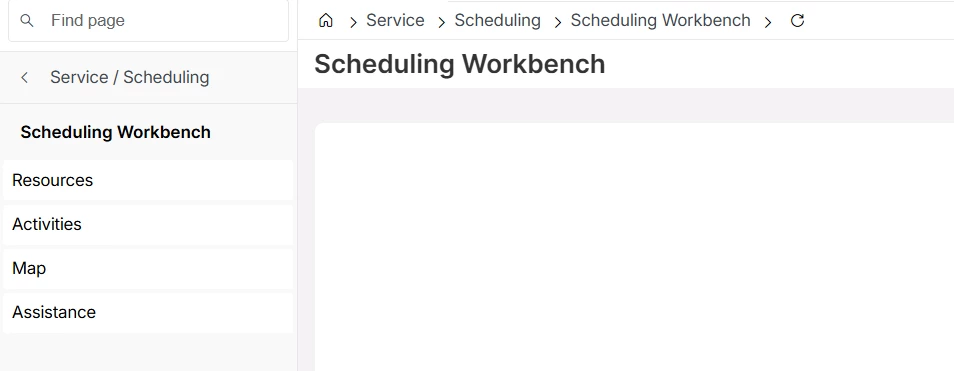
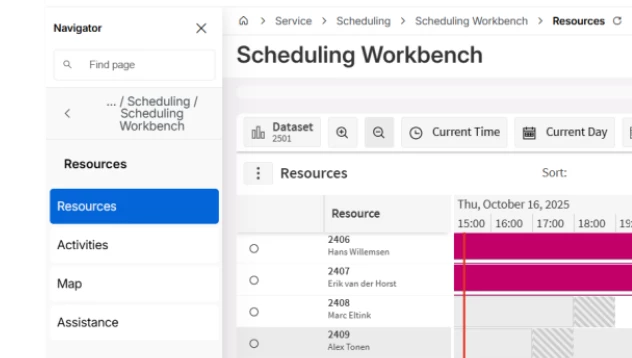
How can i get this screen configure basically i can see it open seperately into new screen.. i want to configure like below, so it should open inside cloud itself.
 

Regards,

Etmshiy

18 replies

Alexander Heinze
Ultimate Hero (Employee)
Forum|alt.badge.img+23
  • Ultimate Hero (Employee)
  • December 9, 2025

This is out-of-the-box functionality in 25R2, not possible in previous releases.


Forum|alt.badge.img+8
  • Author
  • Sidekick (Customer)
  • December 9, 2025

This is out-of-the-box functionality in 25R2, not possible in previous releases.

Can you please let me know how to configure in 25R2,.


Regards


Alexander Heinze
Ultimate Hero (Employee)
Forum|alt.badge.img+23
  • Ultimate Hero (Employee)
  • December 9, 2025

There is no configuration needed. If the PSO Workbench correctly opens in a new browser tab, it should also work in the embedded page. If you need to configure PSO, have a look at IFS Cloud - Scheduling demystified (25R2) | IFS Community


Forum|alt.badge.img+5
  • Do Gooder (Partner)
  • January 27, 2026

There is no configuration needed. If the PSO Workbench correctly opens in a new browser tab, it should also work in the embedded page. If you need to configure PSO, have a look at IFS Cloud - Scheduling demystified (25R2) | IFS Community

HI @ alex,


Its opening in New browser tab in PSO, but its not working in embedded tab. Is there any parameters to recheck or any configuration needs to be done.


Regards,


Alexander Heinze
Ultimate Hero (Employee)
Forum|alt.badge.img+23
  • Ultimate Hero (Employee)
  • January 27, 2026

Did you try the “Scheduling Workbench” page, not “Resources”? Can you share a screenshot?


Forum|alt.badge.img+5
  • Do Gooder (Partner)
  • January 27, 2026

Did you try the “Scheduling Workbench” page, not “Resources”? Can you share a screenshot?

its just showing intilizing dataset, then no data populating


Alexander Heinze
Ultimate Hero (Employee)
Forum|alt.badge.img+23
  • Ultimate Hero (Employee)
  • January 28, 2026

In that case I would raise a support ticket.


Forum|alt.badge.img+5
  • Do Gooder (Partner)
  • January 28, 2026

In that case I would raise a support ticket.

Thanks for your support


Forum|alt.badge.img+5
  • Do Gooder (Partner)
  • February 1, 2026

In that case I would raise a support ticket.

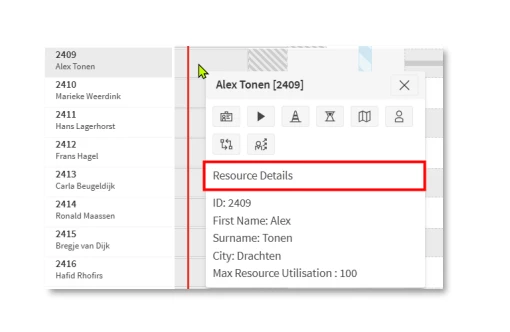
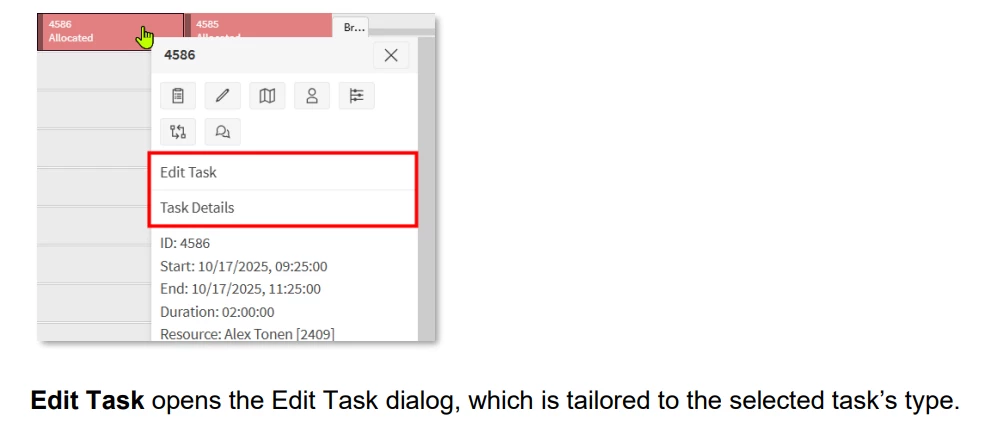
Hi, After adding the permission PSO it started working now. but there is 3 new tool tip added in the screen which is not opening. When i click on Resources details its not showing the Resources card with all the details as expected in 25 R2. as well as in Activity window Edit task & Task details.


Minindu Somaratne
Hero (Employee)
Forum|alt.badge.img+9

Hi ​@Rehaan,

Could you please share the permission that you added to resolve the issue? Any screenshots would be helpful. And could you also share the outcome when you click on the 3 callbacks that you’ve pointed out?

Minindu.


Forum|alt.badge.img+5
  • Do Gooder (Partner)
  • February 2, 2026

Hi Minindu,


While clicking the option no response. it's not opening anything.


User permission given on : PSO -- Administrator -- Users -- Groups -- Integration users with access to the Scheduling Gateway added.


Regards,

Shiyaz


Forum|alt.badge.img+5
  • Do Gooder (Partner)
  • February 3, 2026

Hi Minindu,


While clicking the option no response. it's not opening anything.


User permission given on : PSO -- Administrator -- Users -- Groups -- Integration users with access to the Scheduling Gateway added.


Regards,


Awaiting response


Forum|alt.badge.img+5
  • Do Gooder (Partner)
  • February 4, 2026

awaiting for feedback..


Alexander Heinze
Ultimate Hero (Employee)
Forum|alt.badge.img+23
  • Ultimate Hero (Employee)
  • February 6, 2026

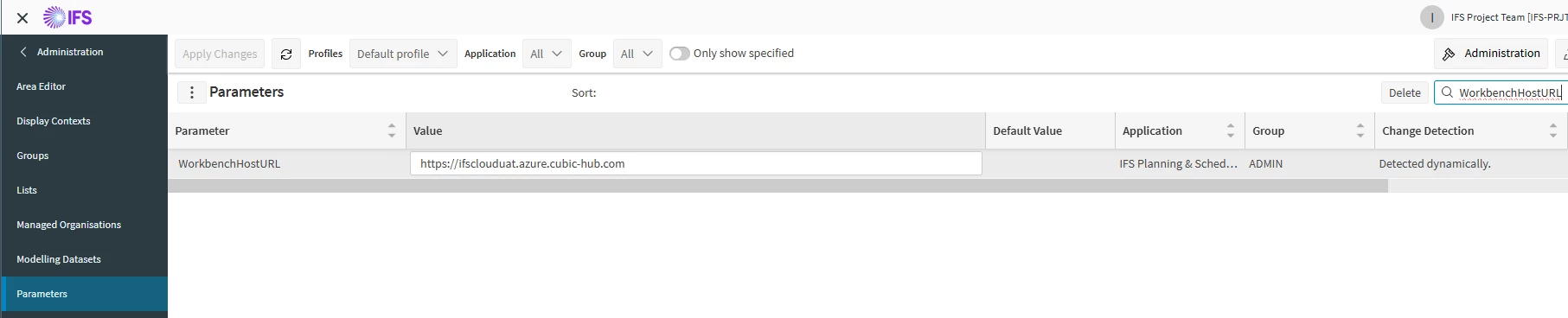
Can you check this setting in your instance?

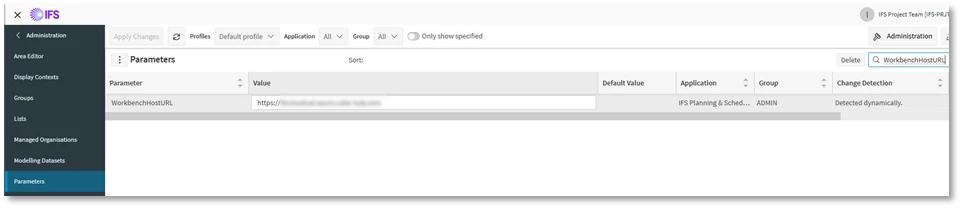
The embedded workbench requires the organization-wide parameter WorkbenchHostURL to be populated with the IFS Cloud callback URL.

Without this parameter you will get error messages in the PSO Event Log.


Forum|alt.badge.img+5
  • Do Gooder (Partner)
  • February 6, 2026

Can you check this setting in your instance?

The embedded workbench requires the organization-wide parameter WorkbenchHostURL to be populated with the IFS Cloud callback URL.

Without this parameter you will get error messages in the PSO Event Log.


Hi ​@Alexander Heinze , I cannot see WorkbenchHostURL  in Parameters, is it something need to add via cloud 


Regards,

Shiyaz


Alexander Heinze
Ultimate Hero (Employee)
Forum|alt.badge.img+23
  • Ultimate Hero (Employee)
  • February 6, 2026

It needs to be done in PSO in the head organisation. I don’t know how this is set in customer environments, so it’s probably still best to open a ticket.

This parameter only needs to cover the server which hosts the calling application, not each client workstation that will be accessing the system.


Forum|alt.badge.img+4
  • Do Gooder (Employee)
  • February 6, 2026

It is a PSO Parameter. You need to have administrator privileges to see it


Alexander Heinze
Ultimate Hero (Employee)
Forum|alt.badge.img+23
  • Ultimate Hero (Employee)
  • February 10, 2026

@etmshiy  Should you later face issues with the embedded detail cards, there was an issue in 25.2.1, resolved in SU2.