Question

How is the Appointment Window durations is PSO

  • May 12, 2026
  • 3 replies
  • 10 views

Forum|alt.badge.img+4

24R2, In PSO/Audit/Load/Input Reference Appointment window Durations is showing as 54 Days. how is this calculating.

In Scheduling Dataset, Scheduling working days is ‘4’ and Appointment Working Days is ‘38’

3 replies

Forum|alt.badge.img+8
  • Hero (Employee)
  • May 12, 2026

Hi,

You probably have a calendar stated on your Scheduling Dataset?

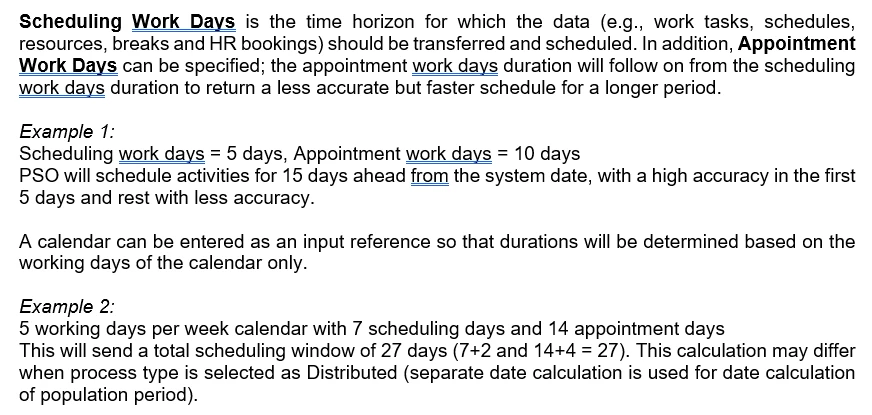
The Appointment window is caluclated as 4+38 = 42 Working Days

But taking the calendar you have stated into consideration the total window with non-working days included is likely to be why you are having  a 54 day window.


Forum|alt.badge.img+4
  • Author
  • Do Gooder (Partner)
  • May 12, 2026

Thanks for your Input

Suppose if i change the calander which is currently as ‘5’ working days to ‘7’ working days … will the Appointment window Durations in PSO be as ‘42’ ?


Alexander Heinze
Ultimate Hero (Employee)
Forum|alt.badge.img+25
  • Ultimate Hero (Employee)
  • May 12, 2026

Thanks for your Input

Suppose if i change the calander which is currently as ‘5’ working days to ‘7’ working days … will the Appointment window Durations in PSO be as ‘42’ ?

Yes, you should get a total horizon of 42 days. Here’s the respective section from Scheduling Demystified (IFS Cloud - Scheduling demystified (25R2) | IFS Community):