Question

How can i remove scheduling exception from tooltip in PSO

  • April 14, 2026
  • 1 reply
  • 8 views

Forum|alt.badge.img+8

Hi,


How can i remove the scheduling exception showing below.. May i know the settings.
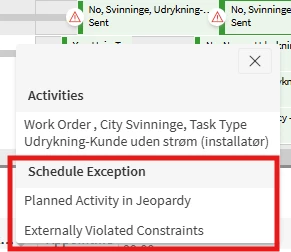


Regards,

Shiyaz

1 reply

Sachitra_W
Do Gooder (Employee)
Forum|alt.badge.img+6
  • Do Gooder (Employee)
  • April 15, 2026

@etmshiy 

You can remove these exception from being triggered through the PSO workbench Scheduling Exceptions screen located in the Administration → Organization → Scheduling Exceptions. If you no longer wish to see those specific type of exceptions, uncheck the 'Active' box for that ID in the Scheduling Exceptions screen.