Solved

How can I completely delete a service resource in 26R1?

  • September 3, 2026
  • 4 replies
  • 47 views

Forum|alt.badge.img+5

Hi,

The service resource was never used. I don’t wand to hide or block this resource.

The URL: main/ifsapplications/projection/v1/ResourceIndividualsHandling.svc/ResourceSet(ResourceSeq=6403)

Method: POST

returns:

{
    "error": {
        "code": "DATABASE_ERROR",
        "message": "Database error occurred. Contact administrator.",
        "details": [
            {
                "code": 20116,
                "message": "ORA-20116: Resource.CONSTRAINT: The Resource \"6403\" is used by 592 rows in another object (Resource Base Schedule)."
            }
        ]
    }
}

Which API-Call do I have to use to remove the entries in Resource Base Schedule?


Best Regards

Michael
Best answer by MFW-58

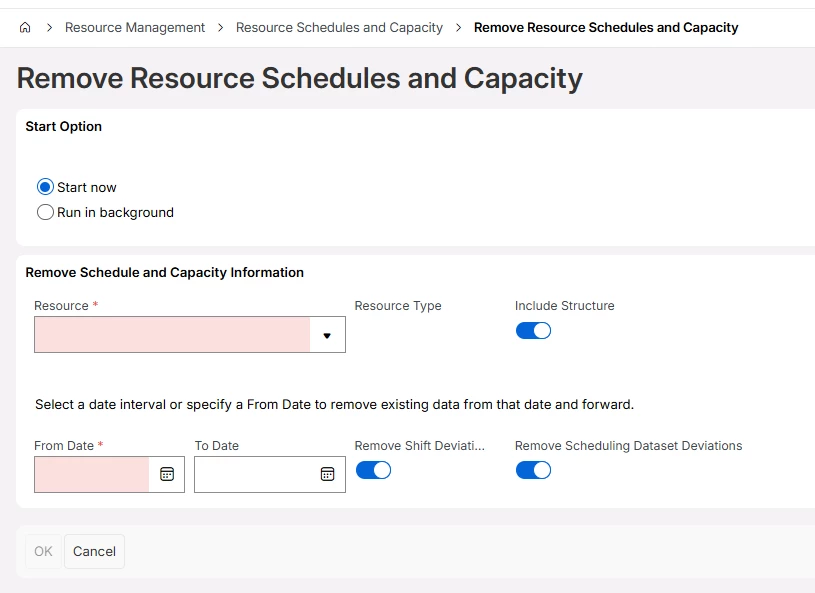
Do you have to do the delete of the shifts via an API? There is a routine in IFS Cloud that allows you to select the Resource you want to delete Shifts for which is likely a cleaner way to do it. I am not sure if you can call this routine from API; I suspect you probably could. 

Search for Remove Resource Schedules and Capacity


Using the assistant is pretty self explanatory. Once all the related information is removed against the Resource then I expect you should be able to delete them.

4 replies

Forum|alt.badge.img+5
  • Author
  • Do Gooder (Customer)
  • September 3, 2026

Sorry, please change method to: DELETE.


With this API-Call it is possible to show the entries:

“int/ifsapplications/entity/v1/ResourceBaseScheduleEntity.svc/ResourceBaseScheduleSet?$filter=(ResourceId eq '{ResourceId}')”

Forum|alt.badge.img+3
  • Do Gooder (Employee)
  • September 4, 2026

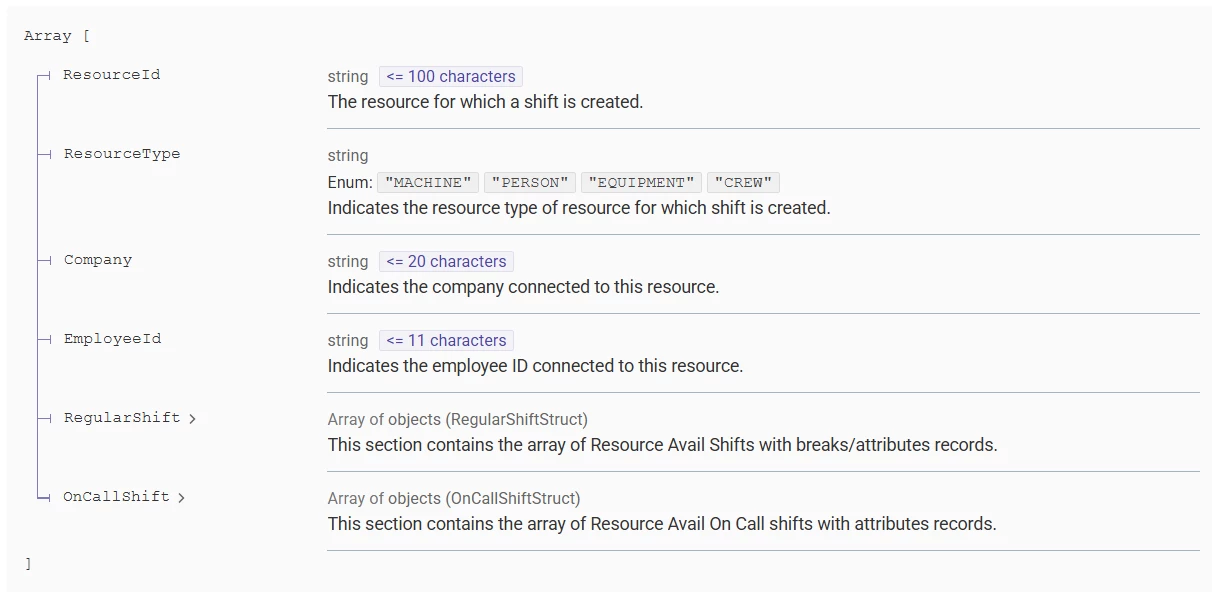
Hi Michael, I imagine you’d have to delete all generated shifts for that resource, and you could try this:

“int/ifsapplications/projection/v1/ResourceShiftService.svc/DeleteResourceShift”

{
  "DeleteResourceShift": [
    {
      "ResourceId": "It is a Text",
      "ResourceType": "MACHINE",
      "ResourceSeq": 1,
      "Company": "It is a Text",
      "EmployeeId": "It is a Text",
      "RegularShift": [
        {
          "AccountDate": "2019-10-10",
          "ShiftPeriod": 1
        }
      ],
      "OnCallShift": [
        {
          "AccountDate": "2019-10-10",
          "ShiftPeriod": 1
        }
      ]
    }
  ]
}


Let me know if you still get an error!


MFW-58
Sidekick (Former Employee)
Forum|alt.badge.img+5
  • Sidekick (Former Employee)
  • Answer
  • September 4, 2026

Do you have to do the delete of the shifts via an API? There is a routine in IFS Cloud that allows you to select the Resource you want to delete Shifts for which is likely a cleaner way to do it. I am not sure if you can call this routine from API; I suspect you probably could. 

Search for Remove Resource Schedules and Capacity


Using the assistant is pretty self explanatory. Once all the related information is removed against the Resource then I expect you should be able to delete them.


Forum|alt.badge.img+5
  • Author
  • Do Gooder (Customer)
  • September 7, 2026

Hi Michael, I imagine you’d have to delete all generated shifts for that resource, and you could try this:

“int/ifsapplications/projection/v1/ResourceShiftService.svc/DeleteResourceShift”

{
  "DeleteResourceShift": [
    {…...

Let me know if you still get an error!


Hi danhse,

thank you for this api.

Unfortunately the deletion was not successfull. The api returned code 200 but with an error description.


   *** ResourceSeq for ResourceId XXXXX: 6691
   *** Found 592 ResourceBaseScheduleSet for ResourceId XXXXX
   1 /  592: 2025-07-08 * 1 * 1 6691
   *** removed (200): {
  "@odata.context": "https://xxxxxxx.ifs.cloud/int/ifsapplications/projection/v1/ResourceShiftService.svc/$metadata#Collection(IfsApp.ResourceShiftService.ResponseDeleteStruct)",
  "value": [
    {
      "ResourceId": "XXXXX",
      "ResourceType": "PERSON",
      "ResourceSeq": 6691,
      "Company": "*",
      "EmployeeId": "*",
      "ResourceShiftsDeleted": 0,
      "OnCallShiftsDeleted": 0,
      "NumberOfErrors": 2,
      "ErrorMessageDetails": [
        {
          "ErrMssgDetails": "Error deleting regular shift with Shift Start , Shift End . Original error ORA-20115: ResourceAvailShift.FND_REMOVED2: The \"Resource Availability Shift\" has already been removed by another user."
        },
        {
          "ErrMssgDetails": "Error deleting On Call shift with the Shift Start , Shift End . Original error ORA-20115: ResourceAvailOnCall.FND_REMOVED2: The \"Resource Availability On Call Shift\" has already been removed by another user."
        }
      ]
    }
  ]
}
 

Best regards

Michael