



Question

FSM Mobile - Cached Data Place for Stock

  • March 26, 2026
  • 6 replies
  • 24 views

AdrianEgley
Hero (Customer)
Forum|alt.badge.img+14

Hi,

We have technicians that may assist in different locations and use stock from those locations.

In FSM we have set up processes to use dates on the Person Place table to show when they are in a different location.

The example below shows his standard place would be TN, but on the dates shown he is working from G and using their stock.
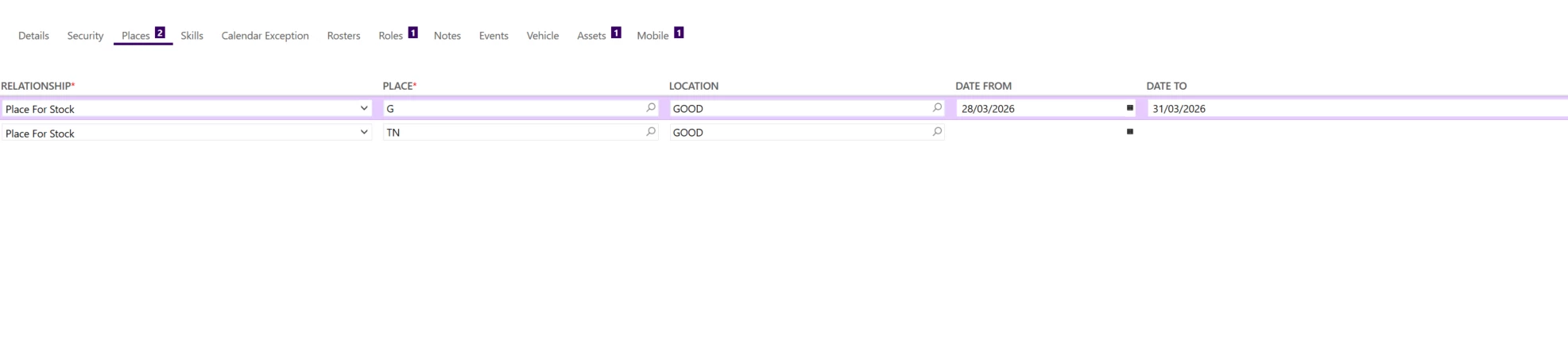
FSM drives this, and we thought that FSM Mobile would then update if the technician was to perform an INIT on the morning they goes to a different place.

What we have noticed is that on INIT, the Sync Rule obtains the correct data, but that’s pretty irrelevant as it appears the process for stock usage is taken from:

var location = getUserInfo('StockFromLocation');
var place = getUserInfo('StockFromPlace');


It appears this data is then held somewhere as the INIT file is pulling through the data we have captured below.
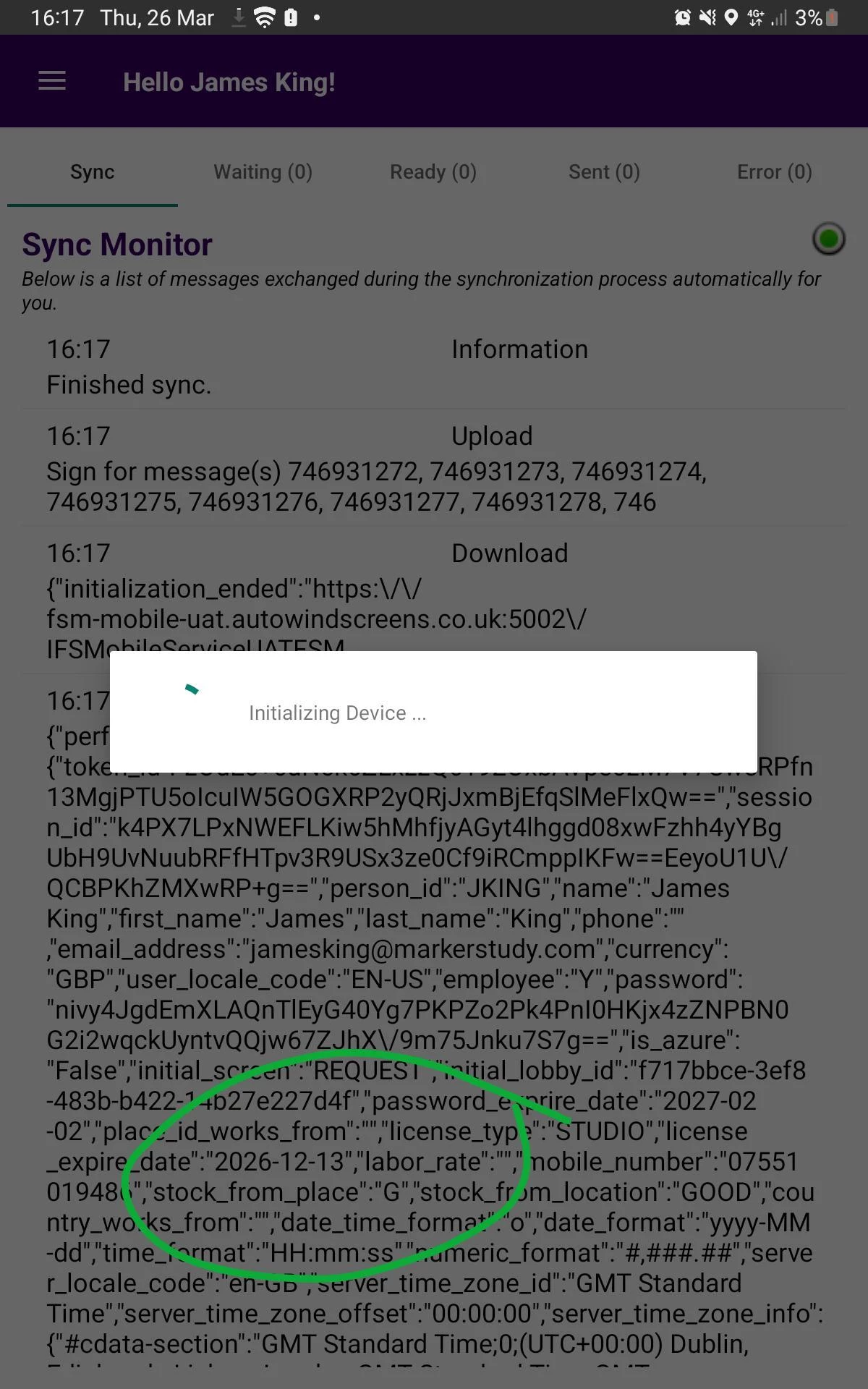
 

If we check the database, the database shows Place for Stock being TN as per the sync rule.


However it’s simply pulling through the first place alphabetically.


Is there any explanation for this, and how do we use the data on the person_place sync to be the place for stock?


Ady

6 replies

Shneor Cheshin
Superhero (Employee)
Forum|alt.badge.img+28
  • Superhero (Employee)
  • March 26, 2026

HI ​@AdrianEgley 

Below is my understanding of the platform. I could not find this info anywhere official.\

TL;DR 😇: As far as I know, the ‘Date From’ and ‘Date To’ are custom fields and not supported by the baseline getUserInfo method. FSM expects unique place relationship values.

The long explanation 😥

1. Person–place links are stored in PERSON_PLACE, and each record represents one relationship type

  • A Person can have relationships such as Place for Stock, Work From Place, Place for Portal, etc.
  • These are stored as person_place relationships, and each relationship type has functional meaning (e.g., stock sourcing, work start location).
  • More info from the community: FSM Person and Place | IFS Community

Because each relationship type (place_relationship) has a specific functional purpose, FSM expects a single authoritative record per type for a person.

2. Example from getUserInfo('StockFromPlace') resolution logic

  • IFS provides a query used internally by mobile to resolve getUserInfo('StockFromPlace'):
    Something like!--scriptorendfragment-->!--scriptorstartfragment-->

    select distinct place_id
    from person_place
    where place_relationship='FOR_STOCK'
    and person_id=@personId
  • This implies:
    • FSM expects exactly one FOR_STOCK record for the given person.
    • If you had two FOR_STOCK rows, the function would return multiple values, not supported, and the behaviour becomes unpredictable.

3. More Info from community: On the person screen and place screen, how the values of places_relationship are used in repair progress? | IFS Community


So can you have two identical person–place relationships?

Technically:

FSM will not block you at the database level — PERSON_PLACE does not enforce a uniqueness constraint.

Functionally:

No! You should not.
If you duplicate a relationship like:

person_id place_relationship place_id
TECH01 FOR_STOCK WH1
TECH01 FOR_STOCK WH2

Then:

  • getUserInfo('StockFromPlace') may return the “wrong” one or none.
  • Mobile may cache/resolve inconsistently.
  • Assignment logic, stock sourcing, and repair flows may break.

Recommended rule

For each person, each place_relationship should exist at most once.

If you need fallback or multi‑place logic (e.g., technicians working across regions), implement it using:

  • business rules
  • app parameters
  • custom scripting
  • PSO configuration (primary FE, etc.)

...but not by creating multiple identical person–place relationships.


High-level suggested solution

In your case, you could query the DB and find the relevant values.

Pseudo code

var place = select place_id from person_place

where getdate() is between date_from and date_to

and place_relationship='FOR_STOCK' 

and person_id = @personId


Cheers!


AdrianEgley
Hero (Customer)
Forum|alt.badge.img+14
  • Author
  • Hero (Customer)
  • March 27, 2026

Hi ​@Shneor Cheshin ,


With regards to this point

2. Example from getUserInfo('StockFromPlace') resolution logic

  • IFS provides a query used internally by mobile to resolve getUserInfo('StockFromPlace'):
    Something like!--scriptorendfragment-->!--scriptorstartfragment-->


    select distinct place_id

    from person_place

    where place_relationship='FOR_STOCK'

    and person_id=@personId

I would expect that to be the activity on the mobile device. Are you saying that regardless of what the Sync Rule might be saying, the Initialisation process is running that script and picking up the first record regardless?


Looks like I will need to go back to the drawing board for this.


Ady


Shneor Cheshin
Superhero (Employee)
Forum|alt.badge.img+28
  • Superhero (Employee)
  • March 29, 2026

Hi ​@AdrianEgley 

You did not share your sync rule, so it is hard to guess what it is doing.

The Date To/From are custom fields, and it is not clear how you use them.

In general, if you sync only 1 record, the method should return only that record.

Can you please share your sync rule?

Cheers!


AdrianEgley
Hero (Customer)
Forum|alt.badge.img+14
  • Author
  • Hero (Customer)
  • March 30, 2026

Hi ​@Shneor Cheshin

The sync rule is as follows for Person Place.

I’m using a view to get the Place based on dates, and happy with the data returned.


<hierarchy_select>

  <primary_table>person_place</primary_table>

  <attrs>

    <attr>person_place.*</attr>

  </attrs>

  <from>

    <table>person_place</table>

    <table>aw_person_place_view</table>

  </from>

  <where>

    <data_constraint>

      <constraint>

        <left_operand>aw_person_place_view.person_id</left_operand>

        <operator>eq</operator>

        <right_operand>{PERSON_ID}</right_operand>

      </constraint>

    </data_constraint>

    <join_constraint>

      <constraint>

        <left_operand>person_place.person_id</left_operand>

        <operator>equi</operator>

        <right_operand>aw_person_place_view.person_id</right_operand>

      </constraint>

      <constraint>

        <left_operand>person_place.place_relationship</left_operand>

        <operator>equi</operator>

        <right_operand>aw_person_place_view.place_relationship</right_operand>

      </constraint>

      <constraint>

        <left_operand>person_place.place_id</left_operand>

        <operator>equi</operator>

        <right_operand>aw_person_place_view.place_id</right_operand>

      </constraint>

    </join_constraint>

  </where>

</hierarchy_select> 


As stated above, the data is good on the XML response and the data in the Database locally is correct. But it just appears to disregard that and get the first record.


Ady


Shneor Cheshin
Superhero (Employee)
Forum|alt.badge.img+28
  • Superhero (Employee)
  • March 31, 2026

Hi ​@AdrianEgley 

Looks strange.

If there is only 1 record in the Mobile DB, I have no idea where the value is coming from.

I would recommend opening a support case.

Cheers!


Shneor Cheshin
Superhero (Employee)
Forum|alt.badge.img+28
  • Superhero (Employee)
  • March 31, 2026

@AdrianEgley 

You can try the following

  1. Specify the column names instead of * in the select
  2. In the constraint, use the table and not the view aw_person_place_view.person_id → person_place.person_id

Cheers!



