Question

FSM 6.34 Installation Error

  • December 4, 2025
  • 8 replies
  • 24 views

Forum|alt.badge.img+5
  • Do Gooder (Customer)

Hello All,


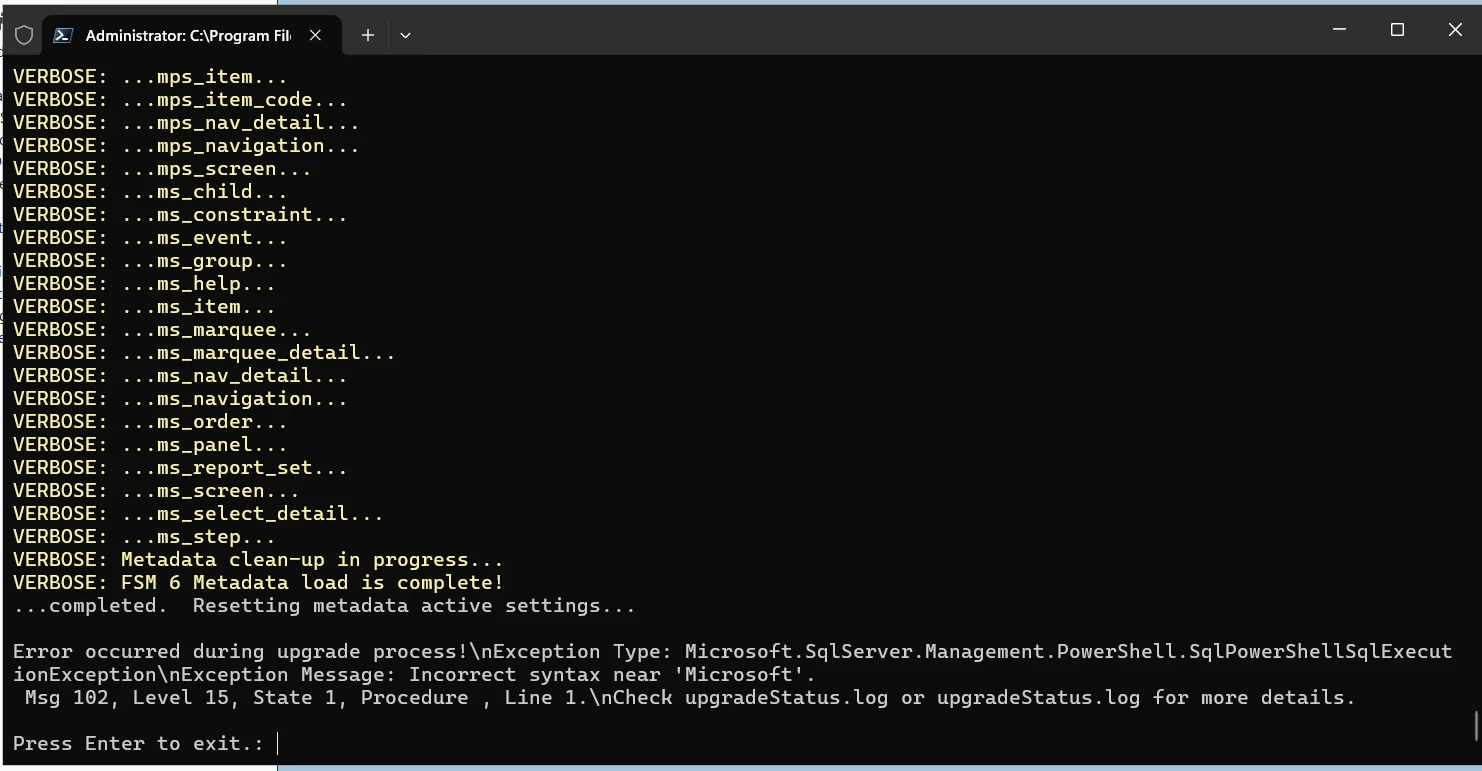
I am getting attached error while trying to upgrade DB for FSM 6.34 
Can anyone please help me 
Shaik

8 replies

Hushan Hasarel
Hero (Employee)
Forum|alt.badge.img+12

Hi ​@Shaik ,

Did you check the upgrade logs to see where this error is coming from? Can you attach those here ?

Thanks & best regards,
Hushan


Forum|alt.badge.img+5
  • Author
  • Do Gooder (Customer)
  • December 4, 2025

Thank you for your response, May i please know where to check those logs


Hushan Hasarel
Hero (Employee)
Forum|alt.badge.img+12

If this is a new installation, could you please check inside your delivery package, in the following path? All “.log” files are from your installer,

\DatabaseData\SQLServer\NewInstall


If it is an upgrade attempt, may be check in the following path,


\DatabaseData\SQLServer\Upgrade

Also, as a general rule of thumb, please make sure you copy your delivery package to the shortest path possible, and make sure path to your delivery package has no spaces and special characters


Forum|alt.badge.img+5
  • Author
  • Do Gooder (Customer)
  • December 4, 2025

Please find the attached updatelog.txt


Hushan Hasarel
Hero (Employee)
Forum|alt.badge.img+12

I see your delivery package is in a place something like this,

\Desktop\FSM_6_U34_D2\FSM_6_U34_D2\FSM_6_U34_D2\

Could you please put this in a path as short as possible?

Something like 

D:\FSM_6_U34_D2

Then re-run the installer ?


Forum|alt.badge.img+5
  • Author
  • Do Gooder (Customer)
  • December 4, 2025

Hi Hushan,


I have put the Package in E drive and still have the same issue 


Forum|alt.badge.img+5
  • Author
  • Do Gooder (Customer)
  • December 4, 2025

Hi Husham,
I am trying to run the DB upgrade on Microsoft SQL Server 2025 Enterprise Developer Edition (64-bit) hosted on Windows Server 2025 Standard. Just curious if this is the problem and if its even compatible yet


roklde
Superhero (Employee)
Forum|alt.badge.img+27
  • Superhero (Employee)
  • December 5, 2025

@Shaik yes, that could be an issue. You should always use the OS and Software listed in the Installation Guide for the respective release. Eventually some scripts fail to execute in the newer SQL version. 


Best regards
Roman