

Question

Dispatch Console vs PSO InActive Resources 23R2

  • Apr 26, 2024 4:08 PM UTC
  • 8 replies
  • 187 views

Forum|alt.badge.img+5

IFSCloud 23R2

Currently we are using Dispatch Console for day to day Resource and Work Task Activities.

We see there is one key difference in Dispatch Console and PSO ie PSO does not show Inactive resource as expected ie Scheduling Resource(InActive), However Dispatch console does not consider this and will always show all resources regardless of Active/Inactive. This is causing issue for dispatcher, as it is hard to manage resource without any filter and this behaviour and they often end up scheduling to InActive resources during manual scheduling.


Can you please advise how are other customers dealing with this behaviour, is this normal behaviour or environment issue at our end? How can we limit Dispatch Console to show valid Active resources only.


Thank you

8 replies

Alexander Heinze
Ultimate Hero (Employee)
Forum|alt.badge.img+25

What is the reason for inactivating resources? Is this only a temporary deactivation? 


Forum|alt.badge.img+5
  • Author
  • Sidekick (Customer)
  • Apr 26, 2024 9:52 PM UTC

Hello Alexander,

Thank you for responding

It can be temporary deactivation or full deactivation when resource leaves.

1.Resource is not using IFS system and using other WFM system.When deactivated in IFS it should not be visible in console and assigned tasks unassigned and reallocated to other.In future resource can be reactivated.

2.Resource leaving company and fully deactivated. Assigned tasks get reallocated after the deactivation.


Thank you


Alexander Heinze
Ultimate Hero (Employee)
Forum|alt.badge.img+25

I have confirmed this behavior in 24.1E.0 and created a ticket for it.


Forum|alt.badge.img+5
  • Author
  • Sidekick (Customer)
  • Apr 29, 2024 8:27 AM UTC

Thank you Alexander, Shall we consider it as Gap and will be addressed in future release or how we interpret this behaviour. Thank you


Forum|alt.badge.img+7
  • Sidekick (Customer)
  • Apr 29, 2024 11:04 AM UTC

Hi all, we have the same observation from our side and would like to understand if indeed this is considered as a product gap and if it will be addressed in future releases. Thank you


Alexander Heinze
Ultimate Hero (Employee)
Forum|alt.badge.img+25

When I receive an update of my ticket from R&D, I will share here.


Forum|alt.badge.img+2
  • Do Gooder (Customer)
  • Aug 28, 2025 8:22 PM UTC

We just upgraded to 2025R1 and it still appears to be broken, has anyone heard of a fix aside from removing the resource detail record ? 


Alexander Heinze
Ultimate Hero (Employee)
Forum|alt.badge.img+25

Blocked or hidden resources are still shown in Dispatch Console, Resource Shift Gantt etc. to visualize any previous planning information. It is however not possible to create new allocations or shifts etc. when a resource is blocked.


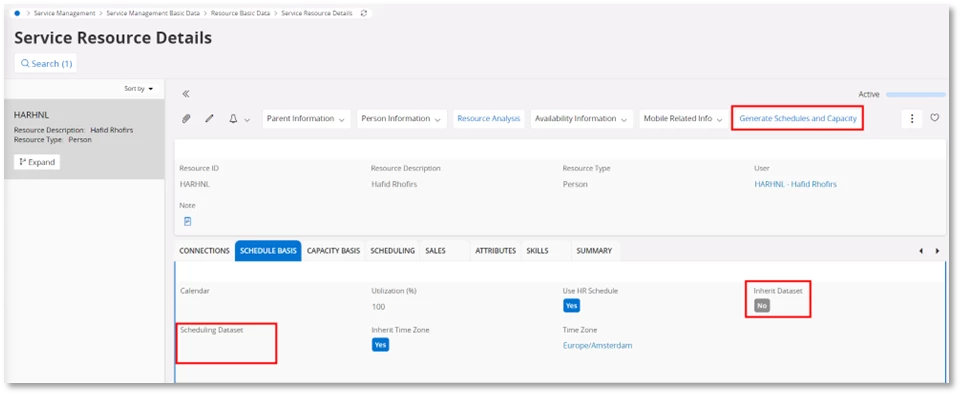
To remove a resource from DC, clear the resource’s Scheduling Dataset or move it to a dummy one.

After that, Generate Schedules and Capacity and activate the toggle Remove Scheduling Dataset Deviations. This creates shifts without association to the Scheduling Dataset and ultimately removes the resource from DC.