


We have a business rule that is running twice resulting in duplicate records in the task table. Do you know what could possibly be causing this? and there is no biplicate brs configured
please any one suggest why duplicate records are creating ?
Execution point: After commit update.
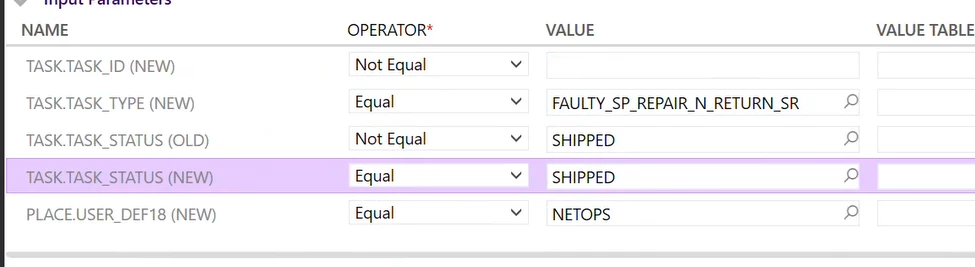
xml message xml:
<perform_batch>
<update_task>
<task>
<task_id />
<access_group>NO_CMR_STC_HQ_EMC_RECEIVE_SHIP</access_group>
<description>Faulty Spare Repair Return EMC Receiving shipping task</description>
<parent_task_id>@task_id</parent_task_id>
<place_id_cust>@place_id_cust</place_id_cust>
<plan_start_dttm>@modified_dttm</plan_start_dttm>
<request_id>@request_id</request_id>
<task_status>OPEN</task_status>
<task_type>FAULTY_SP_REPAIR_N_RETURN_EMC_RS</task_type>
<insert is_initialized="False" />
</task>
</update_task>
</perform_batch>
XML validation:
<hierarchy_select>
<primary_table>task</primary_table>
<attrs>
<attr>task.task_id</attr>
</attrs>
<from>
<table>task</table>
</from>
<where>
<data_constraint>
<constraint>
<left_operand>task.request_id</left_operand>
<operator>eq</operator>
<right_operand>@request_id</right_operand>
</constraint>
<constraint>
<left_operand>task.task_type</left_operand>
<operator>eq</operator>
<right_operand>FAULTY_SP_REPAIR_N_RETURN_EMC_RS</right_operand>
</constraint>
</data_constraint>
</where>
</hierarchy_select>
