Solved

Why IFSAPP can't attach document ?

  • April 14, 2026
  • 5 replies
  • 53 views

SMANUEL
Sidekick (Partner)
Forum|alt.badge.img+9

Dears

Why the user IFSAPP can't attach document using DOCMAN ?


Thanks in Advance

SBM

Best answer by matt.watters

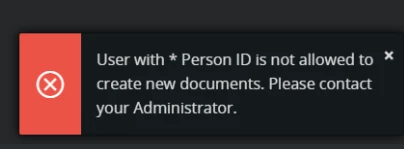
@SMANUEL This error indicates that Person ‘*’ is connected to User IFSAPP which is an incorrect setup. It is recommended that Person ‘*’ is not connected to any User ID, as this Person can represent all system users in the area of Document Access.

User IFSAPP can attach documents if it is connected to a Person other than ‘*’, but this is also not recommended.

Why do you want the app owner to be tied to Document Revision records?

5 replies

matt.watters
Ultimate Hero (Partner)
Forum|alt.badge.img+26
  • Ultimate Hero (Partner)
  • Answer
  • April 14, 2026

@SMANUEL This error indicates that Person ‘*’ is connected to User IFSAPP which is an incorrect setup. It is recommended that Person ‘*’ is not connected to any User ID, as this Person can represent all system users in the area of Document Access.

User IFSAPP can attach documents if it is connected to a Person other than ‘*’, but this is also not recommended.

Why do you want the app owner to be tied to Document Revision records?


Amila Samarasinghe
Superhero (Partner)
Forum|alt.badge.img+14


User IFSAPP can attach documents if it is connected to a Person other than ‘*’, but this is also not recommended.

@matt.watters You actually need to connect a Person to IFSAPP if you want to use Transfer document option as well as Invoice check in with Incoming invoices. These processes will fail (without any error) if you do not have a person connected to IFSAPP


piswpl
Do Gooder (Partner)
Forum|alt.badge.img+4
  • Do Gooder (Partner)
  • April 14, 2026

...and we got to the never-ending discussion of should IFSAPP use the IFSAPP person or the * person (default I believe).

I have really vague memories that something was not working fine in service and maintenance when the person for IFSAP was not ‘*’ (Apps 10 or earlier).


SMANUEL
Sidekick (Partner)
Forum|alt.badge.img+9
  • Author
  • Sidekick (Partner)
  • April 15, 2026

@SMANUEL This error indicates that Person ‘*’ is connected to User IFSAPP which is an incorrect setup. It is recommended that Person ‘*’ is not connected to any User ID, as this Person can represent all system users in the area of Document Access.

User IFSAPP can attach documents if it is connected to a Person other than ‘*’, but this is also not recommended.

Why do you want the app owner to be tied to Document Revision records?

@matt.watters Thanks for the response...We just wanted to use APPOWNER (Test env) for a demo where we might be required to attach some document...Anyways thanks for the clarity..

Regards

SBM


LOVISATS
Sidekick (Customer)
Forum|alt.badge.img+6
  • Sidekick (Customer)
  • April 15, 2026

DOCMAN and Invoice Print - do not use IFSAPP

We are running IFS Apps 10. Normally we setup scheduled tasks to run as “IFSAPP”, but that does not work for all types of jobs. As already mentioned, it is quite explicitly coded that IFSAPP cannot attach documents if default connection to person *

IF (Person_Info_API.Get_Id_For_User(Fnd_Session_API.Get_Fnd_User) = '*') THEN
Error_SYS.Appl_General('DocTitle', 'CREATENEWNOTALWD: User with * Person ID is not allowed to create new documents. Please contact your Administrator.');
END IF

We use IFS standard function for Invoice Image Document Class, to check in the PDF-file (invoice image) created in the Report Archive window when sending a customer invoice message with E-INVOICE media code. 

In order to be able to use scheduled task for creating and sending invoices, we have created a generic user “EDI” that is allowed to create documents. IFSAPP can still create the invoices, it is the “print” that needs to have another user.