Question

View documents rather than downloading

  • Aug 11, 2026 5:38 AM UTC
  • 1 reply
  • 35 views

SMANUEL
Sidekick (Partner)
Forum|alt.badge.img+9

Good day..

In Document Folder Navigator.(FS Cloud 24R2 & 25R1)documents are downloaded before viewing it.

Is there a setup to view directly rather than downloading ?
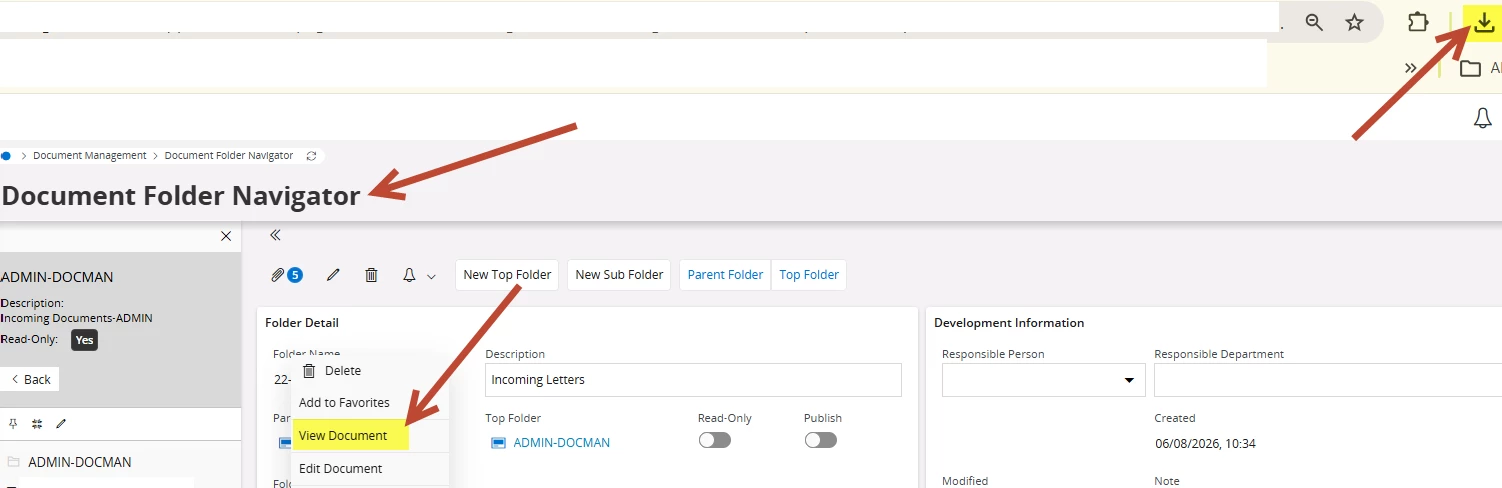
In my case, its saved in my TEMP folder each time I view it.


Regards

SBM

1 reply

richardwoods
Do Gooder (Partner)
Forum|alt.badge.img+6
  • Do Gooder (Partner)
  • Nov 24, 2026 10:58 PM UTC

Short answer: when you click View in the Document Folder Navigator, the file that is checked in to the document revision (the original or the view copy) is brought down through the browser, so it lands in the browser's download location. The temp folder behaviour you describe fits that, and where it goes is largely down to the browser rather than an IFS setting.

What decides what you get

  • View can show the original file in its own application, or a view copy (typically a PDF) if one is checked in with the original. A view copy is the better route for plain reading.
  • The download folder follows the browser. In Chrome, for example, it is under Settings > Downloads > Location.
  • You need at least view access on the document, and the file must be checked in.

Things to try

  • Check whether the documents you open have a view copy. If not, the document revision has a Create View Copy action, which gives you a read-only copy to open.
  • Point the browser's download location to a folder you want to manage, and consider clearing it periodically.
  • The same document opened from the Document Revision page is a useful comparison: if it behaves the same, it is the download route rather than the folder navigator.

Worth a look: the IFS Cloud documentation topics View Document and Create View Copy.

Are the files you open mostly PDFs, and do they have a view copy checked in?

Created with the help of Ask Olive.