I’m looking for some clarification regarding how to properly manage the Report Archive in IFS Cloud, and I would appreciate insights from others who have worked with this area.
Specifically, I’d like to understand:
How much impact the Report Archive can have on overall database size and performance over time.
Whether there are any recommended retention rules or legal requirements (for example, in the context of Poland/EU) regarding how long archived reports should be stored.
How the expiration_date field works within the archive – what exactly it controls, how it is normally set, and whether it can be safely updated directly at the database level.
Any best practices or lessons learned from managing report archiving in production environments.
If anyone could share their experience, guidelines, or potential pitfalls to avoid, it would be extremely helpful.
Thanks in advance!
Best answer by Marcel.Ausan
@kacperifs in the beggining of the year I did an upgrade project witha customer from Apps10 to IFS Cloud. When looking at the DB size by tables, pdf_archive_tab was close to 150 GB (total GB size of the customer: 350 GB).
As a upgrade step we decided to truncate the pdf_archive_tab.
Now, coming to your questions:
How much impact the Report Archive can have on overall database size and performance over time.
- pdf_archive_tab - can grow substantially over time. I didn’t notice any side effects in terms of poor performance
Whether there are any recommended retention rules or legal requirements (for example, in the context of Poland/EU) regarding how long archived reports should be stored.
not sure about this. However, if there are docs that should be kept, I always do a Report Rule and check-in the PDF to DocMan, so the customer doesn’t care if it’s cleaned up from pdf_archive_tab as long as it will be linked to a Document revision linked to an Invoice / Purchase Order
How the expiration_date field works within the archive – what exactly it controls, how it is normally set, and whether it can be safely updated directly at the database level.
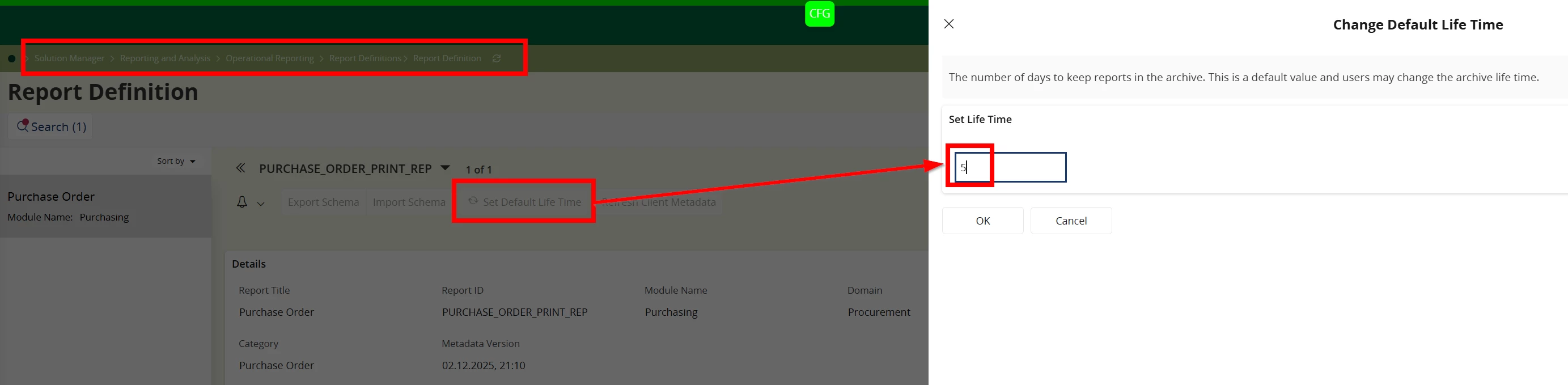
This is setup in Report Definitions. There is another background job - Heavy Cleanup that runs daily and deletes the data in pdf_archive_tab according to the default lifetime
Any best practices or lessons learned from managing report archiving in production environments.
@kacperifs in the beggining of the year I did an upgrade project witha customer from Apps10 to IFS Cloud. When looking at the DB size by tables, pdf_archive_tab was close to 150 GB (total GB size of the customer: 350 GB).
As a upgrade step we decided to truncate the pdf_archive_tab.
Now, coming to your questions:
How much impact the Report Archive can have on overall database size and performance over time.
- pdf_archive_tab - can grow substantially over time. I didn’t notice any side effects in terms of poor performance
Whether there are any recommended retention rules or legal requirements (for example, in the context of Poland/EU) regarding how long archived reports should be stored.
not sure about this. However, if there are docs that should be kept, I always do a Report Rule and check-in the PDF to DocMan, so the customer doesn’t care if it’s cleaned up from pdf_archive_tab as long as it will be linked to a Document revision linked to an Invoice / Purchase Order
How the expiration_date field works within the archive – what exactly it controls, how it is normally set, and whether it can be safely updated directly at the database level.
This is setup in Report Definitions. There is another background job - Heavy Cleanup that runs daily and deletes the data in pdf_archive_tab according to the default lifetime
Any best practices or lessons learned from managing report archiving in production environments.
@Marcel.Ausan When truncating the table, did you retrieve the documents afterward?
How can we transfer the data from the Archive to Docman?
Thank you in advance
The docs in reports archive were no longer needed. Everything that was needed longer term (invoices / POs / DeliveryNotes) had a report rule created that would checkIn the pdf to DocMan. So we had no issues in truncating the report archive. If you truncate the report archive, you lose those documents.
To transfer pdfs from report archive I guess it would be possible with a BPA WF and a chain of blocks that would read the pdf from report archive and create a document revision for it. Of course this could be a consistent CRIM. I’m not aware of any standard process to move pdfs from report archive tab to document revisions.