

Question

Question about possible technical failure during document transfer from DB to FSS

  • August 19, 2025
  • 14 replies
  • 227 views

Dumeesha Wanigarathna
Superhero (Partner)
Forum|alt.badge.img+16

Hi IFS Community,


We are going to move documents from DB to FSS via ‘Transfer Document’ assistant. The customer is a live customer hosted in IFS Managed cloud and therefore we do not have access to File Storage. Then I have a major concern on what will happen if any technical failure happen ? Is there any chance of happening technical failure during the transfer. 


I have analyze the code and here are my findings.

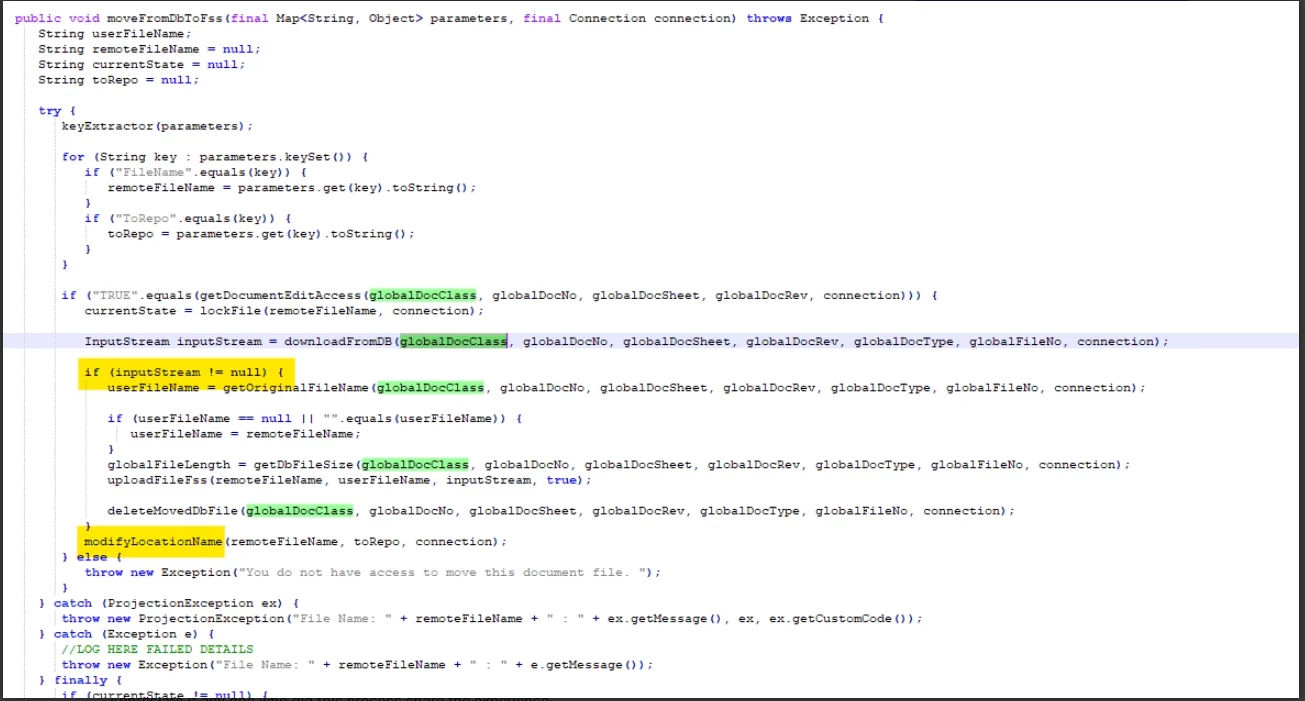
Back ground job created for ‘EDM_FILE_API.Batch_Process’ and then execute Batch_Transfer_Handler_API.Move_From_Db_To_Fss. This create application messages to transfer each file to FSS. Then the IFS connect logic executes as below.

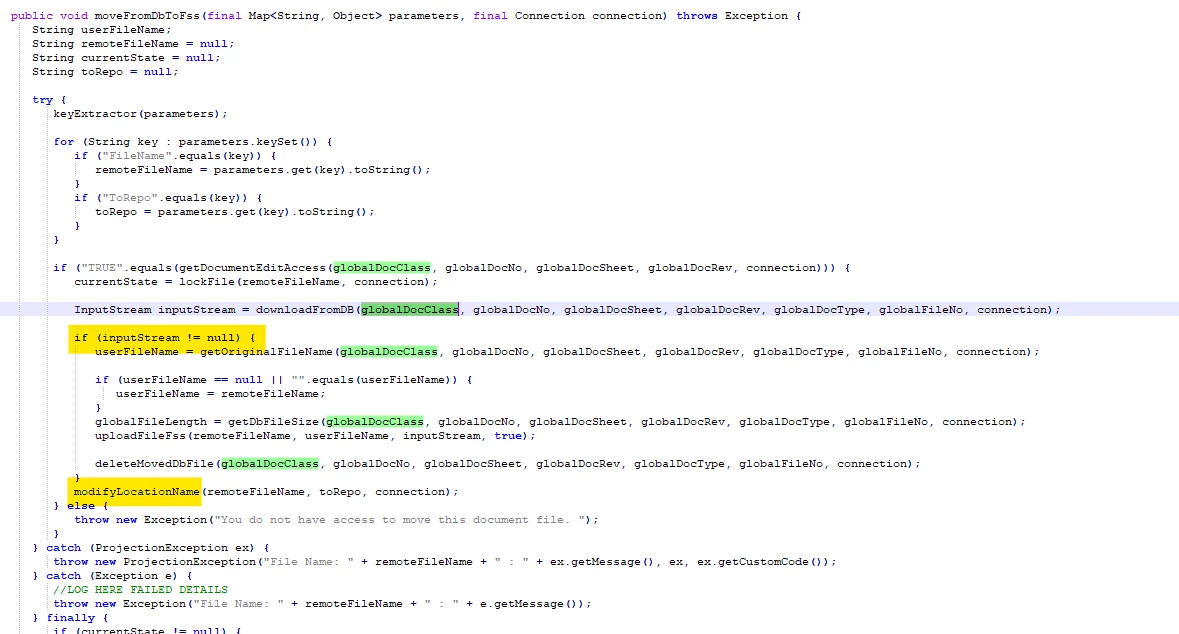
I would like to check whether is there any chance of executing modifyLoactionName without executing actual logic for physical file transfer. 

The location Name in Edm_File_Tab will be changed when ‘modifyLoactionName ’ executes. 
 

1.0 Can IFS RND consultant can check whether is there any chance of happening this ?

2.0 Does any consultant among IFS community encounter this situation ?

3.0 Can you comment if anyone has successfully transferred documents in PROD when the customer is live. We have around 500 000 documents in one document class and then it result around 500000 application messages. I am thinking about what will happen if technical failure happen when this executes.

4.0 I tried transfer DB → FSS and FSS → DB for some files using Transfer Document Assistant. DB→ FSS was successful and no detectable error. However when I transfer back from FSS to DB some of files failed to transfer. Background job is successful and  Application messages failed by saying the file is already existing in DB. Now the files are in both DB and FSS. Edm_File_Tab has FSS as the location_name. Does any one experience  this scenario.


Appreciate if any one who did this process share the experience.

14 replies

Dumeesha Wanigarathna
Superhero (Partner)
Forum|alt.badge.img+16

Hi,

Today I was able to recreate above suspected problem.  We have changed the current repository to FSS. Tested scenario in EInvoice flow.


As per the functionality Invoice report is attaching to invoice as a pdf when sending the invoice.

In EInvoice flow first check  the files in to DB and then transfer the files  to FSS using below logic.

You can see this logic in Send_Einvoice_Attach_Inv_API.Check_In_Files__. 


Move_From_Db_To_Fss is the same logic underlined to ‘Transfer Document Assistant’. 

I can see application messages created and successful- However files didn’t move to FSS. But Edm_File_Tab location_name changed to FSS location. File is still there in Edm_File_Storage_Tab. 


Luckily before moving files from DB to FSS as a bulk we first tried to allow new file to refer FSS repo. Appreciate if ​@Mathias Dahl  and /or  ​@chanaka-shanil can check this.


Mathias Dahl
Superhero (Employee)
Forum|alt.badge.img+32
  • Superhero (Employee)
  • August 25, 2025

Hi,

Today I was able to recreate above suspected problem.  We have changed the current repository to FSS. Tested scenario in EInvoice flow.


As per the functionality Invoice report is attaching to invoice as a pdf when sending the invoice.

In EInvoice flow first check  the files in to DB and then transfer the files  to FSS using below logic.

You can see this logic in Send_Einvoice_Attach_Inv_API.Check_In_Files__. 


Move_From_Db_To_Fss is the same logic underlined to ‘Transfer Document Assistant’. 

I can see application messages created and successful- However files didn’t move to FSS. But Edm_File_Tab location_name changed to FSS location. File is still there in Edm_File_Storage_Tab. 


Luckily before moving files from DB to FSS as a bulk we first tried to allow new file to refer FSS repo. Appreciate if ​@Mathias Dahl  and /or  ​@chanaka-shanil can check this.

Does the Transfer Documents functionality work as it should?


Dumeesha Wanigarathna
Superhero (Partner)
Forum|alt.badge.img+16

Hi ​@Mathias Dahl ,


I was able to solve the EInvoice related problem today. We made the active repo to FSS in UAT for all the new documents without transferring old documents to FSS. We did EInvoice flow testing in UAT after that. This is what we plan to do in PROD environment because of some concerns we have related to document bulk transfer as well as planned activities in customer environments. 


EInvoice flow uses same logic for document bulk transfer and then I noted that creating a person for IFSAPP is a essential activity. It solved the issue.


However I still think the below code can lead to problems during document bulk transfer. Is there any possibility for you to check that.

My concern is if something (technical failure) happen and if this yellow highlighted if block doesn’t execute then the next code for changing the location in EDM_FILE_TAB executes and created a document access failure. Until we do a data repair and change the location_name the users will not have access to documents.

I still need answers to below concerns

1.0 Can you check whether is there any chance of happening this ?

2.0 Does any consultant among IFS community encounter this situation ?

3.0 Can you comment if anyone has successfully transferred documents in PROD when the customer is live. We have around 500 000 documents in one document class and then it result around 500000 application messages. I am thinking about what will happen if technical failure happen when this executes.

4.0 I tried transfer DB → FSS and FSS → DB for some files using Transfer Document Assistant. DB→ FSS was successful and no detectable error. However when I transfer back from FSS to DB some of files failed to transfer. Background job is successful and  Application messages failed by saying the file is already existing in DB. Now the files are in both DB and FSS. Edm_File_Tab has FSS as the location_name. Does any one experience  this scenario. 


wahelk
Hero (Former Employee)
Forum|alt.badge.img+11
  • Hero (Former Employee)
  • October 27, 2025

Hi Dumeesha,


I did document transfer in CFG for a customer only for doc class > INVOICE  documents which has 175,000. This took close to 3 days finishing the application messages there.

I can see all transferred  except 49 failed application messages . Error  was a below. I couldnt investigate it further to find the cause.


 ExecutionException from Sender thread

Caused by: ifs.fnd.connect.senders.ConnectSender$TemporaryFailureException: Exception while sending data

Caused by: ifs.fnd.connect.http.InternalServerErrorException: InternalServerErrorException: 500#{"error":{"code":"ODATA_PROVIDER_ERROR","message":"An internal server error occurred. Contact administrator.","details":[{"code":"PROJECTION_IMPL_EXCEPTION","message":"Error when moving document from DB to File Storage. [File Name: INVOICE-17309577-1-A1-1.PDF : Failed to upload the file to File Storage. Failed to upload the file to storage location]"}]}}

Best regards,
Wasana


Dumeesha Wanigarathna
Superhero (Partner)
Forum|alt.badge.img+16

Hi ​@wahelk ,

Did you do anything to fix the error or have you tried restarting the transfer


Forum|alt.badge.img+4
  • Do Gooder (Employee)
  • January 8, 2026

Hi ​@wahelk ​@Dumeesha Wanigarathna,


I am also facing same issue. Can you please let me know how you resolve the issue?


Dumeesha Wanigarathna
Superhero (Partner)
Forum|alt.badge.img+16

@mumoin ,

What is your error ?

Not transferring the documents or application message error as mentioned by wahelk


Forum|alt.badge.img+4
  • Do Gooder (Employee)
  • January 8, 2026

Hi,

Error message:

ExecutionException from Sender thread   

Caused by: ifs.fnd.connect.senders.ConnectSender$TemporaryFailureException: Exception while sending data   

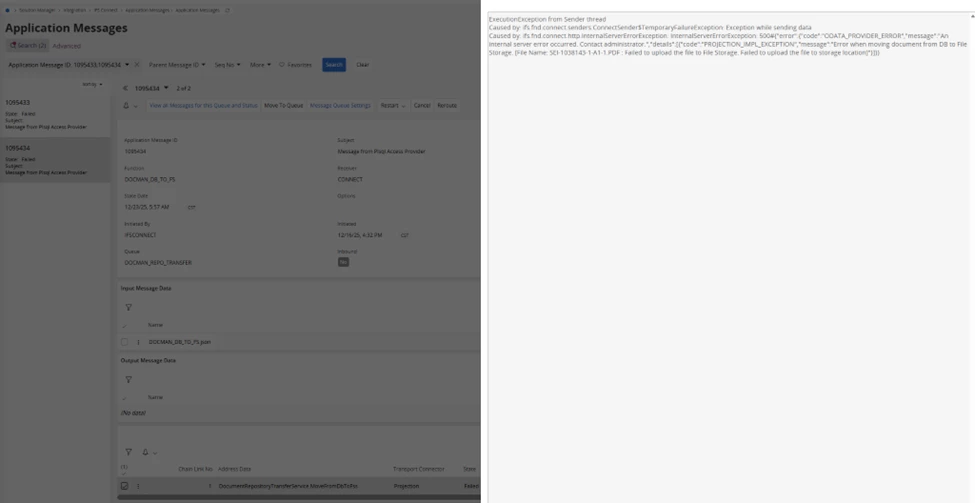
Caused by: ifs.fnd.connect.http.InternalServerErrorException: InternalServerErrorException: 500#{"error":{"code":"ODATA_PROVIDER_ERROR","message":"An internal server error occurred. Contact administrator.","details":[{"code":"PROJECTION_IMPL_EXCEPTION","message":"Error when moving document from DB to File Storage. [File Name: SEI-1038143-1-A1-1.PDF : Failed to upload the file to File Storage. Failed to upload the file to storage location]"}]}}  


Dumeesha Wanigarathna
Superhero (Partner)
Forum|alt.badge.img+16

Hi ​@mumoin ,

So far I haven’t done anything to solve the error. I got to know that wahelk didn’t get the error when she run in PROD. I also still only executed in UAT.


Dumeesha Wanigarathna
Superhero (Partner)
Forum|alt.badge.img+16

Hi,

I found a knowledge article about this error.IFS Product - File Storage Transfer Failure Due to Internal Server Error


Forum|alt.badge.img+4
  • Do Gooder (Employee)
  • January 15, 2026

hi ​@Dumeesha Wanigarathna 

Thank you for sharing the KBA. However, the error message in that KBA is different from the one I’m encountering.


Thanks,

Muntaj


Forum|alt.badge.img+2

Hi Dumeesha,


I did document transfer in CFG for a customer only for doc class > INVOICE  documents which has 175,000. This took close to 3 days finishing the application messages there.

I can see all transferred  except 49 failed application messages . Error  was a below. I couldnt investigate it further to find the cause.


 ExecutionException from Sender thread

Caused by: ifs.fnd.connect.senders.ConnectSender$TemporaryFailureException: Exception while sending data

Caused by: ifs.fnd.connect.http.InternalServerErrorException: InternalServerErrorException: 500#{"error":{"code":"ODATA_PROVIDER_ERROR","message":"An internal server error occurred. Contact administrator.","details":[{"code":"PROJECTION_IMPL_EXCEPTION","message":"Error when moving document from DB to File Storage. [File Name: INVOICE-17309577-1-A1-1.PDF : Failed to upload the file to File Storage. Failed to upload the file to storage location]"}]}}

Best regards,
Wasana

Hi ​@wahelk ​@Dumeesha Wanigarathna 

The error mentioned typically occurs when the data exists in Azure Blob Storage, but the transfer to FSS has not been completed successfully, while the document reference still remains in the database. This indicates that the file was never fully registered in FSS.

As a workaround, the affected Azure blob can be manually removed while keeping the database reference, after which the transfer completes successfully.

Similar issues have already been reported by a few customers and are being looked into.


Amila Samarasinghe
Superhero (Partner)
Forum|alt.badge.img+14

Hi ​@Dumeesha Wanigarathna 

Thank you for raising this issue here. I was encountering the exact same scenario you have mentioned in the post. The issue first came as EInvoices are not saving in FS even though there are no error messages in the application message. 

Then I tried the transfer document assistant and that also gave the same result. No error message in the background job or application message but the repository is now changed in edm_file_tab but there is no record in fss_file_tab, meaning there is no way to view the file from the application other than doing a data repair to fix the repository from the DB table.

When I check the file storage pod logs, I could see below errors.

message":"File ID - INVOICE-1010173-1-00-1.PDF, Bucket - docman does not exist.","ecs.version":"1.12.1"

error.type":"com.ifsworld.storage.service.exceptions.FssResourceNotFoundException","error.message":"File not found","message":"Error occurred while downloading the file.","ecs.version":"1.12.1"
 

After your hint, I have connected a person to IFSAPP and the issue was resolved. But in my opinion this is a serious issue since by default there is no person connected to IFSAPP and to make matters worse, the errors are silent, giving the impression to user that everything went ok.

My customer is using 24R2 so I am not sure if the things are better in latest versions. I know in the past IFS RND fixed lot of silent and common errors raised in FS and if this is still not fixed, I think they should fix this too as this could cause serious issues.


Dumeesha Wanigarathna
Superhero (Partner)
Forum|alt.badge.img+16

Hi ​@Amila Samarasinghe ,

Yes. There is no place in IFS documentation mentioned about that EInvoice functionality require IFSAPP - Person connection. That requirement is there for Transfer documents. But this IFS E Invoice use same logic for document transfer. So if a customer do not do document transfer and just activate EInvoice then they face this situation. I have mentioned that to IFS and I am not aware that they have updated the IFS documentation about that.


Furthermore recently I noted that EInvoice Resending is not working with FSS. My customer is IFS managed cloud. IFS support was able to recreate this in 25 R1 SU9 as well.

You try sending customer invoice via EInvoice when FSS is activated. Everything work fine. Background job and application messages work perfect.

But then try Resend the customer invoice. This will be a practical scenario. Then notice that application messaged failed like below.You will get multiple fail messages if you have other attachments as well.


Then go to the customer invoice and check the customer invoice PDF attachment. You will note that new revision created and attached. That new revision sending to FSS is failing. Now you cannot view the Invoice PDF attachment anymore in customer invoice. 

The reason is EDM_FILE_TAB change the file location as new FSS location. But actual file transfer not happened. 

This problem I raised to IFS via support ticket and IFS RND informed me that above particular logic is intentionally introduced to cover a specific scenario. However as I suspected this cause the Resend Customer invoice problem.

Still the IFS ticket ongoing and luckily we found this just few hours before activating FSS.

I am curious that how other customers work with this problem. Don’t they resend invoice. In our case customer invoice is main part of docman functionality and resending is something frequent. 

Appreciate if you can check this in your customer environment as well and raise to IFS.