
Solved

Preview PDF files with Digital Signature

  • Apr 21, 2023 6:09 AM UTC
  • 4 replies
  • 224 views

Forum|alt.badge.img+3
  • Do Gooder (Customer)

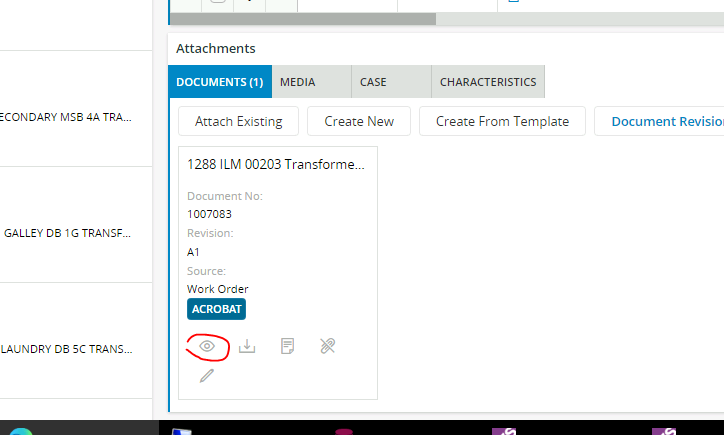
When i view a PDF in Aurena using the eye icon, the digital signatures in the pdf are not visible.  I can see then when i download and open the file.


Is this an Aurena limitation or a browser problem?
 

Best answer by Mathias Dahl

Yes, you need to download and open with an application on your PC. This can be fully automated by telling your web browser to always open downloaded PDF files automatically and you don't even need the Aurena Agent to do it.

Good luck!


View original

4 replies

Mathias Dahl
Superhero (Employee)
Forum|alt.badge.img+33
  • Superhero (Employee)
  • Apr 24, 2023 6:46 PM UTC

Most likely a limitation of the built-in PDF viewer used. If I were to guess, it's not something that can be easily added. You need to rely on an external viewer for viewing the signatures.


Forum|alt.badge.img+3
  • Author
  • Do Gooder (Customer)
  • Apr 28, 2023 1:21 AM UTC

@Mathias Dahl  Thanks a lot for the answer.  I hope there is no way that we configure to use an external viewer within Aurena to preview?    I assume you meant to download it and view?


Mathias Dahl
Superhero (Employee)
Forum|alt.badge.img+33
  • Superhero (Employee)
  • Answer
  • Apr 28, 2023 4:56 AM UTC

Yes, you need to download and open with an application on your PC. This can be fully automated by telling your web browser to always open downloaded PDF files automatically and you don't even need the Aurena Agent to do it.

Good luck!


Forum|alt.badge.img+3
  • Author
  • Do Gooder (Customer)
  • Apr 28, 2023 4:58 AM UTC

@Mathias Dahl  Thanks a lot for the confirmation!