Question

Object Connection Transformation

  • May 12, 2026
  • 4 replies
  • 33 views

Forum|alt.badge.img+4

We are trying to set up an object connection transformation from the Multi-Company Customer Invoices Analysis screen to the Customer Invoice screen.

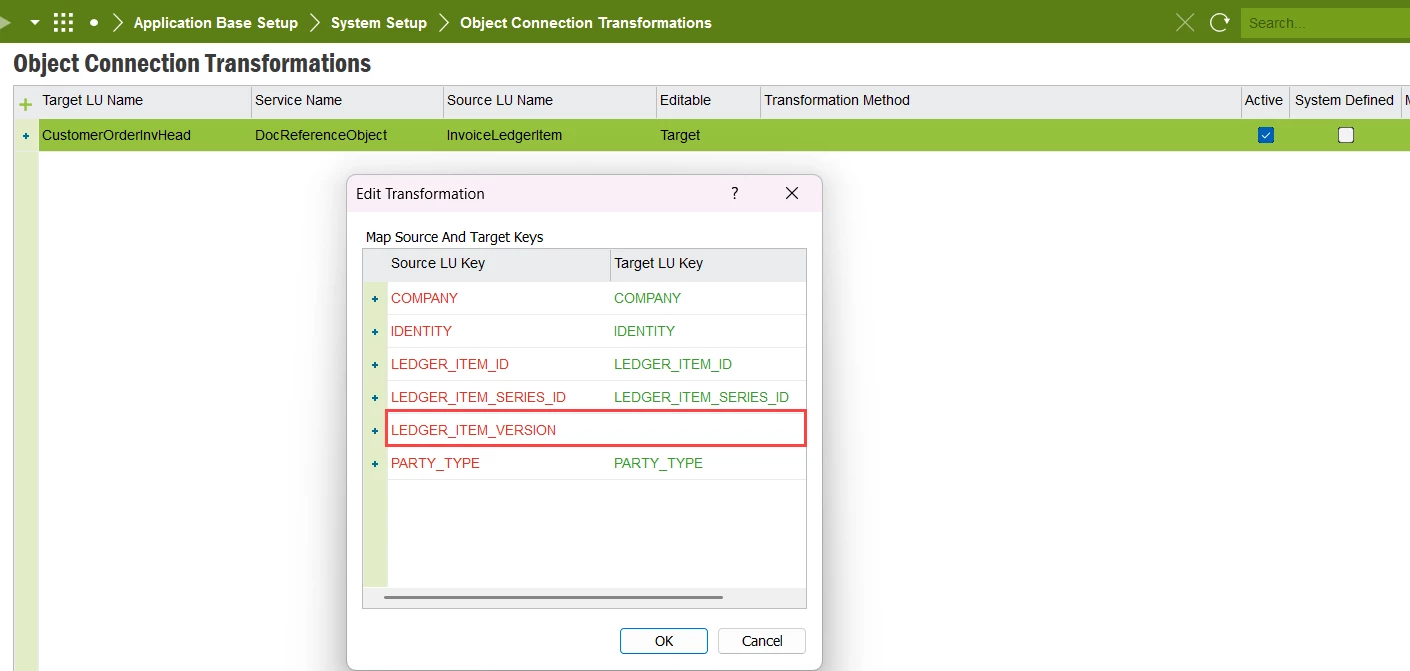
We have configured the following using the standard transformation method.  However, this doesn’t seem to work.

Does anybody have any ideas on how to make this work?

Thanks,

Monique

4 replies

matt.watters
Ultimate Hero (Partner)
Forum|alt.badge.img+26
  • Ultimate Hero (Partner)
  • May 12, 2026

@boomonidamo In Apps10 I attempted the same transformation, but my method looks like this, where the Target LU does not contain the LEDGER_ITEM_VERSION key, so some programming work would be required here.


Forum|alt.badge.img+4
  • Author
  • Do Gooder (Customer)
  • May 13, 2026

Thanks, Matt.  When I click on Edit Transformations in Apps10, the only available Source LU Keys are: Company, Invoice_ID and Party_Type.  How were you able to add the other fields as source keys?  Or was that done with programming as well?

Thanks, 

Monique


matt.watters
Ultimate Hero (Partner)
Forum|alt.badge.img+26
  • Ultimate Hero (Partner)
  • May 13, 2026

@boomonidamo after entering the Source and Target LUs, I right-clicked ‘Edit Transformation’ and that was the dialog that appeared. I did nothing custom, this was the standard list of keys. This was in an Apps10 Upd15 world.


Forum|alt.badge.img+4
  • Author
  • Do Gooder (Customer)
  • May 14, 2026

Thanks, Matt.  That’s interesting.  We are on Apps10 Upd22 and it seems the list of standard keys are different.  I will follow up with IFS directly.

Appreciate the help.

Regards,

Monique