Question

Object Access to Documentation attached to Work Tasks and other objects

  • Nov 6, 2026 12:14 PM UTC
  • 5 replies
  • 30 views

Forum|alt.badge.img+1

Hi! I am having an issue where users that need to access documents attached to a Work Task (JtTask) cannot do so when only Object Access is enabled. I always have to give them person or group access to resolve the issue.

The Object Access is working when authorizing invoices through ManSuppInvoice, so I believe the functionality is working but that me and my colleagues are doing something wrong or not aware what is truly required to enable a specifc user to access a document through Work Task object Access. 

Is there any guideline or documentation that could help me understand what role or access to an object like JtTask (and describing preferably more objects) is needed to grant a user access to the attached documents, provided object access is enabled? I have so far not found an answer to this conundrum and the workarounds I have been utilizing aren’t gonna help long term.


5 replies

matt.watters
Ultimate Hero (Partner)
Forum|alt.badge.img+26
  • Ultimate Hero (Partner)
  • Nov 6, 2026 12:32 PM UTC

​@sestojans You can read about Document Access here. The section on Object Controlled Access will help your situation.

https://docs.ifs.com/ifsclouddocs/26r2/?openpage=https://docs.ifs.com/ifsclouddocs/26r2/CreateAndMaintainDocument/AboutDocumentAccess.htm

Without more detail, I think the lack of access through the object may be related to this from the documentation:

“The concept works like this: when the necessary configuration is in place, and when a document is connected to a certain kind of object, a new access line will be added to the document's access definition. If the user making the connection is an administrator of the connected document, the initial access level on the new access line will be given by the configuration in Document Basic/Default Object Access Levels. If the user is not an administrator of the document, then no access will be given through the new access line that is added (all Enabled options are cleared). An administrator of the document can later update these levels on the document itself, making the access higher or lower or clearing it completely. The document might have other access definition lines however, that grants access to persons or groups of persons.”

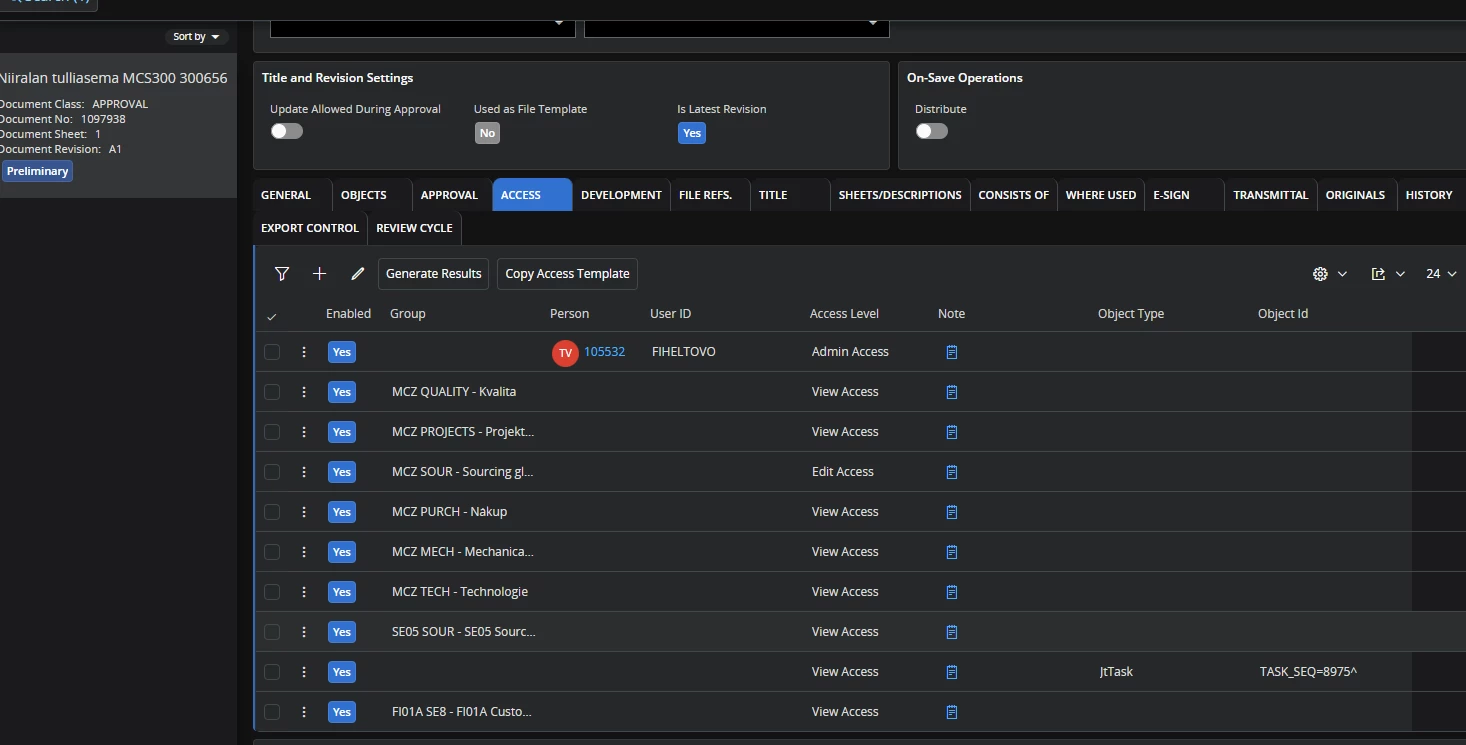
What is shown on the Access tab for a document connected to a Work Task? There should be a line for JtTask with some level of access defined (View, Edit, Admin). If not, make sure the administrator of the document makes the connection to the Work Task and then check the Access tab again.


Forum|alt.badge.img+1
  • Author
  • Do Gooder (Customer)
  • Nov 6, 2026 12:46 PM UTC

​@matt.watters What details would help in understanding the problem?

I have read the documentation you are referring to multiple times to try and find something I’m missing and checked the Access tab on every revision where the issue has been in play. Each time I have confirmed that Document Revision has been attached by a user with Admin has attached the document and an access line reflecting the object in question and specifying View Access as intended.

The one thing that I can’t be sure we are doing right is what access our users actually are entitled to according to this part from the same documentation: 

Actual access given from an object

The maximum available document access derived from the object, for a certain document, will be set from the Definition tab. This means that, regardless of what level the object tries to grant the document, from the defined API method, the access level set on the access line on the document will set the maximum limit. For example, if the access granted from the object side is Admin, but the object access line on the document only has View selected, the resulting access from that line will never be higher than View. If the object access line on the document is instead set to grant Admin access, the object can grant this too, if needed. However, if the object does not grant as high access as the access line defines, the user will only get as high access as the object grants. This way, the document administrator always have control over the access, since he can control the access definition.

The following table shows the actual, resulting access for the user, given the access that the object grants (via the API method defined in basic data) and the access defined on the access line itself:

  View Access (from Object) Edit Access (from Object) Admin Access (from Object)
View Access (from access line) View Access View Access View Access
Edit Access (from access line) View Access Edit Access Edit Access
Admin Access (from access line) View Access Edit Access Admin Access


Since I can confirm the existence of the access line and that the admin attached the revision, the mystery is centered solely around what grants “access from the object”. Without understanding that, I cannot discuss with my colleagues what we need to do differently to make this work.


matt.watters
Ultimate Hero (Partner)
Forum|alt.badge.img+26
  • Ultimate Hero (Partner)
  • Nov 6, 2026 1:34 PM UTC

​@sestojans Can you provide screenshots of:

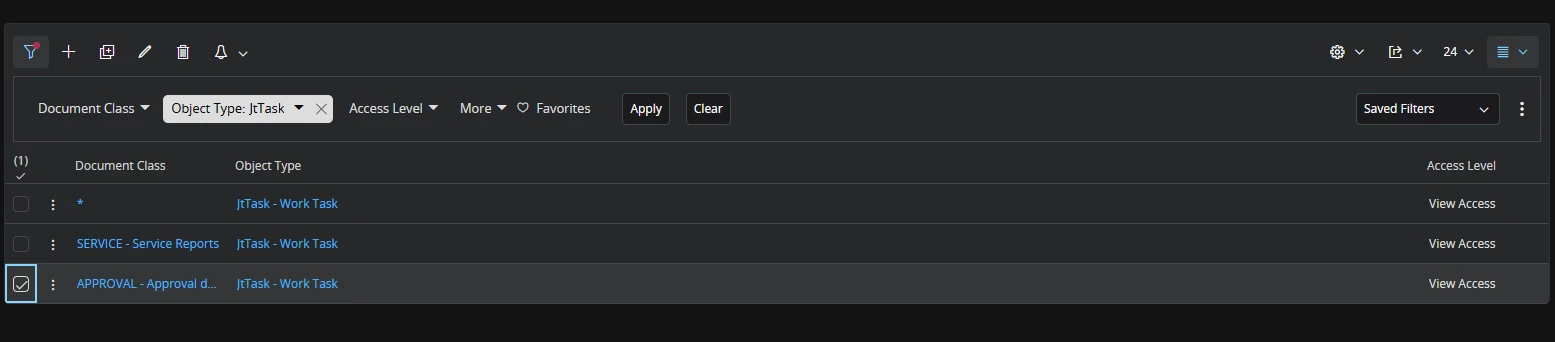
  1. The setup in Default Object Access Levels for JtTask.
  2. The Access tab of a document revision that users cannot access at a Work Task but should be able to.
  3. If the number of records will be small, generate the access results for this document and provide a screenshot of the Access Results.

Forum|alt.badge.img+1
  • Author
  • Do Gooder (Customer)
  • Nov 6, 2026 2:30 PM UTC

​@matt.watters Just to let you know, we are not using B2B IFS Cloud

  1. Tried adding specific classes besides having a class line, didnt work.


  2. To make up for lack of access through the object, we are using person groups. Starting to spiral a bit so either need the object access or rethink:


  3. The list would be a bit long, but the sources are consists of 1 Person, multiple users with System Privilege and even more with Group.

matt.watters
Ultimate Hero (Partner)
Forum|alt.badge.img+26
  • Ultimate Hero (Partner)
  • Nov 6, 2026 3:23 PM UTC

​@sestojans is is possible to temporarily disable the Person Groups in the access tab and regenerate the results? Looking to see if any of the Source Types = Object with the Person Groups removed.