Solved

How to display the technical drawing in the shop floor workbench

  • Apr 17, 2023 10:30 AM UTC
  • 3 replies
  • 309 views

Forum|alt.badge.img+11

Hi,


I have a reference to the Technical drawing on my master part, using the “Technical Drawing” field in the main tab.

I would like to display this drawing on the shop floor workbench. If they make this specific part, the drawing should be visible in the workbench. Does anyone know how?

I can make attachments visible using Object connection transformations, but I can’t figure out how to do it for the technical drawing.

The drawing itself is an attachment in the screen “technical drawing”


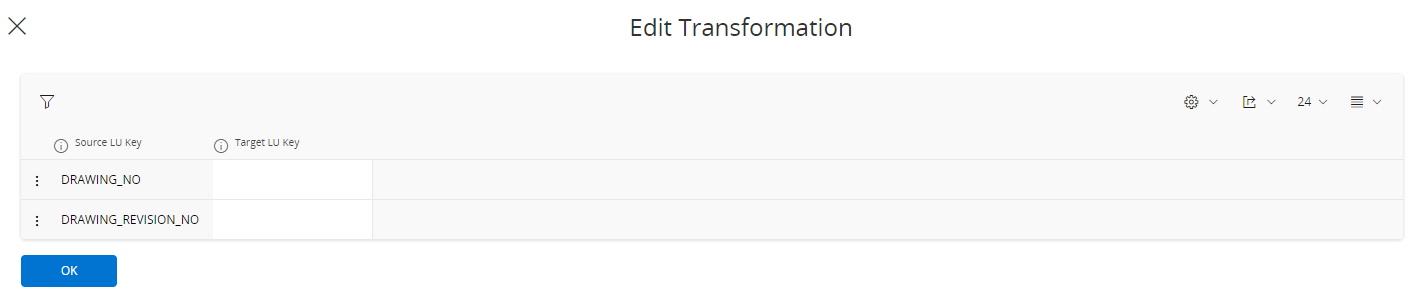
Wouldn’t this one do the trick:

 

Should I add more parameters?
 

Best answer by MikeCH

Hi,

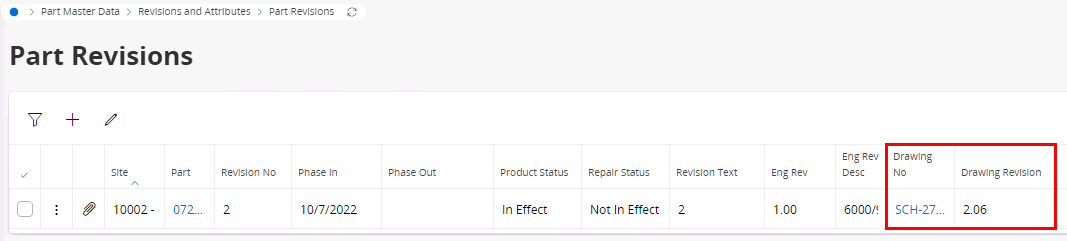
Everything is correct with the object connections. The connection between ShopOrd / PartRevision is relevant. The missing puzzle will probably be that the Drawing No and Drawing Revision are not present here in the partrevisions: 

These are entered automatically if these data were previously stored in the engineering part revision during engineering part transfer. Otherwise, they must be assigned here manually.


Best regards,
Mike

View original

3 replies

MikeCH
Superhero (Employee)
Forum|alt.badge.img+13
  • Superhero (Employee)
  • Answer
  • Apr 17, 2023 12:40 PM UTC

Hi,

Everything is correct with the object connections. The connection between ShopOrd / PartRevision is relevant. The missing puzzle will probably be that the Drawing No and Drawing Revision are not present here in the partrevisions: 

These are entered automatically if these data were previously stored in the engineering part revision during engineering part transfer. Otherwise, they must be assigned here manually.


Best regards,
Mike


Forum|alt.badge.img+11
  • Author
  • Sidekick (Partner)
  • Apr 17, 2023 12:53 PM UTC

Revision was nog filled in. Thank you, works indeed!


MikeCH
Superhero (Employee)
Forum|alt.badge.img+13
  • Superhero (Employee)
  • Apr 17, 2023 1:14 PM UTC

Perfect. Please close the question as answered. Thanks.