Question

File Sizes of Uploaded Files - Doc Man

  • Jul 15, 2025 7:30 PM UTC
  • 6 replies
  • 188 views

dfsjmarchant
Sidekick (Customer)
Forum|alt.badge.img+8

How do we determine the file size of documents that have been uploaded into Cloud?

We are using the DocMan module, and the Document Revisions. But I can't see an easy way to determine the size of files uploaded.


6 replies

Forum|alt.badge.img+10
  • Hero (Employee)
  • Jul 16, 2025 7:56 AM UTC

​@dfsjmarchant before you upload a file from  your local pc or when download a file to your pc you will have an idea about the file size. Currently, in the client there is no possibility to view the file size. For our knowledge, can you elaborate what your requirement is? Is it individual file size of each document revision or Bulk file size utilized in a certain file repository? If so why?


dfsjmarchant
Sidekick (Customer)
Forum|alt.badge.img+8
  • Author
  • Sidekick (Customer)
  • Jul 16, 2025 7:13 PM UTC

Hello,

We are trying to get an understanding on the volume of data we will be storing in IFS each year from given sites. We know that we upload ‘x’ number of documents per turbine per site, each document is, e.g. 1MB, and then we know that we’ll attach a number of photos too. 

This way we can gauge our future storage requirements, and also, bandwidth requirements for our mobile data plans, as we have to download a lot of this data from/to mobile devices. 

I hope this makes sense, to me, it feels like it’s just a core requirement of a document management system to show the size of the files stored. 

Kind Regards,

James


Mathias Dahl
Superhero (Employee)
Forum|alt.badge.img+33
  • Superhero (Employee)
  • Jul 30, 2025 9:55 PM UTC

If you keep the files in the database it's not hard to get the sizes using an SQL query (in a lobby or quick report). If they are on your own hardware, you can check there. If they are in our managed cloud, in cloud storage, it's harder and you need to contact Cloud Services to get help with that.


MikeCH
Superhero (Employee)
Forum|alt.badge.img+13
  • Superhero (Employee)
  • Sep 11, 2026 9:06 AM UTC

If you keep the files in the database it's not hard to get the sizes using an SQL query (in a lobby or quick report). If they are on your own hardware, you can check there. If they are in our managed cloud, in cloud storage, it's harder and you need to contact Cloud Services to get help with that.

Hi,

I tried to retrieve the file size from the database using a quick report in 25R2. However, there was no field showing this file size. Does anyone have an example of how I can retrieve the file size using the quick report? Many thanks.


Mathias Dahl
Superhero (Employee)
Forum|alt.badge.img+33
  • Superhero (Employee)
  • Sep 14, 2026 8:40 PM UTC

If you keep the files in the database it's not hard to get the sizes using an SQL query (in a lobby or quick report). If they are on your own hardware, you can check there. If they are in our managed cloud, in cloud storage, it's harder and you need to contact Cloud Services to get help with that.

Hi,

I tried to retrieve the file size from the database using a quick report in 25R2. However, there was no field showing this file size. Does anyone have an example of how I can retrieve the file size using the quick report? Many thanks.

Try calling DBMS_LOB.getlength on the FILE_DATA column. 


MikeCH
Superhero (Employee)
Forum|alt.badge.img+13
  • Superhero (Employee)
  • Sep 16, 2026 7:20 AM UTC

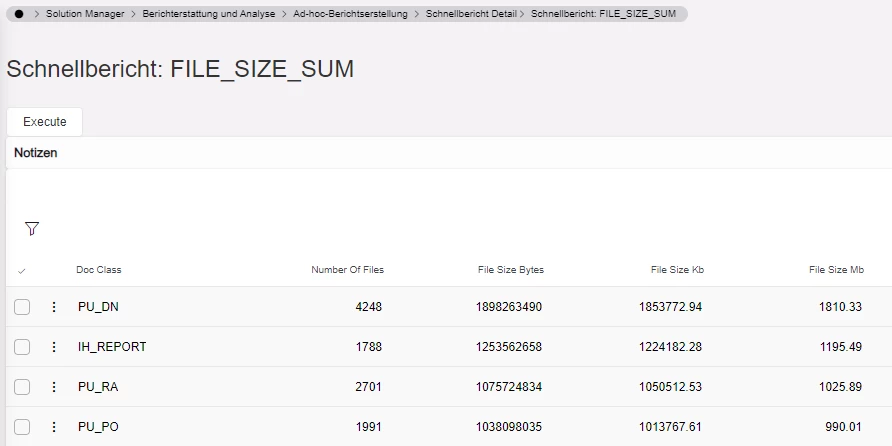
Here is the result in response to Mathias’s answer:

FILE_SIZE_SUM

SELECT

    DOC_CLASS,

    COUNT(*) AS NUMBER_OF_FILES,

    SUM(DBMS_LOB.GETLENGTH(FILE_DATA)) AS FILE_SIZE_BYTES,

    ROUND(SUM(DBMS_LOB.GETLENGTH(FILE_DATA)) / 1024, 2) AS FILE_SIZE_KB,

    ROUND(SUM(DBMS_LOB.GETLENGTH(FILE_DATA)) / 1024 / 1024, 2) AS FILE_SIZE_MB


FROM EDM_FILE_STORAGE


GROUP BY

    DOC_CLASS


ORDER BY

     FILE_SIZE_BYTES DESC


FILE_SIZE

SELECT

    DOC_CLASS,

    DOC_NO,

    DOC_SHEET,

    DOC_REV,


    DBMS_LOB.GETLENGTH(FILE_DATA) AS FILE_SIZE_BYTES,

    ROUND(DBMS_LOB.GETLENGTH(FILE_DATA) / 1024, 2) AS FILE_SIZE_KB,

    ROUND(DBMS_LOB.GETLENGTH(FILE_DATA) / 1024 / 1024, 2) AS FILE_SIZE_MB


FROM EDM_FILE_STORAGE


ORDER BY

     FILE_SIZE_BYTES DESC