Question

Document Access Template not working in IFS

  • March 27, 2026
  • 4 replies
  • 67 views

Forum|alt.badge.img+1

I have provided access to view documents of particular document class in IFS. Still users are able to attach the document in IFS for that document class.

4 replies

Forum|alt.badge.img+7
  • Do Gooder (Partner)
  • March 27, 2026

Hi ​@Agent007 ,

 In IFS Applications 10, this behavior is expected because document class access alone does not control attachment rights.

Even if you give users only view access to a document class, they can still attach documents if they have permission to use Doc Reference / Document Management functions.

In IFS 10, please check the following:

1️⃣ Permission Set → Document Management

  • Go to: Solution Manager → Security → Permission Sets

  • Check if the user has:

    • INSERT / UPDATE access on Document or Doc Reference related LU’s

2️⃣ Doc Reference Object

  • Attachments are controlled via Doc Reference (DOC_REFERENCE_OBJECT / DOC_REFERENCE)

  • If users have access here, they can still attach documents regardless of document class restriction

3️⃣ Document Class Setup

  • Document class mainly controls:

    • Structure / numbering / default values

    • It does NOT restrict attach action by itself

4️⃣ Grant Structure

  • Check if access is coming from:

    • Another permission set

    • A broader role (common issue)

✔️ Solution:

  • Remove INSERT permission from:

    • DOCUMENT

    • DOC_REFERENCE_OBJECT / DOC_REFERENCE

  • Keep only SELECT (view) access if required

 Key point:
Controlling document class ≠ controlling attach functionality in IFS 10.
Attachment is governed by Doc Reference permissions, not just document class access.

Hope this helps 👍


Forum|alt.badge.img+10
  • Hero (Employee)
  • March 27, 2026

@Agent007 In Document Class Management\Persons and Groups, include the persons or persons groups who should have access to create document from using a particular document class. If there is at least one record in this tab then only those users are allowed create documents from that class. if empty all users will be able to do so.


MikeCH
Hero (Employee)
Forum|alt.badge.img+13
  • Hero (Employee)
  • March 27, 2026

Hi ​@Agent007,

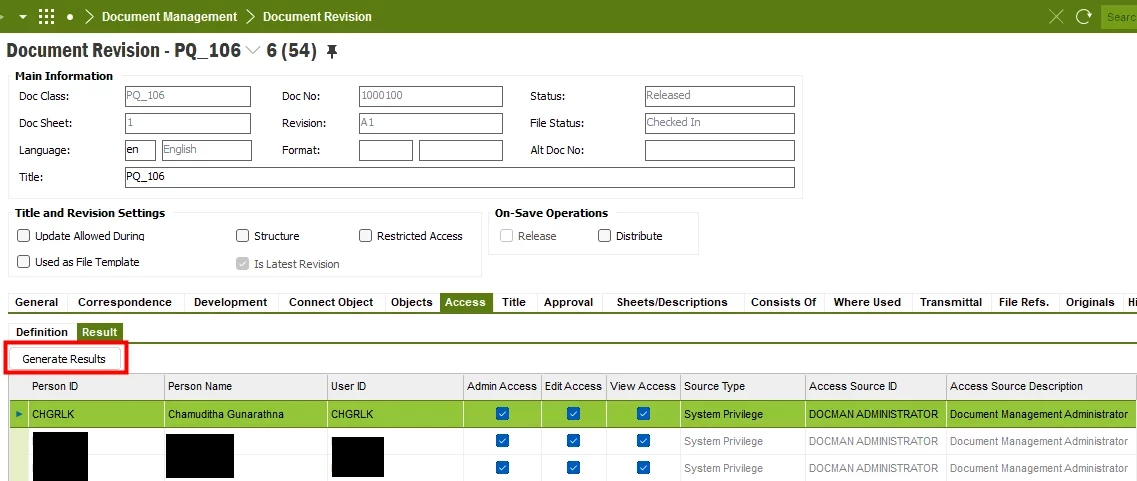
Here you can always check where a person’s access rights to a document come from:


Forum|alt.badge.img+10
  • Hero (Employee)
  • March 27, 2026

@Agent007 Additionally by setting view access on document access template it will only have an effect on the new documents created after this change, where those users will be granted with view access to the new documents. it will not restrict which users are allowed create documents using that class.