Question

Render obsololete Sales Parts unselectable

  • July 24, 2026
  • 2 replies
  • 15 views

When a Sales Part is inactive (and its Sales Base Price is closed), IFS still allows it to be added to a Sales Quotation after displaying only a warning, whereas the same part is blocked on a Customer Order.

Is this the standard IFS behaviour? Is there any standard configuration or recommended approach to completely prevent inactive/obsolete Sales Parts from being added to new Sales Quotations, or would this require a customization?
Product Version: 23.2.17
Business Impact: When a Sales Part is obsolete, it is still possible to select it within a Sales Quotation albeit with a warning message (this is not the case with Customer orders). The warning message is easy to miss so we would like to find a solution that prevents the part from being selected altogether.

2 replies

Abdul
Superhero (Partner)
Forum|alt.badge.img+20
  • Superhero (Partner)
  • July 24, 2026

Hi ​@Ravi Van Roy,

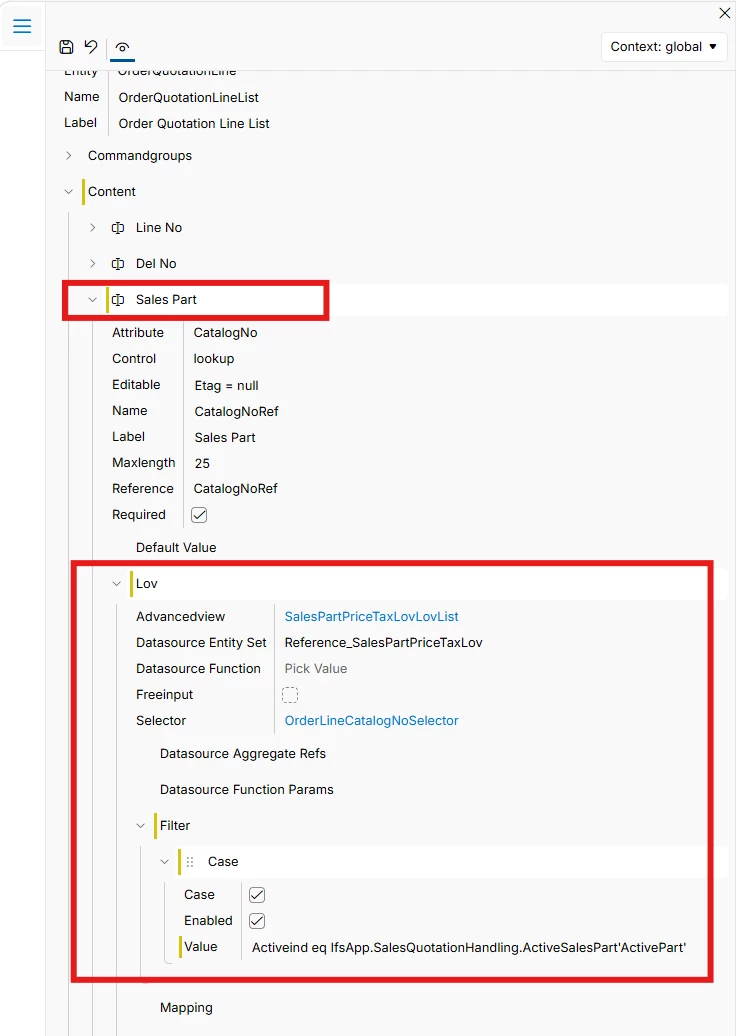
You can filter out non-active Sales Parts from selection using Page Designer. 

Please refer to the screenshot below.


Filter value - Activeind eq IfsApp.SalesQuotationHandling.ActiveSalesPart'ActivePart'


Hope this helps.


Forum|alt.badge.img+8

Hi ​@Ravi Van Roy,

I believe this is the intended behavior in IFS Cloud. Sales Quotations allow inactive Sales Parts to be selected with a warning because quotations are considered pre-sales records and may reference parts that are no longer actively sold.

However, Customer Orders represent actual fulfillment transactions, and therefore IFS blocks inactive Sales Parts from being added to ensure that obsolete products cannot be processed through the order flow.

In previous cases as well, it has been emphasized that, a sales part can be made 'inactive' either for a shorter period, longer period or permanently based on the customer requirements. If a sales part is in 'inactive' status, no transactions can be performed for the part like customer order line creation.

Best Regards,

Uvina Jayamaha.