



Answer

Pick List not showing Delivery Address on the printout

  • April 21, 2021
  • 11 replies
  • 248 views

Asela Munasinghe
Superhero (Customer)
Forum|alt.badge.img+23

When I print the Consolidated Picklist from the Shipment for one customer only, this issue occurs on the printout on the place usually the delivery Address is displayed. 
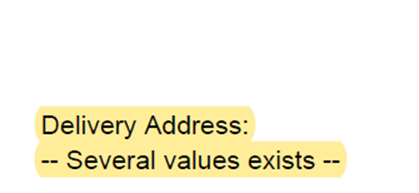


However when I check the Customer record, ‘Delivery’ has been ticked for one address ID only. How come I get this error?


Best answer by Thilini Aluthweediya

Hi,

You may check the customer order line address and the shipment receiver address too.

This can be due to having multiple values in both places.

Cheers,

Thilini

This topic has been closed for replies.

11 replies

Thilini Aluthweediya
Hero (Employee)
Forum|alt.badge.img+6

Hi,

You may check the customer order line address and the shipment receiver address too.

This can be due to having multiple values in both places.

Cheers,

Thilini


Asela Munasinghe
Superhero (Customer)
Forum|alt.badge.img+23
  • Author
  • Superhero (Customer)
  • April 22, 2021

Hi,

You may check the customer order line address and the shipment receiver address too.

This can be due to having multiple values in both places.

Cheers,

Thilini

Hi Thilini, thanks for the reply. All CO lines and the header has address id ‘11’. Shipment Receiver Address has the id ‘99’. So 99 should be the one to be printed right? It does not happen. When I try to recreate in the IFS testing environment, 99 is printed on the consolidated pick list. So it seems this is not recreatable. :(


Thilini Aluthweediya
Hero (Employee)
Forum|alt.badge.img+6

Hi,

Is there any shipment receiver address name in both examples?

/Thilini


Asela Munasinghe
Superhero (Customer)
Forum|alt.badge.img+23
  • Author
  • Superhero (Customer)
  • April 22, 2021

Hi,

Is there any shipment receiver address name in both examples?

/Thilini


Yes Thilini


Vimukthi Mahakumbura
Superhero (Customer)
Forum|alt.badge.img+19

When I print the Consolidated Picklist from the Shipment for one customer only, this issue occurs on the printout on the place usually the delivery Address is displayed. 


However when I check the Customer record, ‘Delivery’ has been ticked for one address ID only. How come I get this error?

Hi,

You created the Consolidated Pick list per Delivery Address right?

Thank you. 


Asela Munasinghe
Superhero (Customer)
Forum|alt.badge.img+23
  • Author
  • Superhero (Customer)
  • April 22, 2021

When I print the Consolidated Picklist from the Shipment for one customer only, this issue occurs on the printout on the place usually the delivery Address is displayed. 


However when I check the Customer record, ‘Delivery’ has been ticked for one address ID only. How come I get this error?

Hi,

You created the Consolidated Pick list per Delivery Address right?

Thank you. 

How do I check that @Vimukthi Mahakumbura ?


Asela Munasinghe
Superhero (Customer)
Forum|alt.badge.img+23
  • Author
  • Superhero (Customer)
  • April 22, 2021

Hi,

Is there any shipment receiver address name in both examples?

/Thilini


Actually no @Thilini Aluthweediya, Address ID 99 which is ticked as the default delivery address in Customer has no Customer name 


Vimukthi Mahakumbura
Superhero (Customer)
Forum|alt.badge.img+19

When I print the Consolidated Picklist from the Shipment for one customer only, this issue occurs on the printout on the place usually the delivery Address is displayed. 


However when I check the Customer record, ‘Delivery’ has been ticked for one address ID only. How come I get this error?

Hi,

You created the Consolidated Pick list per Delivery Address right?

Thank you. 

How do I check that @Vimukthi Mahakumbura ?

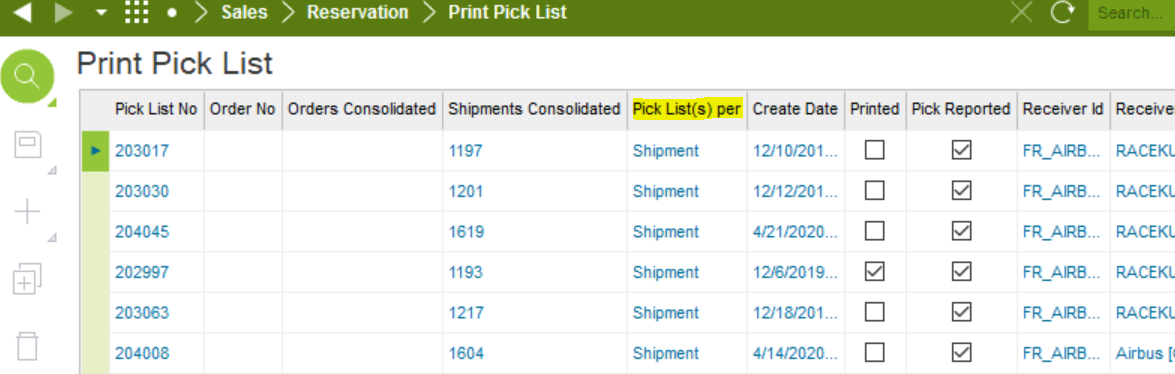
Check the value here,


Asela Munasinghe
Superhero (Customer)
Forum|alt.badge.img+23
  • Author
  • Superhero (Customer)
  • April 22, 2021

When I print the Consolidated Picklist from the Shipment for one customer only, this issue occurs on the printout on the place usually the delivery Address is displayed. 


However when I check the Customer record, ‘Delivery’ has been ticked for one address ID only. How come I get this error?
Hi,

You created the Consolidated Pick list per Delivery Address right?

Thank you. 

How do I check that @Vimukthi Mahakumbura ?

Check the value here,


Thanks Vimukthi, yes its per Shipment


Thilini Aluthweediya
Hero (Employee)
Forum|alt.badge.img+6

Hi EnzoFerrari ,


This should be related to your address setup.

According to the code behind in this report ,this several values exists message will be print when having multiple delivery addresses.

As you are getting this for one customer only ,try to compare the address set up of this record against other customer examples.

Otherwise you may report this from a support case for us to investigate the issue in details.


Cheers,

Thilini


Asela Munasinghe
Superhero (Customer)
Forum|alt.badge.img+23
  • Author
  • Superhero (Customer)
  • April 23, 2021

Hi,

You may check the customer order line address and the shipment receiver address too.

This can be due to having multiple values in both places.

Cheers,

Thilini


Thanks Thilini, this way I was able to reproduce the error. Interesting enough - it occurs only when the CO has multiple lines, not just 1. 


Have a great weekend!