
Question

NEW USER SETUP IN APPS 10

  • Jun 21, 2022 8:13 PM UTC
  • 4 replies
  • 221 views

Forum|alt.badge.img+7

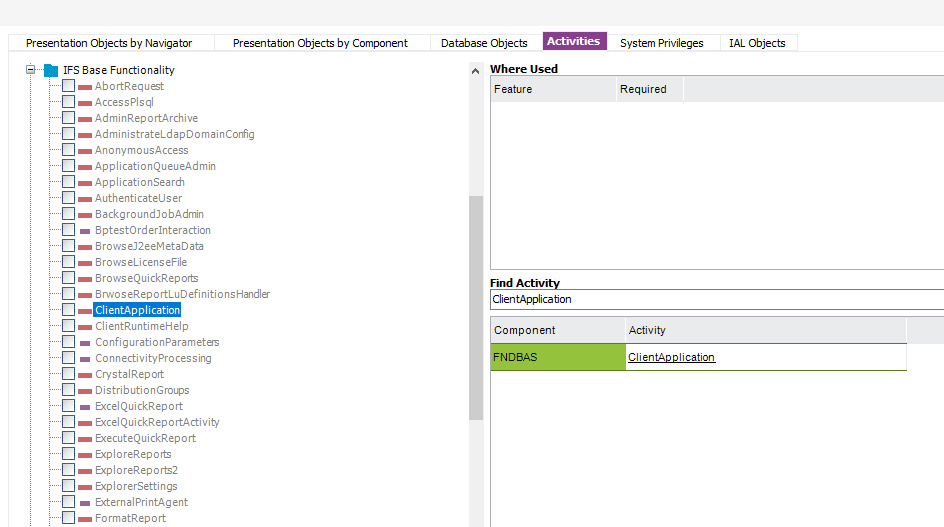
Getting an error after creating a new user :  ifs user XXXXX has not been granted access to activity ClientApplication

4 replies

Forum|alt.badge.img+7
  • Author
  • Do Gooder (Customer)
  • Jun 21, 2022 8:16 PM UTC

i get this when i try to log that new user in to APPS 10


Forum|alt.badge.img+15
  • Jun 21, 2022 10:43 PM UTC

Hi @dlyon6 , 

FND_RUNTIME role needed for a user to logon to IFS Enterprise Explorer.

Make sure the new user has granted a permission set that includes this role.


Forum|alt.badge.img+15
  • Jun 21, 2022 10:58 PM UTC

Apologies, that might not be the problem in your case.


Forum|alt.badge.img+28
  • Superhero (Customer)
  • Jun 22, 2022 12:30 AM UTC

On the Permission Set definition view, there is a tab for Activities

Under Activities, there is an Activity for ClientApplication

RMB on the Activity ClientApplication and view Grantees, this will tell you the Permission Sets that have this activity included.  As mentioned, it should be in the FND_RUNTIME permission set as long as it hasn’t been modified.