Answer

How to align data in field

  • April 4, 2023
  • 6 replies
  • 133 views

Forum|alt.badge.img+6

Hi All,


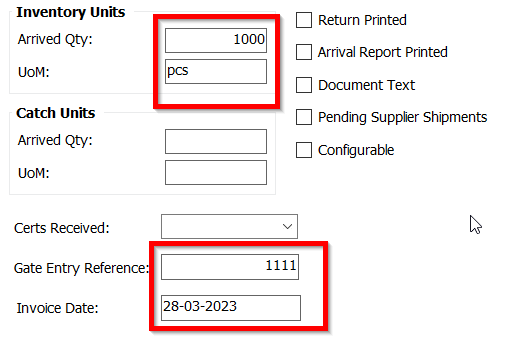
From below image you can see that data is not aligned properly, how can I do that? please help.

Screen name: Procurement > Receipt > Receipt


I need to bring all data either to left or right. But here some are in left and others in right.

issue is in IFS APPS 10.


Best Regards,

Hari

Best answer by pratik.b.shah

It is a standard functionality of IFS and it cannot be modified.

Numeric fields - Right aligned by default

Others / Text fields - Left aligned by default.

6 replies

RakeshChangeshpur
Sidekick (Partner)
Forum|alt.badge.img+10

As far as i am aware, numeric fields would be right aligned and the others left aligned by default , i dont think you can change this behavior 😀


Link
Superhero (Customer)
Forum|alt.badge.img+23
  • Superhero (Customer)
  • April 4, 2023

Hi @Harikrishnangr 

you can’t change it. It is standard. All numbers are aligned to the right. 

Why is that important for you?


Forum|alt.badge.img+8
  • Sidekick (Partner)
  • Answer
  • April 4, 2023

It is a standard functionality of IFS and it cannot be modified.

Numeric fields - Right aligned by default

Others / Text fields - Left aligned by default.


Forum|alt.badge.img+6
  • Author
  • Sidekick (Customer)
  • April 6, 2023

As far as i am aware, numeric fields would be right aligned and the others left aligned by default , i dont think you can change this behavior 😀

Thank you Rakesh


Forum|alt.badge.img+6
  • Author
  • Sidekick (Customer)
  • April 6, 2023

Hi @Harikrishnangr 

you can’t change it. It is standard. All numbers are aligned to the right. 

Why is that important for you?

Thank you Link


Forum|alt.badge.img+6
  • Author
  • Sidekick (Customer)
  • April 6, 2023

It is a standard functionality of IFS and it cannot be modified.

Numeric fields - Right aligned by default

Others / Text fields - Left aligned by default.

Thank you Pratik