Solved

Create PO at Register Arrival w/o prior receipt

  • September 11, 2024
  • 7 replies
  • 168 views

Forum|alt.badge.img+12

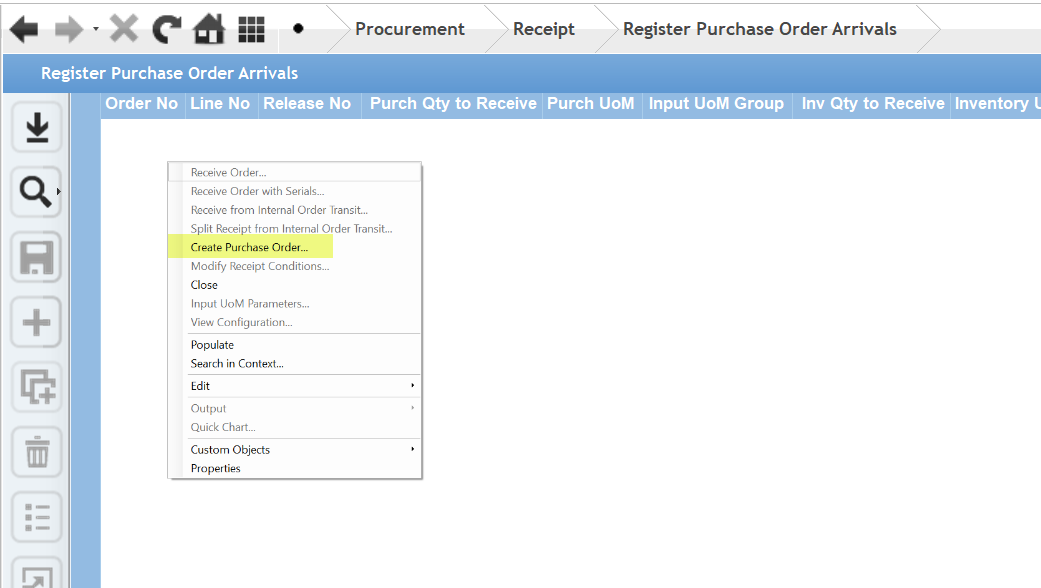
It seems that you need an existing record in the Register Arrivals screen in order to select that line and then use the line-specific commands to Create the PO.  What if you’ve never created a PO for this PN?  In this case, when you search the Register Arrivals screen, there are no records and when there are not records, there is no line to select to enable the command to create PO.


Thank you

Patrick
Best answer by matt.watters

@PIreland I agree it’s quite the conundrum. In EE you could create a PO in a blank Arrivals page, but in Cloud there is no command available in a blank Arrivals page. The ‘you need to have an open PO line to create a PO’ makes zero sense. Seems like a feasible Idea request to reimplement this previous functionality.


7 replies

Chanu_Yazi
Hero (Partner)
Forum|alt.badge.img+12
  • Hero (Partner)
  • September 11, 2024

Hi @PIreland 

I think to use the “Register Arrivals” screen in IFS, you first need to create a Purchase Order (PO). Without a PO for the part number (PN), nothing will show up on the Register Arrivals screen because it depends on the POs that are already in the system.

You can fix it:

    1.    Create a PO: Go to the “Purchase Order” section and make a new PO for the part number (PN). Add the supplier, quantity, delivery date, and any other important details.
    2.    Register Arrivals: Once the PO is created, it will show up in the “Register Arrivals” screen when the goods arrive. Then you can choose the correct line and process the arrival.

By following these steps, you make sure that the PO is in the system, so the Register Arrivals screen can work properly.

Regards

Chanuka

If this response helps you, please mark it as the correct answer, as it will also assist other community members in future. 


Forum|alt.badge.img+12
  • Author
  • Hero (Employee)
  • September 11, 2024

It does help but misses the mark.  I think it is bad functionality to have to create a PO, at least once, and have it sitting there until you have used create receipt at register arrivals after which time, you can delete the oriiginal dummy PO.

Shiouldn’t the user just be able to create a PO and not have to have one that has been previously created?


matt.watters
Ultimate Hero (Partner)
Forum|alt.badge.img+26
  • Ultimate Hero (Partner)
  • Answer
  • September 11, 2024

@PIreland I agree it’s quite the conundrum. In EE you could create a PO in a blank Arrivals page, but in Cloud there is no command available in a blank Arrivals page. The ‘you need to have an open PO line to create a PO’ makes zero sense. Seems like a feasible Idea request to reimplement this previous functionality.


Chanu_Yazi
Hero (Partner)
Forum|alt.badge.img+12
  • Hero (Partner)
  • September 11, 2024

Hi @PIreland 

I understand your concern. It does seem inefficient to have to create a dummy PO and wait until you register arrivals before you can delete it. Ideally, users should be able to create a PO directly and manage supplier-owned stock without needing to go through these additional steps. It would be beneficial if the system could be adjusted to streamline this process, allowing users to handle supplier-owned stock more effectively without the need for unnecessary intermediate steps.

If a response resolves your issue, please use "Best Answer" so that the thread can be closed and others can find solutions more easily.


Regards

Chanuka


matt.watters
Ultimate Hero (Partner)
Forum|alt.badge.img+26
  • Ultimate Hero (Partner)
  • September 12, 2024

There’s no need for a dummy PO. Any open PO line can be used to generate a new Purchase Order for any Supplier for any Part/No Part.

To do in Cloud what was available in EE, it appears the process is.

  1. Populate or search for an open PO line in Register Arrivals.
  2. Select a record, then select Operations>New Purchase Order.
  3. Select any Supplier. Select any purchase part setup for this supplier. Enter a quantity.
  4. When completed, this PO will auto-populate in the Register Arrivals page.

Forum|alt.badge.img+12
  • Author
  • Hero (Employee)
  • September 12, 2024

HI @matt.watters 


Good to know.  Thanks.  Still somewhat of a kluge.


papulk
Do Gooder (Partner)
Forum|alt.badge.img
  • Do Gooder (Partner)
  • June 17, 2026

@PIreland In a scenario where there are no records in the Register Arrivals page (i.e., the user has never created a PO or there is no prior arrival context), this behavior is expected as the available actions are context-dependent.

In such cases, the correct approach is to navigate directly to the Quick Purchase Order Registration assistant and create the PO there. This is the same assistant that is triggered by the New Purchase Order command in the Register Arrivals page when a valid context exists.

@Chanu_Yazi In a typical consignment (supplier-owned stock) scenario in IFS Cloud (where stock is physically held at the customer site but remains supplier-owned until consumption), replenishment may be driven by the supplier in a VMI model. However, this does not necessarily involve creating a purchase order per transaction in IFS.

Instead, when the stock is consumed, ownership is transferred and the corresponding inventory transactions are recorded. At the same time, the financial transactions (often via self-billing, such as an automatically generated supplier invoice) are created based on agreed pricing.