Question

Migration Job Error - Method List

  • May 12, 2026
  • 2 replies
  • 28 views

Forum|alt.badge.img+3

Please advise on how to handle this error.
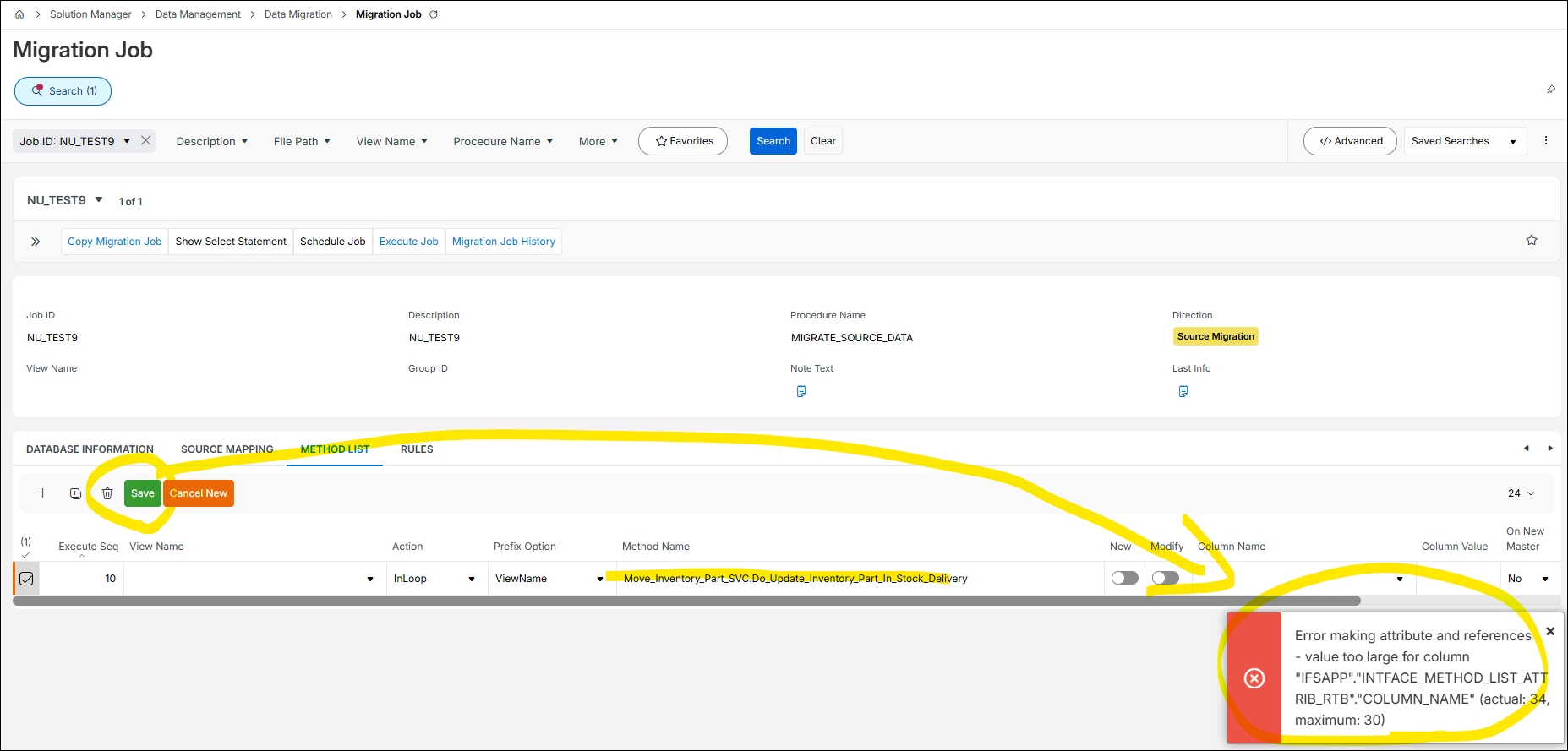
 

I would like to enable inventory part movement using the Migration Job in IFS.
To achieve this, I added Move_Inventory_Part_SVC.Do_Update_Inventory_Part_In_Stock_Delivery to the METHOD LIST tab.
However, when I clicked the Save button, the following error occurred.

Error message:

[Error making attribute and references - value too large for column "IFSAPP"."INTFACE_METHOD_LIST_ATTRIB_RTB"."COLUMN_NAME" (actual: 34, maximum: 30)]




2 replies

FlorianTauber
Hero (Partner)
Forum|alt.badge.img+6

Interesting. It seems like a limitation of the FNDMIG. You won’t be able to use this method. Maybe there is another procedure, usually an API triggered by the SVC..


martin.surasky
Hero (Customer)
Forum|alt.badge.img+10

I agree with ​@FlorianTauber: this is almost certainly an IFS Data Migration/FNDMIG metadata issue. The error is very likely caused by an IFS Migration Job technical limitation. In this case the error message is pretty clear in what’s going on: the column has a maximum length of 30 characters, but one of the generated attribute names is 34 characters long. In other words, when you add:

Move_Inventory_Part_SVC.Do_Update_Inventory_Part_In_Stock_Delivery

IFS tries to generate method attributes/references, but at least one parameter/attribute name from that service method is longer than the migration job metadata table allows

Here are some solutions, although I have to say I have not tested them myself, only ideas for you to think about (in order of how fast they are to implement)


Option 1 — Use a shorter/lower-level API method if available

Look for an older PL/SQL API method behind the projection/service call, something like an Inventory_Part_In_Stock_API method, rather than the long Move_Inventory_Part_SVC service operation.


Option 2 — Wrap the call in a custom PL/SQL procedure

Create a small custom procedure with short parameter names, for example:

Custom_Move_Inv_API.Move_Part(
contract_,
part_no_,
from_loc_,
to_loc_,
qty_
);

Inside that wrapper, call the correct IFS API/service logic.

Then add your wrapper procedure to the Migration Job Method List instead of the long service method.

This avoids the 30-character migration metadata limitation.


Option 3 — Use a custom projection/API or integration instead of Migration Job

For inventory movement, especially if it creates inventory transactions, I would be cautious with Migration Jobs. A custom REST call or integration using the supported IFS business operation may be safer and easier to control.


Hope this helps!