Question

IFS Cloud - Migration Job by Schedule

  • February 16, 2026
  • 3 replies
  • 52 views

Forum|alt.badge.img

The Migration Job has a Schedule function, which I have not used before.
Could someone who is familiar with this function explain to me how to use it and what its benefits are?

Best Regards,

Kanokkan

3 replies

Fikret
Do Gooder (Employee)
Forum|alt.badge.img+3
  • Do Gooder (Employee)
  • February 16, 2026

Hello,


You're actually close to the solution.
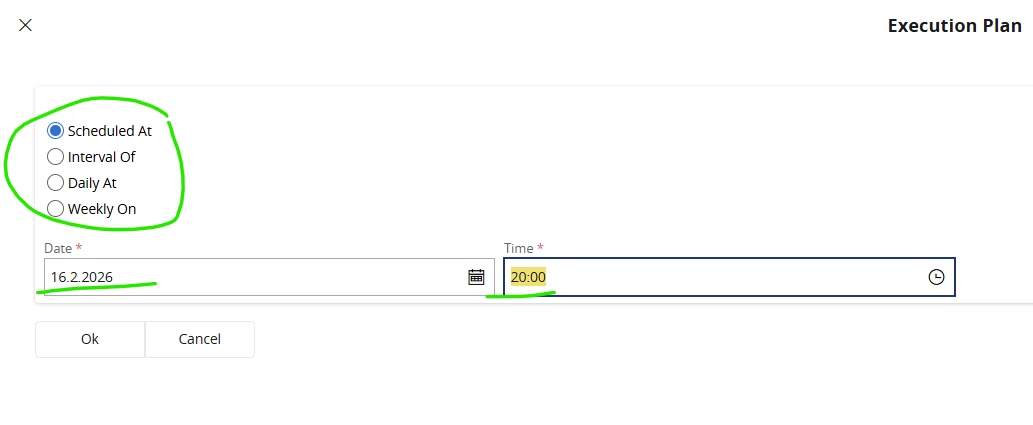
Click on Schedule. Then you have four options.
They are self-explanatory.
In my example, I selected one-time execution. 

Then you enter your desired time.

With the daily and weekly intervals, this repeats itself. That's the benefit. You can predetermine when it should run, and if you have a job that should run once during the night, you can schedule it.

The job will then run in the background, of course.

In general, it doesn't always make sense to automate or schedule every job. If you have any status change jobs or something like that, then it makes sense. There are other cases as well, so it depends on your goal.


Forum|alt.badge.img
  • Author
  • Do Gooder (Partner)
  • February 16, 2026


Hello,
Thank you for the information.
Although I set the daily and weekly intervals, I still need to load the data file beforehand.

Example :

Every day, I would like to update the price. I set daily at 10:00. And then, I have to load new price file in everyday before 10:00, correct?


Fikret
Do Gooder (Employee)
Forum|alt.badge.img+3
  • Do Gooder (Employee)
  • February 16, 2026

That's exactly what I meant. Not all jobs are suitable for scheduling. 
In your case, you would have to do the following:

I assume you have two jobs (create table from file and migrate source data).

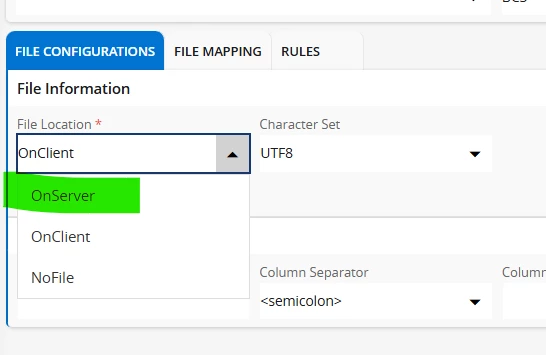
You can automate the second one as normal. The first one, where you import your new file, has to retrieve your export file from the FTP directory. That's the only way you can automate it. 


Nevertheless, you will upload your export files, which change daily, to FTP yourself. 


If this doesn't help you, then please consider whether a “migration job” is what you need.

In general, migration is a one-time thing :)
For daily data updates, there are solutions like “integration (Boomi)”, possibly “workflows”, etc.