Question

Data Migration - Rules: FILEBKP

  • May 14, 2026
  • 4 replies
  • 24 views

Forum|alt.badge.img+2

Hello,

My name is Tomek and we’re starting to implement IFS Cloud 25R1 at my company.

Please check  whether it works for you.

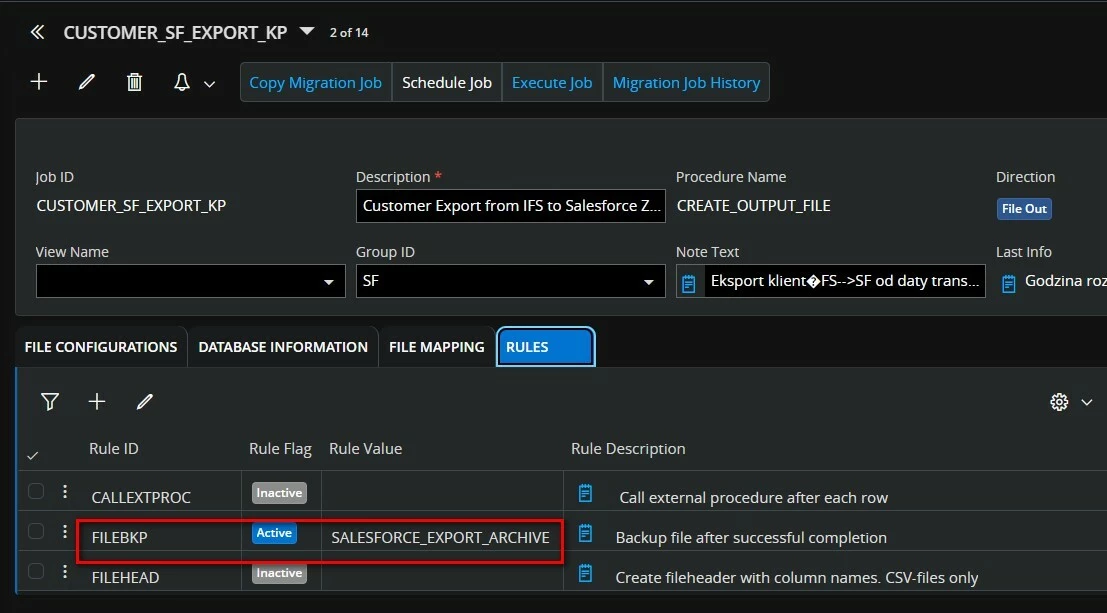
I have a migration task with data export to a file in the OnServer directory. The directory was created in Windows and as an Oracle directory. It also has an archive subdirectory (Windows and Oracle). In the migration task rules, I have the FILEBKP rule active, pointing to the Oracle directory (archive)

After the task is completed, a file named file.txt should be created in the destination directory (and this works), and according to the rule, a backup file named file*.bkp should be created in the Archive directory. However, this file is not being created. FILEBKP is enabled in the Default Rules.

This works very well in IFS8, but not in IFS Cloud.

What could be the cause of this?

Thank you

Tomek



4 replies

Forum|alt.badge.img+9
  • Hero (Customer)
  • May 15, 2026

could you please share the different rules in the datamigration job please?


FILEBKP : If set to Active, a backup will be taken of the original file after the job has finished. The file will be named: <filename><seq.no>.bkp. If the backup file should be stored in a different directory than the original, use the Rule Value column to specify a path. NOTE: The original file will be truncated (on server) or deleted (on client) after the backup is done.
It is recommended to keep the standard rule Inactive, and activate the rule on each job as needed.


Forum|alt.badge.img+2
  • Author
  • Do Gooder (Customer)
  • May 15, 2026

I'm sorry, but I don't understand the question.


Forum|alt.badge.img+9
  • Hero (Customer)
  • May 15, 2026

could you share the tab Rules of the datamigration job please?


Forum|alt.badge.img+2
  • Author
  • Do Gooder (Customer)
  • May 18, 2026

Hi, 

I have attached a screenshot.

The Rule Value points to both the Oracle directory and the Windows directory where the bkp file is to be placed.