


Solved

[Data migration] Migrate the work location

  • Nov 17, 2022 7:28 PM UTC
  • 4 replies
  • 375 views

Forum|alt.badge.img+5

Hello,

I am trying to migrate the work location for the emplyee file. I tried it via template EmployeeWorkLocation, but I didn’t manage. The two-step job works fine, but the field “work location” is empty.

I am using the Cloud version 22R1

I appreciate any help on the subject!

Kind regards,
Aleksandra 
Best answer by MMcK

Hi

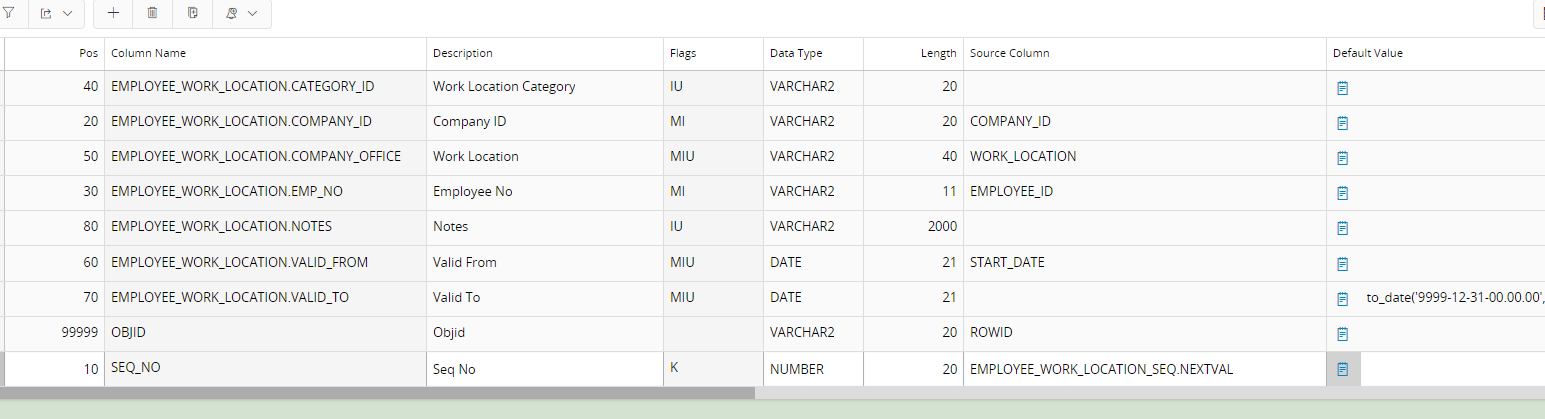
I believe the problem is the fixed value of SEQ_NO in the migration job.  It needs to be set with EMPLOYEE_WORK_LOCATION_SEQ.NEXTVAL


The above job works fine in 21R2, I haven’t tried it in 22R1.

I hope this helps you.

View original

4 replies

Forum|alt.badge.img+10
  • Hero (Partner)
  • Nov 18, 2022 7:04 AM UTC

Hi! In order to better help you, 

could you add some screenshots of your two jobs you created?
Maybe the column is not mapped?

Maybe the modify setting is not set?


so some screenshots of the 2 jobs would be great!  


Forum|alt.badge.img+5
  • Author
  • Do Gooder (Partner)
  • Nov 18, 2022 9:54 AM UTC

Hello,

Yes of course, I attached the screenshots of both jobs, template and IFS screen.

Thank you in advance,

Aleksandra


Forum|alt.badge.img+11
  • Hero (Customer)
  • Answer
  • Nov 18, 2022 10:11 AM UTC

Hi

I believe the problem is the fixed value of SEQ_NO in the migration job.  It needs to be set with EMPLOYEE_WORK_LOCATION_SEQ.NEXTVAL


The above job works fine in 21R2, I haven’t tried it in 22R1.

I hope this helps you.


Forum|alt.badge.img+5
  • Author
  • Do Gooder (Partner)
  • Nov 18, 2022 5:04 PM UTC

Hello,

Indeed, it was the problem with sequence number. Thank you very much!

Aleksandra