Solved

BUSINESS_OPPORTUNITY_API.Write_Note_ error in Mig Job

  • December 13, 2022
  • 9 replies
  • 319 views

Forum|alt.badge.img+4

Hi together,

we are currently in an Upgrade Project to 22R2 and we want to migrate Notes.
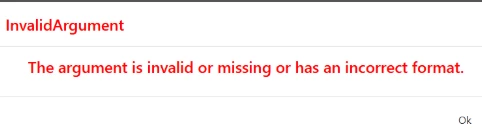
We found the topic Job migration of Business Opportunity - Note issue | IFS Community but when we enter the method BUSINESS_OPPORTUNITY_API.Write_Note_ in the Method List of the Mig Job we get the following error.
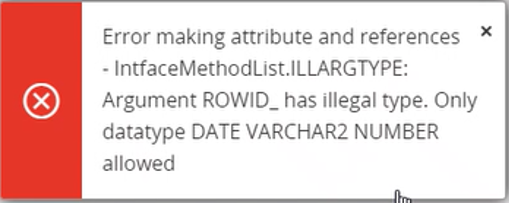
 

So we checked the API in PL/SQL Developer and saw that the datatype for rowid_ is ROWID. This seems wrong.
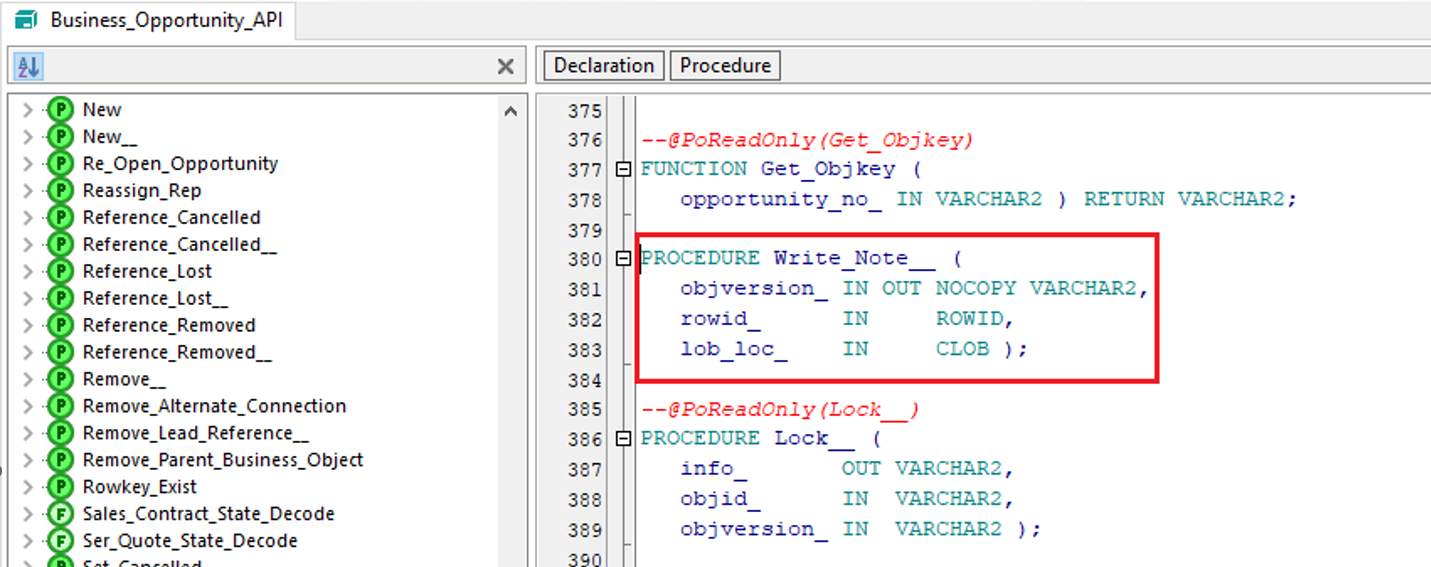

Does anybody have the same issue? Do you know how to fix that error?
Thanks in Advance for any help!

Best regards,
Andreas

Best answer by Jens

Hi @lpktysack,

the are two problems in this case:

ROWID and CLOB are data types which you can’t use in the migration tool and a known limitation, only NUMBER/VARCHAR2/DATE are valid data types.

By the way: ROWID is a valid datatype in Oracle.

For your example you can use the procedure BUSINESS_OPPORTUNITY_API.Write_Note_Excel__ but keep in mind that you only have 4000 characters available for your notes field.

I hope this will solve your problem.

/Jens

9 replies

Link
Superhero (Customer)
Forum|alt.badge.img+23
  • Superhero (Customer)
  • December 13, 2022

Hi @lpktysack 

what kind of notes do you want to migrate? Sticky notes fromt Apps 9 to IFS Cloud?


Jens
Hero (Employee)
Forum|alt.badge.img+10
  • Hero (Employee)
  • Answer
  • December 13, 2022

Hi @lpktysack,

the are two problems in this case:

ROWID and CLOB are data types which you can’t use in the migration tool and a known limitation, only NUMBER/VARCHAR2/DATE are valid data types.

By the way: ROWID is a valid datatype in Oracle.

For your example you can use the procedure BUSINESS_OPPORTUNITY_API.Write_Note_Excel__ but keep in mind that you only have 4000 characters available for your notes field.

I hope this will solve your problem.

/Jens


Forum|alt.badge.img+4
  • Author
  • Do Gooder (Customer)
  • December 13, 2022

Hi @lpktysack 

what kind of notes do you want to migrate? Sticky notes fromt Apps 9 to IFS Cloud?

Hi Isy,

we want to migrate notes from our CRM system into IFS, so no sticky notes.

Best regards,
Andreas


Forum|alt.badge.img+4
  • Author
  • Do Gooder (Customer)
  • December 13, 2022

Hi @lpktysack,

the are two problems in this case:

ROWID and CLOB are data types which you can’t use in the migration tool and a known limitation, only NUMBER/VARCHAR2/DATE are valid data types.

By the way: ROWID is a valid datatype in Oracle.

For your example you can use the procedure BUSINESS_OPPORTUNITY_API.Write_Note_Excel__ but keep in mind that you only have 4000 characters available for your notes field.

I hope this will solve your problem.

/Jens

Hi Jens,

we will test that tomorrow. The limitation to 4000 characters is known and no problem.

Best regards,
Andreas


Forum|alt.badge.img+4
  • Author
  • Do Gooder (Customer)
  • December 14, 2022

Hi @lpktysack,

the are two problems in this case:

ROWID and CLOB are data types which you can’t use in the migration tool and a known limitation, only NUMBER/VARCHAR2/DATE are valid data types.

By the way: ROWID is a valid datatype in Oracle.

For your example you can use the procedure BUSINESS_OPPORTUNITY_API.Write_Note_Excel__ but keep in mind that you only have 4000 characters available for your notes field.

I hope this will solve your problem.

/Jens

Hi @Jens,

your solution worked fine for us. 
We have to import/migrate the opportunities first and then use BUSINESS_OPPORTUNITY_API.Write_Note_Excel__ in a second update migration job.
But this is absolutely fine for us.

Best regards,
Andreas


Srikanth
Superhero (Partner)
Forum|alt.badge.img+18
  • Superhero (Partner)
  • January 20, 2026

Hi,

I can Load data but keep getting this error and followed every detail specified in Cloud Technical Documentation: 

Is it possible to share an export of the migration job that worked for you please, to compare?


Forum|alt.badge.img+1
  • Sidekick (Customer)
  • May 8, 2026

Hi,

I can Load data but keep getting this error and followed every detail specified in Cloud Technical Documentation: 

Is it possible to share an export of the migration job that worked for you please, to compare?


Hello, I am also getting same error is there any solution for it?


..me2, i followed the Tech Doc for the workaround exactly and the same error persists. It is beginning to sound like this might be a bug?..


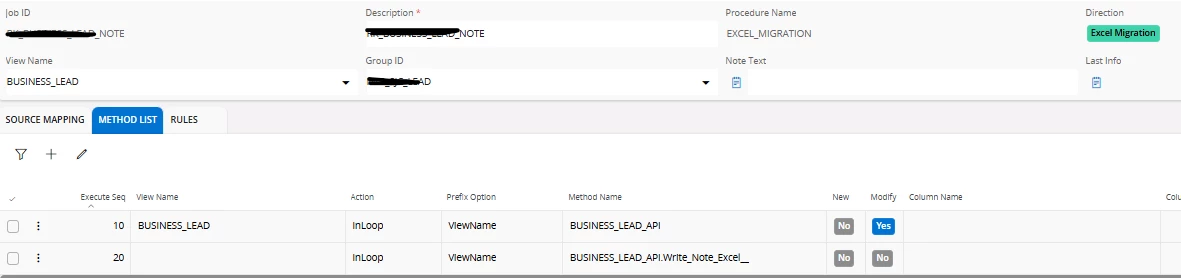
OK, with a bit more playing around I did get it to work. I think the issue is that the tech help is not always easy to follow and some images are truncated so it is not clear to follow as a guide to check if you are populating all the fields correctly/the same.

The solution is actually easier than it may come across in the online doco. This is what I did:

add method @ 20


For 10 - switch off New / Modify flags in Method Attribute List

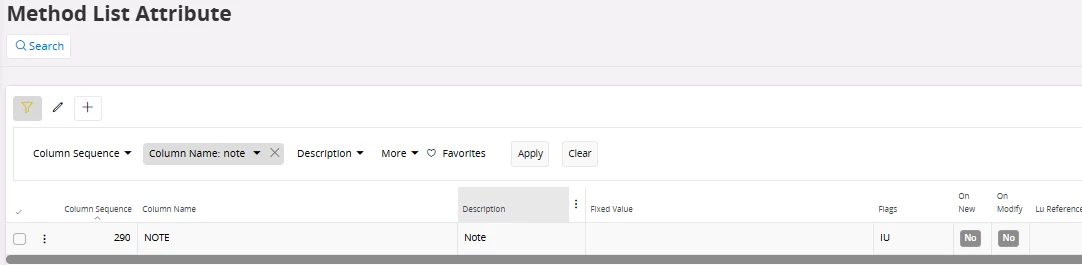
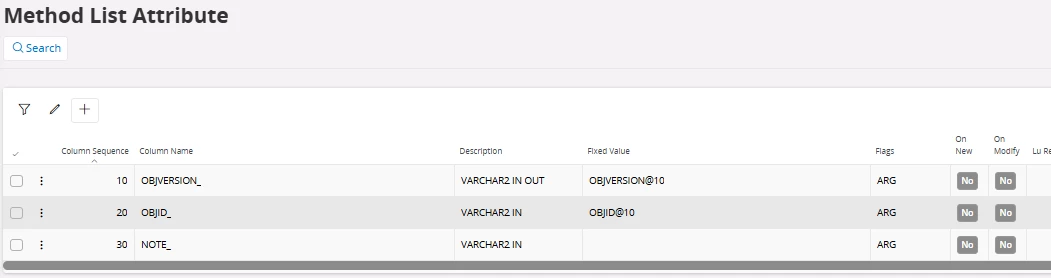
For 20 set Attributes as below


My final source mapping was as below, (prob don’t need last modified...but i originally had it there as it was M but I removed the Column Source after testing and it works fine...):


hth anyone else doing this...