

Question

Voucher date changes when posting.

  • Nov 16, 2026 6:54 PM UTC
  • 1 reply
  • 8 views

Forum|alt.badge.img

Voucher date changes when posting.

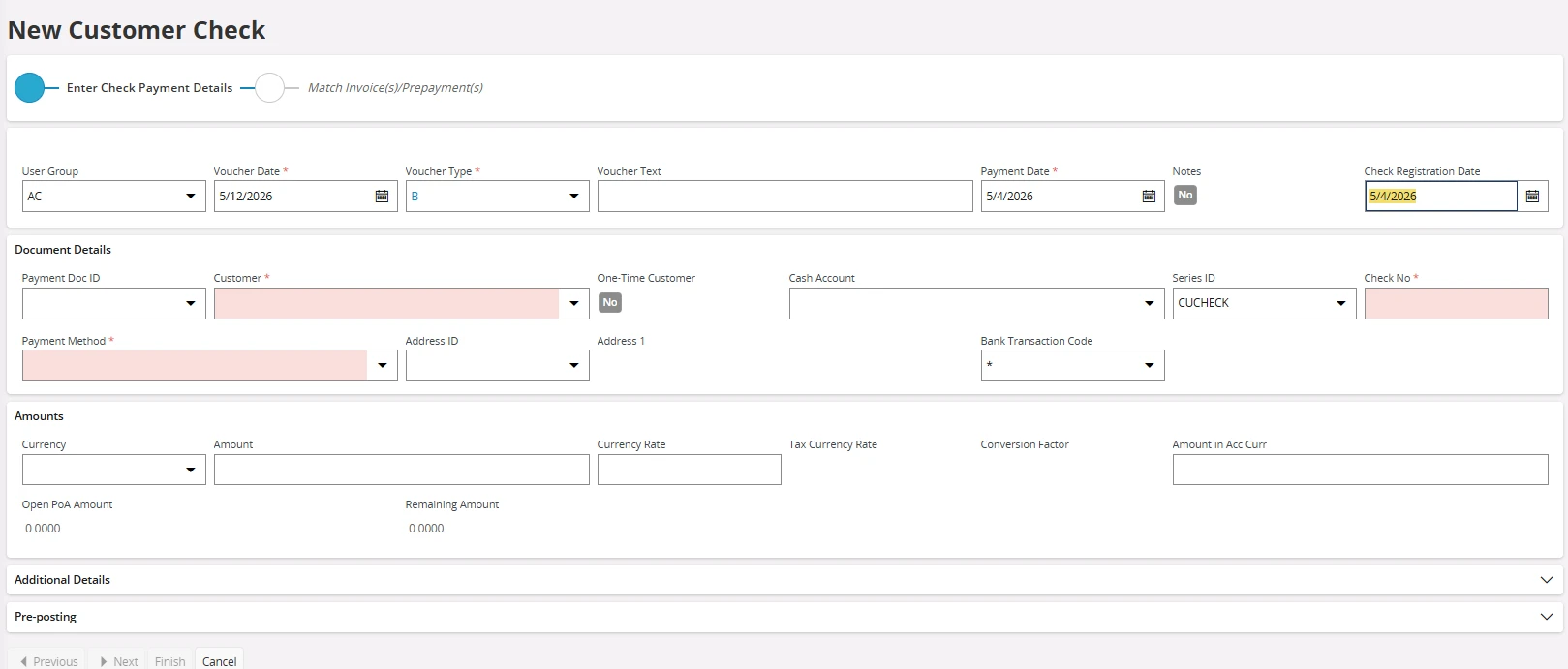
I enter the date below of 5/4/2026 in this order - voucher date, payment date then the check registration date.  And the voucher date changes back to the current date.  See below screenshot.

If I enter the payment date first, then the voucher date.  The voucher date will not change back to the current date.  It will stay as the correct date.


1 reply

Piyal Perera
Hero (Partner)
Forum|alt.badge.img+12
  • Hero (Partner)
  • Nov 17, 2026 4:15 PM UTC

Hi ​@TrevorL, 

I think, it is caused by an application-layer field validation event. 

Here is an AI-assisted breakdown of why this behavior occurs:

  • Order 1: Voucher Date → Payment Date → Check Registration Date

    1. You type a custom Voucher Date.
    2. You enter Payment Date.
    3. You click or tab into Check Registration Date.
    4. Leaving Payment Date triggers ValidatePaymentDate, which evaluates the payment date and returns Voucher Date = SYSDATE.
    5. The UI overwrites your custom Voucher Date back to the current date right before your eyes.
  • Order 2: Payment Date → Voucher Date → Check Registration Date

    1. You enter Payment Date.
    2. When leaving Payment Date, the validation runs and sets Voucher Date to current date.
    3. After that, you manually enter your custom Voucher Date.
    4. Moving to Check Registration Date does not reset it because neither Voucher Date nor Check Registration Date has a validation hook that clears or re-defaults the voucher date.
    5. Your voucher date remains intact.

There are many pages/places in IFS application, similar behavior can occur. 

Regards,

Piyal