Question

unable to get supply code "purchase"

  • March 4, 2026
  • 3 replies
  • 45 views

Forum|alt.badge.img+8

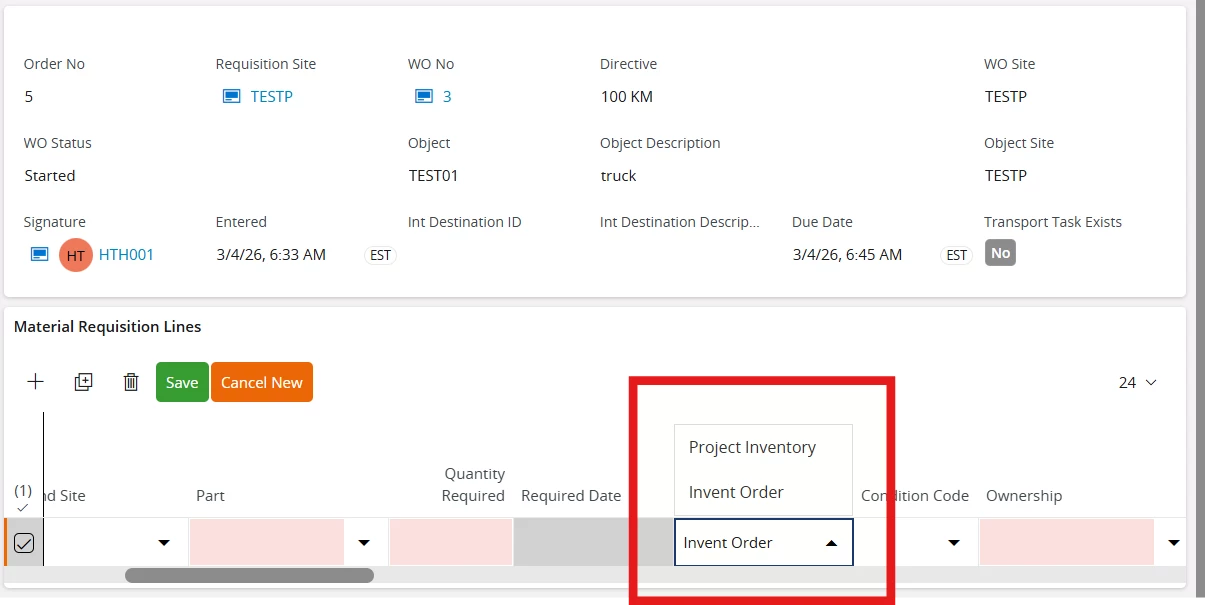
I am intending to order a non inventory purchase part on the material requisition by using supply code as purchase. However I am not getting the option of purchase in the drop down. 


3 replies

Forum|alt.badge.img+13
  • Hero (Partner)
  • March 20, 2026

I’m not a maintenance expert, but I don’t believe Purchase Order is an option on that page like it is on the standard Material Requisition.  


Nikila Dis
Superhero (Employee)
Forum|alt.badge.img+14
  • Superhero (Employee)
  • March 23, 2026

Hi ​@Hashmit,

I think In the reason you are not seeing the “Purchase” option in the Supply Code dropdown is because the system is currently treating your part as an inventory part. In Material Requisition, the available supply options depend on how the part is defined. If the part is set up as an inventory item, the system will only show options like Project Inventory or Inventory Order, since it assumes the demand should be fulfilled from stock or internal supply. The “Purchase” option only appears when the part is defined as a non-inventory purchase part and is properly connected to a supplier. Additionally, Material Requisition in IFS Cloud is mainly designed for internal or stock-related demand, not for direct purchasing of non-inventory items. Therefore, if your requirement is to procure a non-inventory item, the recommended approach is to use a Purchase Requisition instead, or ensure the part is correctly set up as a non-inventory purchase part so that the “Purchase” option becomes available.

  • Check/Create Non-Inventory Part
    • Go to Purchase Part
    • Create or ensure the part is a Non-Inventory Purchase Part (not an Inventory Part)
  • Connect Supplier
    • Go to Supplier for Purchase Part
    • Add a supplier for the part
    • Set it as Default Supplier
  • Verify Purchase Settings
    • Ensure:
      • Unit of Measure is defined
      • Price / supplier info is entered
  • Use Correct Part in MR
    • Go back to Material Requisition
    • Enter this non-inventory purchase part (not an inventory part)
  • Refresh Line / Recreate Line
    • Delete and re-add the line if needed

If this resolves your question, please mark it as the best answer. So that it will be helpful for other peers.

Regards,

Nikila Dissanayake


Forum|alt.badge.img+4
  • Do Gooder (Partner)
  • March 23, 2026

@Hashmit You should be able to create non-inventory material requisition lines even without a supplier for purchase part record. The prurchase requisition will be created anyway.

Handling non-inventory parts in material requisitions was added at some point in the past. Which version are you on?