



Solved

Set Inventory Part to drive through Standard Inventory by default

  • Dec 17, 2025 5:50 PM UTC
  • 2 replies
  • 82 views

aberrant
Do Gooder (Customer)
Forum|alt.badge.img+2

Hello,

I was wondering if there was a way to set a part to drive through standard inventory by default on buildable structures it appears on?

Currently, new structures have a default set of project inventory and we must flag it on the structure level to drive through standard.

Any help would be appreciated.

Thanks,

Andrew
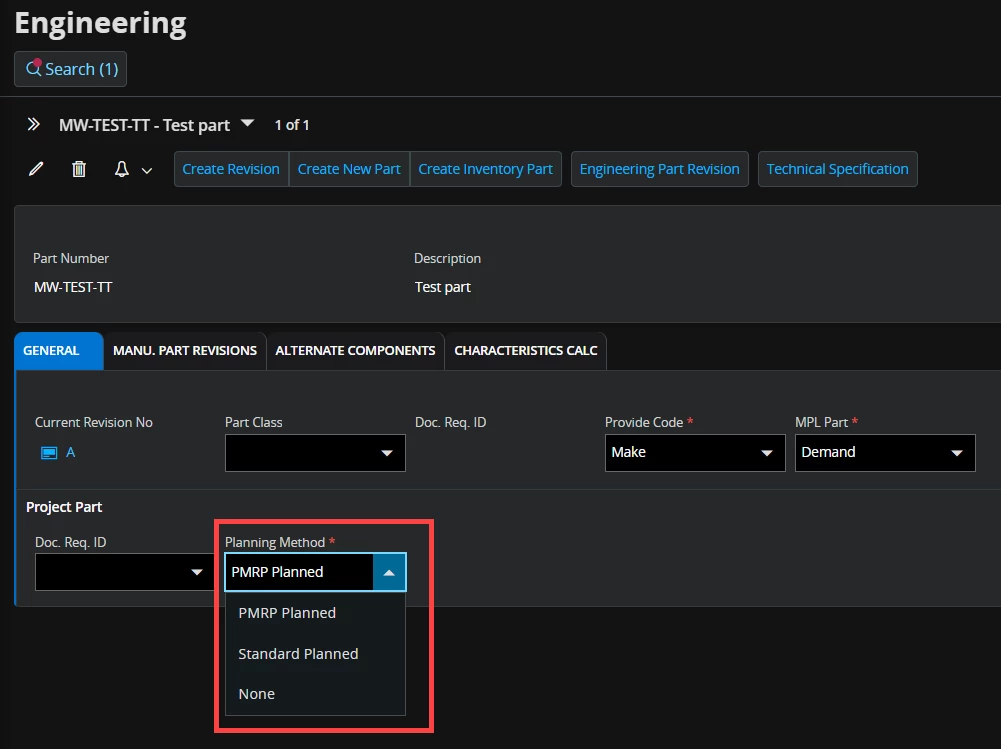
Best answer by matt.watters

If you are using Engineering Parts, the Std Planned Item field in the Product Structure pulls from the Planning Method found on the Engineering tab of the Part page. I do not have access to a non-Cloud system, but the concept shown below in Cloud is the same.


View original

2 replies

matt.watters
Ultimate Hero (Partner)
Forum|alt.badge.img+26
  • Ultimate Hero (Partner)
  • Answer
  • Dec 17, 2025 6:27 PM UTC

If you are using Engineering Parts, the Std Planned Item field in the Product Structure pulls from the Planning Method found on the Engineering tab of the Part page. I do not have access to a non-Cloud system, but the concept shown below in Cloud is the same.


aberrant
Do Gooder (Customer)
Forum|alt.badge.img+2
  • Author
  • Do Gooder (Customer)
  • Dec 17, 2025 6:55 PM UTC

That was exactly what I was looking for, thank you very much!

Andrew