


Solved

PO Authorisation based on Project Role - Sub project

  • February 2, 2026
  • 3 replies
  • 48 views

Forum|alt.badge.img+19

We have setup PO authorisations based on project roles. The setup is working correctly until we connect a sub project to the project role assignment. 

We are interested in narrowing down our PO authorisations down to sub project - activity levels, however it does not work when we connect a sub project id to the role assignment. The auth step is fetched to the auth line, however, does not show the potential authoriser when there is a sub project id is connected. 
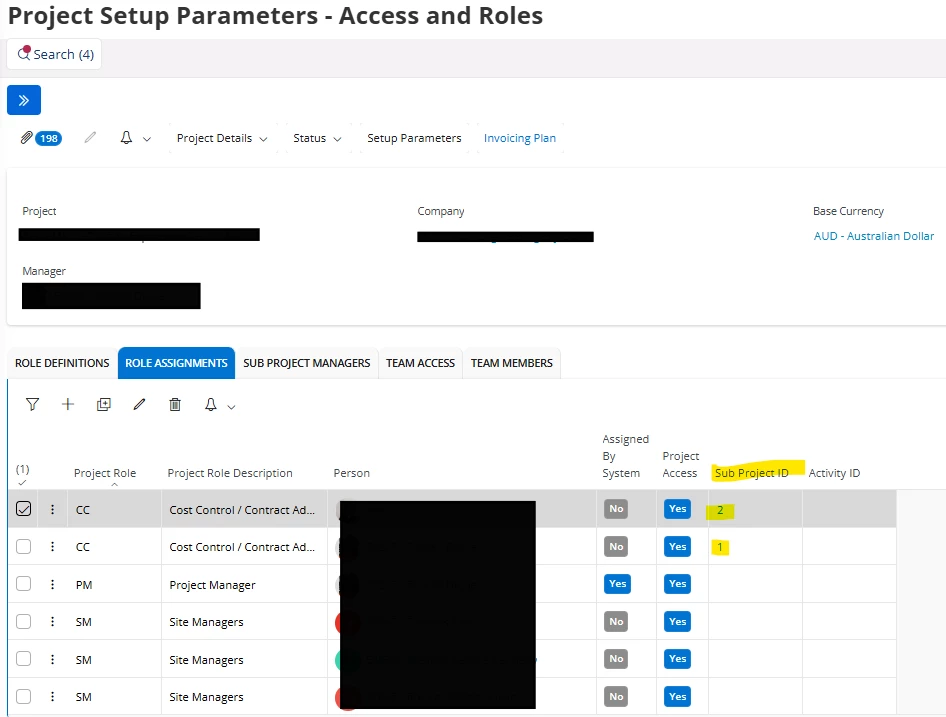

Are we missing anything in the setup?

Best answer by Ravinatha Ariyarathna

Hi ​@Vimukthi Mahakumbura ,

I found below description from an old Solution:


“There are 2 prerequisites to fetch the “Project Role ID” line to the PO Authorization line.

1. Project Role ID should belong to the “Type of Role” of Project Manager, Financial Resp – Project or Other.

Some roles are not suitable to use for authorization of purchase orders e.g. activity responsible and sub project manager. As the authorization of purchase orders are done against the header (and not the lines like for the requisitions) the system can’t find the specific activity or sub project the purchase order is connected to. Project roles connected to sub project or activities are therefore bypassed (not generated) by the generation of authorization steps to the PO.

2. The check box “Project Unique Procurement” in Project-> General tab -> Settings Group Box should be checked.”


Therefore, it seems if you connect the project role to a sub project, authorization will not be triggered. 

Thanks,

Ravi


3 replies

Forum|alt.badge.img+19

cfbr - any experts? 


Forum|alt.badge.img+12

Hi ​@Vimukthi Mahakumbura ,

I found below description from an old Solution:


“There are 2 prerequisites to fetch the “Project Role ID” line to the PO Authorization line.

1. Project Role ID should belong to the “Type of Role” of Project Manager, Financial Resp – Project or Other.

Some roles are not suitable to use for authorization of purchase orders e.g. activity responsible and sub project manager. As the authorization of purchase orders are done against the header (and not the lines like for the requisitions) the system can’t find the specific activity or sub project the purchase order is connected to. Project roles connected to sub project or activities are therefore bypassed (not generated) by the generation of authorization steps to the PO.

2. The check box “Project Unique Procurement” in Project-> General tab -> Settings Group Box should be checked.”


Therefore, it seems if you connect the project role to a sub project, authorization will not be triggered. 

Thanks,

Ravi


Forum|alt.badge.img+19

@Ravinatha Ariyarathna Hi Ravi, thanks for your reply. Yes, you are right. That makes sense, there is no subproject in the header. Thanks again. :)
