Question

Intercompany - Purchase Order without customer Order

  • May 12, 2026
  • 9 replies
  • 117 views

Hallo

Can somebody help me.

We have purchase orders from one site to another (two different companies) and everything is set up for intercompany but if I release a purchase order without having a customer order it does not transfer the order via intercompany. The demand code is “inventory order” and I can not change that. If I start with a customer order everything works perfect. But if I order parts into stock it doesn’t open up an order on the supplier site :-(. 

Does anybody has an idea what is missing? 

Thanks for your help.

Judith

9 replies

Forum|alt.badge.img+6
  • Sidekick (Employee)
  • May 22, 2026

Hi ​@WHGJTAPLEY,

As I understood, your requirement is to run an intercompany flow to move goods from one company site to another without an external customer order. If yes, then for this scenario, the Distribution Order concept is what is used in IFS.

With the same intercompany setup, you can create a distribution order referring to the demand site and when a distribution order is released, a released customer order line is created on the supply site and a released purchase order line is created on the demand site. The customer orders and purchase orders enable the use of the same reservation, shipment, and receipt processes for the distribution orders as the customer orders and purchase orders respectively. The reservation, shipment, and receipt processes can be reached from the distribution order.

Thanks,

Vihan


  • Author
  • Sidekick (Customer)
  • May 27, 2026

Hi Vihan

Thank you for the answer. Looks like that is what I need. Can you provide a source of how to enter a Distribution Order?

THANKS,

Judith


Forum|alt.badge.img+6
  • Sidekick (Employee)
  • May 27, 2026

Hi ​@WHGJTAPLEY,

Distribution Order (DO) and Intersite/Intercompany order processes are almost identical, but they serve different purposes. A DO is used for a Make-to-Stock scenario to fulfill internal demand at the demand site, while Intersite/Intercompany orders are used for a Make-to-Order scenario to fulfill external demand of the demand site.

Hence, the data setup for a DO is exactly the same as an intercompany flow; the only difference is that the flow starts from the Distribution Order page instead of the Customer Order page.

Steps-

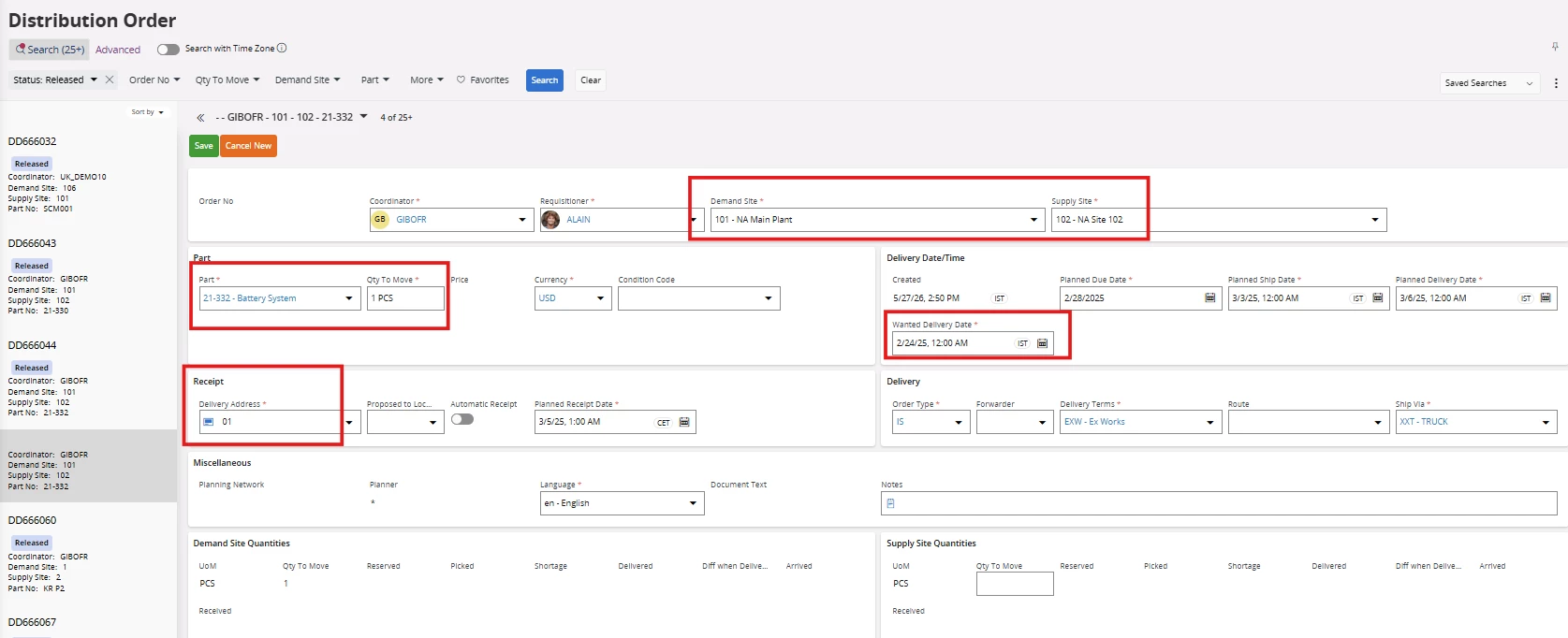
  1. Open Distribution Order window and add the details such as demand site, supply site, part, qty, wanted delivery date, 
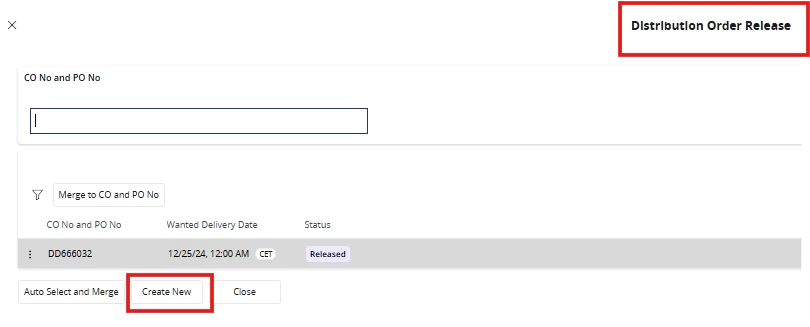
  1. Release the order via the Status option. Then, create a new CO/PO number, or if a CO/PO has already been created, you can connect the new order to it."
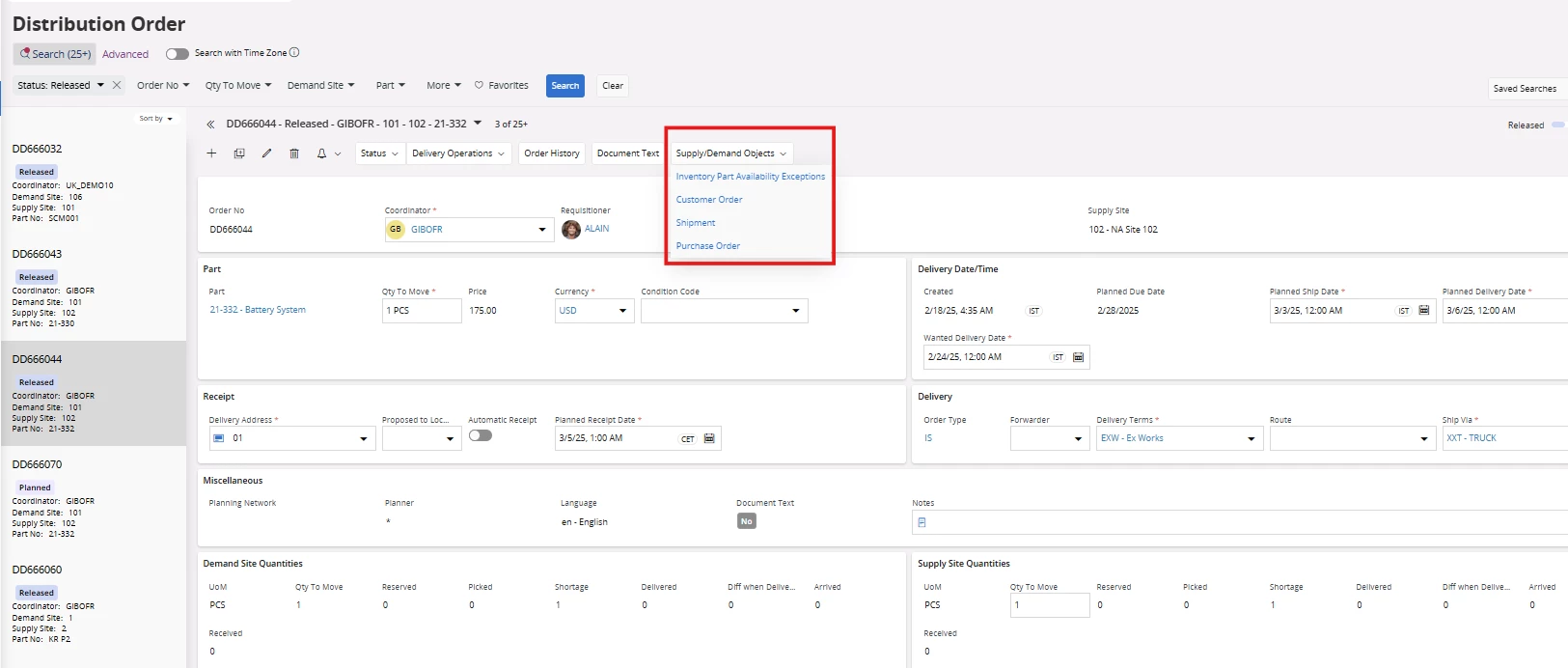
  1.  Once the distribution order is released, you can view the internal customer order and internal purchase order created against it.
  1. Then, you can process the internal CO/PO accordingly, just like processing a normal intercompany or intersite flow.

Further details regarding the distribution order and its process diagram are clearly explained in the documentation below.

http://clouddocs/ifsdoc/24R2/Documentation/en//ProcessModels/Process_Model/distributionorder.htm?StandAlone=true

If this resolves your question, please mark it as the best answer. So that it will be helpful for other peers.

https://www.linkedin.com/in/vihan-weerapura-1a09a1165/

Thanks,

Vihan Weerapura


  • Author
  • Sidekick (Customer)
  • June 2, 2026

Dear Vihan

Yes, that is exactly what we needed.

Thank you very much.

Judith


Forum|alt.badge.img+6
  • Sidekick (Employee)
  • June 2, 2026

Hi ​@WHGJTAPLEY,

Glad the detailed information I provided helped with resolving your issue. Kindly consider marking this response as the best answer so it can help other peers.

Thanks,

Vihan Weerapura.


Forum|alt.badge.img+6
  • Sidekick (Employee)
  • June 2, 2026

Hi ​@WHGJTAPLEY,

Glad the detailed information I provided helped with resolving your issue. Kindly consider marking this response as the best answer so it can help other peers.

https://www.linkedin.com/in/vihan-weerapura-1a09a1165/

Thanks,

Vihan Weerapura


Forum|alt.badge.img
  • Do Gooder (Customer)
  • June 2, 2026

Hi,

If you are not using the Distribution Order (which is an umbrella object above CO and PO) you need to send/share the internal purchase order. When you have an external customer order I think (if I remember correctly) that the pegged internal purchase order is sent automatically.

Anyway this is possible with or without Distribution Order. One benefit with using the Distribution Order is that the demand will be visualized earlier in the supply site for planning purpose.

Best Regards

Fredrik


  • Author
  • Sidekick (Customer)
  • June 2, 2026

Hi Fredrik

If I have an external customer order then you are right. This scenario worked just fine. But in my case we do not have that external customer order and we start at the PO. This does not work with the “normal” intercompany transfer. Her the DO is the better solution.

Best Regards

Judith


  • Author
  • Sidekick (Customer)
  • June 2, 2026

Hi ​@VihanW 

I have one more question: Is it possible to set the DO up that the connected CO will not automatically show up at the supply site in the status “released”? This is quite important. It needs to be received in the status “planned”. I have searched where I can do the setting but did not find anything. Maybe you have an idea.

Thanks for your help.

Judith