

Solved

How to get Customer Order out of blocked status and continue nromally

  • March 27, 2023
  • 4 replies
  • 608 views

Forum|alt.badge.img+17

Hello,

I am currently trying to get customer orders that were in blocked status and then released from blocked status, to process normally and reserve items. (Basically continue as they normally behave when they do not have blocked status). 

As it currently stands, orders that are blocked do not reserve parts or process normally when released from their blocked status. How do I get these orders to “refire” automatically when manually released from blocked status?

Any help would be greatly appreciated.

Thanks,
Bryan

Best answer by EntDhanaP

Hi Bryan,

There is an option/button called ‘Blocked Info’ in the Customer Order Header to process a blocked CO. You can see that if your CO is in ‘Blocked’ status.

 

  • Once you click on that, you will be directed to ‘Handle Blocked Customer Orders’ page. 
  • In there, two buttons will be shown once you click on the relevant order line
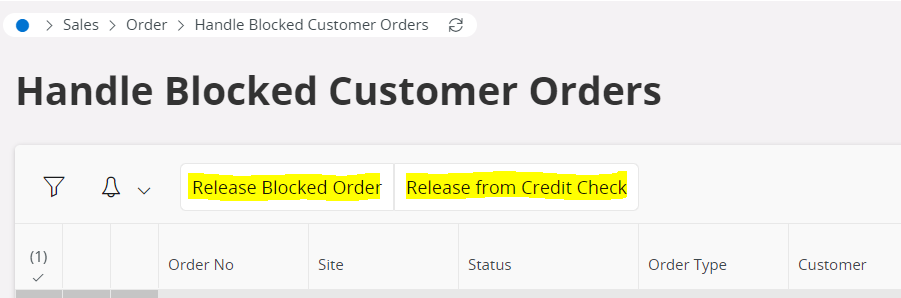
 

By selecting Release from Credit Check, the order will be released and can be processed without any issue as you wanted and will not be blocked again in any of the steps where a credit check occurs.

By selecting Release Blocked Order, the order will be released and can be processed but may possibly be blocked again later in the customer order flow.

Since you want the CO to be processed in the normal way, you can select on Release from Credit Check as there wont be any interruptions again in the process flow.


If you want to unblock a certain customer who is credit-blocked from the Customer Master then you can follow any of the options stated below.
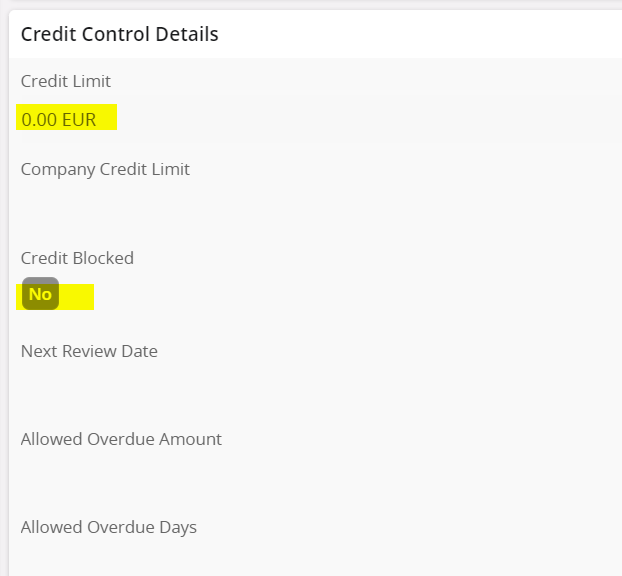
  • in the Customer → Credit Information tab, disable the ‘credit blocked’ checkbox
  • or increase the ‘Credit Limit’ amount

Hope this helps. 😊


Thank you,
Dhananjani.

4 replies

Forum|alt.badge.img+2
  • Do Gooder (Partner)
  • Answer
  • March 28, 2023

Hi Bryan,

There is an option/button called ‘Blocked Info’ in the Customer Order Header to process a blocked CO. You can see that if your CO is in ‘Blocked’ status.


  • Once you click on that, you will be directed to ‘Handle Blocked Customer Orders’ page. 
  • In there, two buttons will be shown once you click on the relevant order line


By selecting Release from Credit Check, the order will be released and can be processed without any issue as you wanted and will not be blocked again in any of the steps where a credit check occurs.

By selecting Release Blocked Order, the order will be released and can be processed but may possibly be blocked again later in the customer order flow.

Since you want the CO to be processed in the normal way, you can select on Release from Credit Check as there wont be any interruptions again in the process flow.


If you want to unblock a certain customer who is credit-blocked from the Customer Master then you can follow any of the options stated below.

  • in the Customer → Credit Information tab, disable the ‘credit blocked’ checkbox
  • or increase the ‘Credit Limit’ amount

Hope this helps. 😊


Thank you,
Dhananjani.


Forum|alt.badge.img+12

Hi @bdoucette, when you release a blocked customer order from Handle Blocked Customer Orders screen, order status is set to the status before putting to blocked. Hence it will not automatically go through the customer order flow. If the order goes to “Released” status after released from “Blocked” status, then you will have to manually do the reservation step again to start the order flow. If the next steps are set up to happen automatically in the Order Type, then it will go through those steps automatically. Thanks.


Forum|alt.badge.img+3
  • Do Gooder (Customer)
  • April 29, 2026

Hi,


I have a question about Blocked Orders and the integration with Requirements planning. Is there an automated way to turn off MRP from planning the products. In some instances, I don't want to trigger replenishment (purchase or shop order) just in case the financial situation deteriorates and the order is never shipped. Leaving us with products in the warehouse and the customer order never gets released. I know there is the Release for mtrl planning at the line level but i have to do this manually. Is there any way to automate this process?

Thanks in advance.


Forum|alt.badge.img+12

Hi,


I have a question about Blocked Orders and the integration with Requirements planning. Is there an automated way to turn off MRP from planning the products. In some instances, I don't want to trigger replenishment (purchase or shop order) just in case the financial situation deteriorates and the order is never shipped. Leaving us with products in the warehouse and the customer order never gets released. I know there is the Release for mtrl planning at the line level but i have to do this manually. Is there any way to automate this process?

Thanks in advance.

From an old solution I found this: “MRP does not look at customer order header and would not know order is credit blocked.  All customer order lines are released and MRP will see all customer order lines in a released state even though the header may be planned or credit blocked”



