Solved

Forecasting Periods in Demand Planner

  • November 22, 2024
  • 5 replies
  • 204 views

Forum|alt.badge.img+9

Is there a way in IFS to create forecasting periods starting from a desired date (Ex first Monday of a given year ) rather always starting from the 1st of January 

Best answer by Richard Owen

Hi Champika,

Yes, it is possible to change the Start and End Dates manually, but this approach is NOT recommended and is NOT best practice due to the way that the standard functionality is designed to work. There are several other functions such as Seasonal Profiles and Period Profiles which also require the Period Versions to start on the 1st January and end on the 31st December to work correctly.

I think you need to review the customer requirements to determine the reasons why the standard functionality will not work for them.

Best Regards,

Richard.

  

5 replies

Richard Owen
Superhero (Employee)
Forum|alt.badge.img+15
  • Superhero (Employee)
  • November 22, 2024

Hi,

This isn’t possible using standard IFS functionality. 

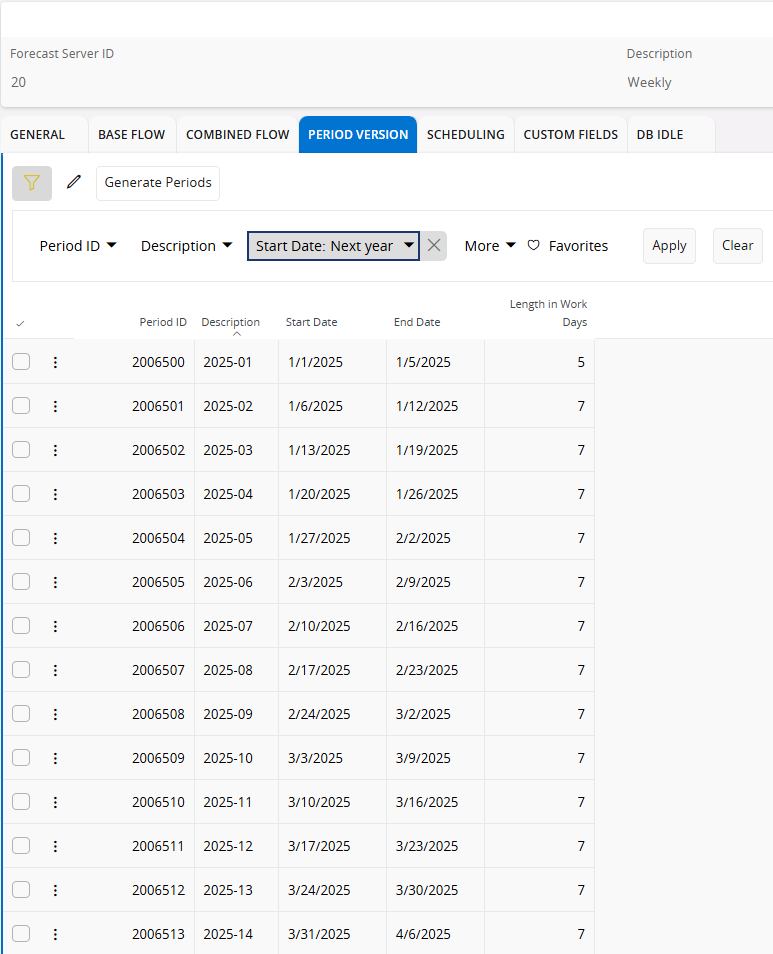
When ‘Monthly’ Period Versions are selected, the ‘Generate Periods’ job will divide the year into monthly buckets starting 1st January and ending 31st December.

When ‘Weekly’ Period Versions are selected, the ‘Generate Periods’ job will essentially divide the year into weekly buckets starting 1st January and ending 31st December.  The difference with weekly periods is that each period will start on a Monday and end on a Sunday. 

This means that the first weekly period and last weekly period may have different ‘Length in Work Days’ values depending on which day of the week the 1st January and 31st December fall on within that year.

I hope that this helps.


Forum|alt.badge.img+9
  • Author
  • Sidekick (Partner)
  • November 22, 2024

Hello Richard,

Thank you very much. We thought of going for a customization.


What we are going to do through this  customization can be done manually today in IFS.


For an example 

  1. We define the periods with User Defined and 52 Periods Per Year
  2. Then adjusted the dates manually 
  3. Some periods go across the years 
  4. We made sure that there are no gaps and overlaps
  5. Then we ran the validation and found no issue

In this customization we additionally make sure that the period length is the same for all the periods

Any advice will be really appreciated 


BR


Champika


Richard Owen
Superhero (Employee)
Forum|alt.badge.img+15
  • Superhero (Employee)
  • Answer
  • November 22, 2024

Hi Champika,

Yes, it is possible to change the Start and End Dates manually, but this approach is NOT recommended and is NOT best practice due to the way that the standard functionality is designed to work. There are several other functions such as Seasonal Profiles and Period Profiles which also require the Period Versions to start on the 1st January and end on the 31st December to work correctly.

I think you need to review the customer requirements to determine the reasons why the standard functionality will not work for them.

Best Regards,

Richard.



Forum|alt.badge.img+9
  • Author
  • Sidekick (Partner)
  • November 25, 2024

Hello Richard,


Thank you very much for your advice.


BR


Champika


Forum|alt.badge.img+2
  • Sidekick (Customer)
  • August 6, 2026

Hi all,

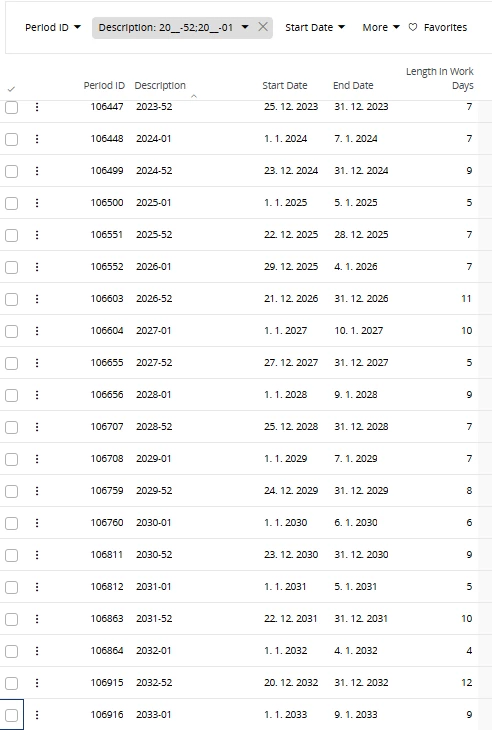
I would like to reopen this discussion because we are also using weekly periods and have encountered an issue around the 2026/2027 year transition.

As mentioned in the previous posts, week 53 is merged into either period 52 or period 1. This is not a problem when the total number of days in periods 52 and 1 remains 14 days. However, at the 2026/2027 transition, periods 2026-52 and 2027-01 together contain 21 days (11 + 10 days).

Since the system forecasts the same volume for each weekly period, the demand of one complete week is effectively lost during forecasting. As a result, the forecasted quantities for this period are significantly lower than expected.

This is a critical issue for our business. We manufacture finished products and purchase raw materials based on the forecast generated in the system. Customer orders are typically received only one day before shipment, which means we cannot rely on actual customer demand for production planning.

Consequently, this forecasting anomaly can lead to insufficient production volumes, raw material shortages, missed deliveries, and ultimately a direct financial impact on the business.

Although this situation occurs only once every 5 to 6 years, the impact can be substantial when it does occur.

I have attached a screenshot illustrating the issue.

Has anyone found a recommended solution, workaround, or best practice for handling this scenario?

Thank you.