
Solved

Error_Scan Order Quotation

  • March 15, 2026
  • 1 reply
  • 23 views

Forum|alt.badge.img+4

Hello all, 


At the moment of validation of scan order quotation, I got this error and could not go to finish the process.


Does anyone has an idea about it please?



Best answer by Nikila Dis

Hi ​@OmarBM,

Field [DOC_CLASS] is mandatory for Document Title and requires a value” indicates that the system is attempting to create a document when completing the Scan Customer Order process, but the required Document Class is not defined. In IFS Cloud this functionality relies on the Document Management configuration, where a valid Document Class (DOC_CLASS) must be available and linked to the corresponding Working Document Type used during the scanning process. If this value is not configured, the system cannot create the document record and therefore stops the process when the Finish button is clicked. 
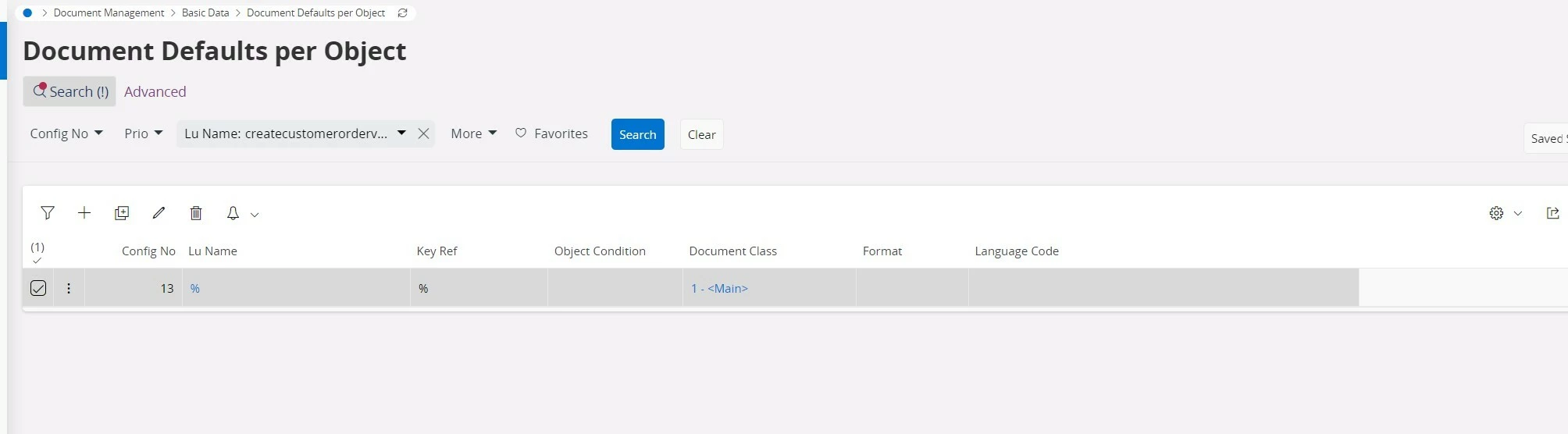
  1. Navigate to the Document Defaults per Object window and create a record with the below details as shown in the below image.
  2. Search by Lu Name: CreateCustomerOrderVirtual
  3. Document Class: Provide a document class for this field.

If there is no LU available to select. After defining an entry for the LU CustomerOrder, it will appear in the list and the functionality will work as expected.

If this resolves your question, please mark it as the best answer. So that it will be helpful for other peers.

Regards,

Nikila Dissanayake

1 reply

Nikila Dis
Superhero (Employee)
Forum|alt.badge.img+14
  • Superhero (Employee)
  • Answer
  • March 16, 2026

Hi ​@OmarBM,

Field [DOC_CLASS] is mandatory for Document Title and requires a value” indicates that the system is attempting to create a document when completing the Scan Customer Order process, but the required Document Class is not defined. In IFS Cloud this functionality relies on the Document Management configuration, where a valid Document Class (DOC_CLASS) must be available and linked to the corresponding Working Document Type used during the scanning process. If this value is not configured, the system cannot create the document record and therefore stops the process when the Finish button is clicked. 

  1. Navigate to the Document Defaults per Object window and create a record with the below details as shown in the below image.
  2. Search by Lu Name: CreateCustomerOrderVirtual
  3. Document Class: Provide a document class for this field.

If there is no LU available to select. After defining an entry for the LU CustomerOrder, it will appear in the list and the functionality will work as expected.

If this resolves your question, please mark it as the best answer. So that it will be helpful for other peers.

Regards,

Nikila Dissanayake




