Cloud IPAP Screen Projected Qty is Not Correct when Filter Applied

  • December 26, 2024
  • 6 replies
  • 104 views

Forum|alt.badge.img+8
  • Sidekick (Customer)

I have a ticket in with IFS about this issue at the moment but I also wanted to post it out here to let everyone else know that this is occurring in cloud today.


On the IPAP screen there is a column called “projected quantity”. In the past, if you filtered the list on the “all” tab, projected qty would update based off of the available qty - the qty required for the specific order/filter applied. This was the logic in 10 at least.


In cloud this does not happen and our buyers almost bought more material because the filter that’s being applied was not recalculating the projected qty.

We regularly filter out MRP messages and won’t do the type of filtering that I’m doing below but the reason for filtering out the MRP messages is because it’s just a suggestion, we may move those orders around. The only way to remove the MRP messages from cloud is to delete the messages which we also don’t want to do.

Please see my screenshots.
 

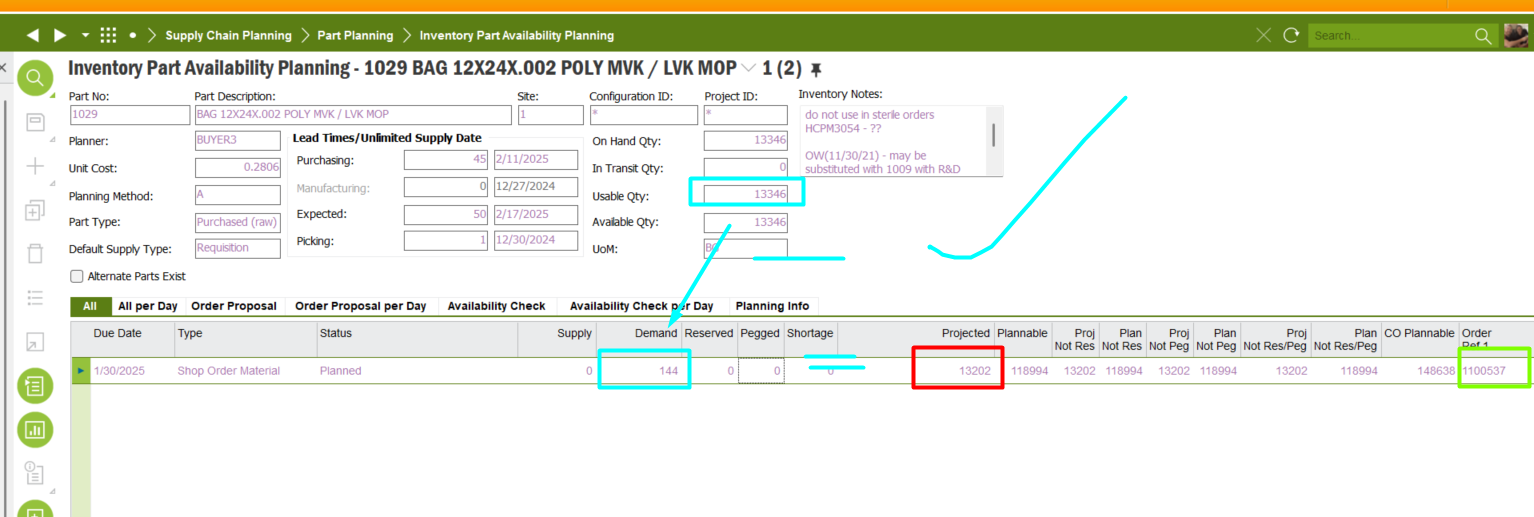
IEE previous line projected qty minus demand = current line projected qty.
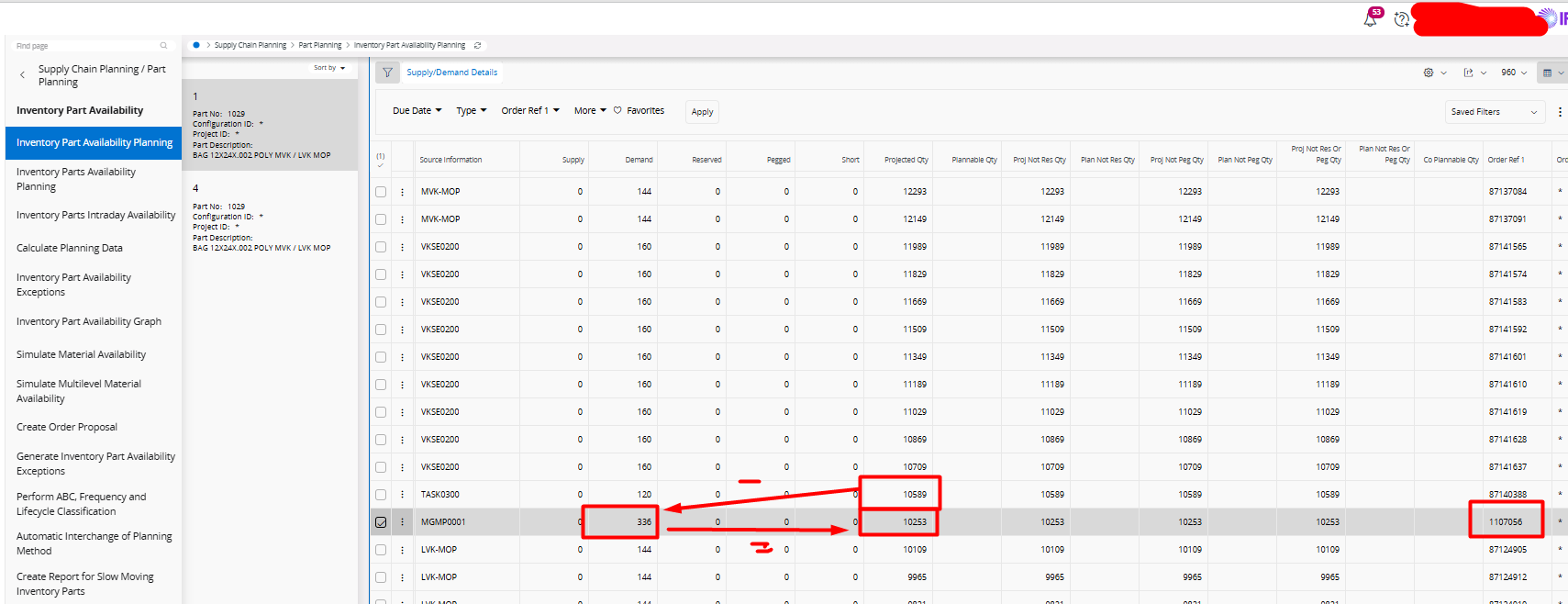
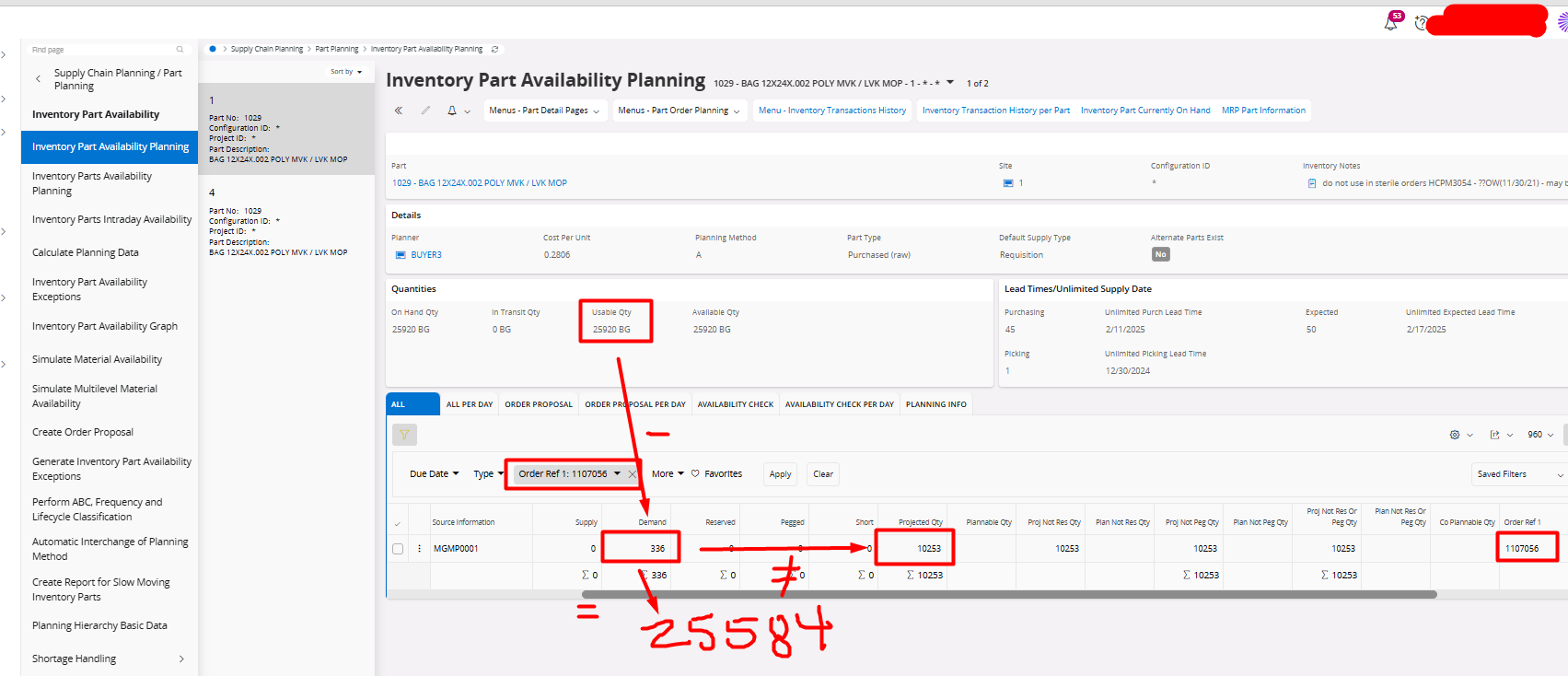
IEE applying a filter for the “all” tab just for this order, logic above checks out again, the filter applied is being taken into consideration when calculating the projected qty. since there is no line above the line I’ve filtered, IFS says right, projected is usable - demand.
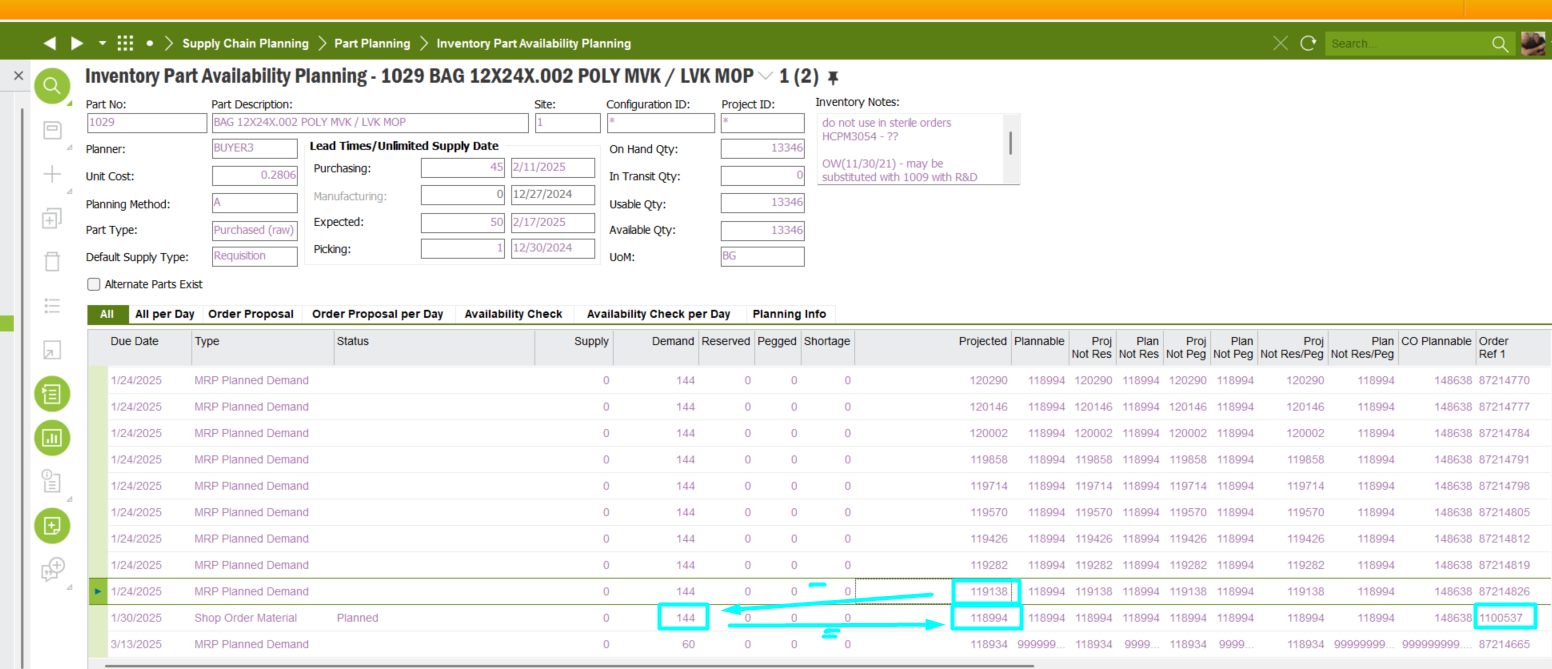
Cloud, projected of previous line minus demand gives us the projected of the current line as it should.
Cloud, projected is static regardless of filter applied. We regularly filter Type Not like MRP% to get a real picture of what our projected onhand is because we may move those MRP orders around. 

Because of this, our buyers almost ordered more inventory because the filter applied is not being taken into consideration when the projected qty is displayed. If it worked in IEE it should be the same in Cloud.


6 replies

Asela Munasinghe
Superhero (Customer)
Forum|alt.badge.img+23

Thanks for posting this thread ​@Anna. Please update here once you have received a response on the ticket


Forum|alt.badge.img+5
  • Sidekick (Customer)
  • July 24, 2026

What has happened on this IPAP issue?  We are running into the same thing, and our purchasing is saying this is a showstopper for our Cloud go live because they can’t use the IPAP screen now because this data is now wrong.  This case was a year ago and I’m hoping IFS has made strides in fixing this.


Ana - what did your group do to work around this issue if IFS didn’t fix the screen?


Forum|alt.badge.img+8
  • Author
  • Sidekick (Customer)
  • July 24, 2026

@MaurineS, IFS said that the behavior we were seeing in apps 10 was really a bug and that this was the fix so the filter will not dynamically update projected qty anymore. We were essentially gas lit into accepting this solution because they thought it was crazy that we would want to see it dynamically even when I explained to them that our company had been using IFS since IFS Applications 2004 and had grown accustomed to this “bug” that they just so happened to figure out how to fix in cloud. Our SC dept was very displeased so we hired an IFS consultant for a customization. The consultant wasn’t able to apply the customization that we needed because the filter used to be done at the UI level and because of the framework differences, it wasn’t possible for IFS to provide the customization we needed. We are rolling forward as it is today without the dynamic updating of the projected qty and if we absolutely need to figure out where we are, our sc analysts export the table to excel and do their filters in there.


Probably not what you wanted to hear but this is just how it is. Maybe if more customers bring it up, they’ll change their stance but this is where we’re at unfortunately. On the bright side, it does seem SC doesn’t complain about it too much anymore but that’s not to say it doesn’t annoy them when they have to do the export.


Forum|alt.badge.img+8
  • Author
  • Sidekick (Customer)
  • July 24, 2026

@MaurineS Please let me know if you guys get any headway on this issue. It would be great if someone else was able to push it in the right direction but we lost the fight.


Forum|alt.badge.img+5
  • Sidekick (Customer)
  • July 24, 2026

@Anna The export function will NOT work for us.  We have over 4,000 purchase requisitions each DAY for steal and they can NOT be exporting information on each one.  I’ll let you know what we come up with.  We have to do something because of the steal market right now they have to dig into each one.  That is more than can be done in one day with our resources.  I would think that a “Bug” for 20 years is NOT A BUG but standard function. 


Forum|alt.badge.img+8
  • Author
  • Sidekick (Customer)
  • July 24, 2026

@MaurineS I completely agree with you. Good luck and please let me know if you guys get any headway on it.