

Question

ETM, Mapping a Custom Multi-Select field in a Dynamic Resource Channel

  • Nov 20, 2026 5:38 PM UTC
  • 3 replies
  • 13 views

askey-s
Sidekick (Customer)
Forum|alt.badge.img+6

Hi

I have a dynamic resource channel within our ETM.  Multi-header CSV files are created to be processed by it.  I need to add a custom multi-select lookup field to the Contact User form, and this field will also need to be processed via the channel to create/update Contact User records.

This is an example of the header records/data record for the file:


resource contactUser
update
columns
self.shortCode
self.csgShortCode
discontinued
custom.S-CU27
custom.S-CU32
custom.S-CU38
data
12345678|NON IT|FALSE|01.04.2026|S-P-999|80000708


Custom field S-CU32 is to be the multi-select one.  What should the header value be to denote it as a multi-select column, and how should the data be formatted?

I’ve been unable to find any relevant details in to wiki, sadly.

Thank you, Steven

3 replies

SGrant89
Hero (Employee)
Forum|alt.badge.img+7
  • Hero (Employee)
  • Nov 23, 2026 10:27 AM UTC

Is the multi-select field a lookup of Contact Users? In this case, the column heading would be:

custom.<assystRESTType>.<customFieldShortCode>.<lookupField>.multi

eg.

custom.contactUser.S-CU32.shortCode.multi


With the data formatted as a comma separated list (Quoted in a CSV).

eg.

“STEPHENG,ASKEYS”


askey-s
Sidekick (Customer)
Forum|alt.badge.img+6
  • Author
  • Sidekick (Customer)
  • Nov 23, 2026 11:17 AM UTC

Hi

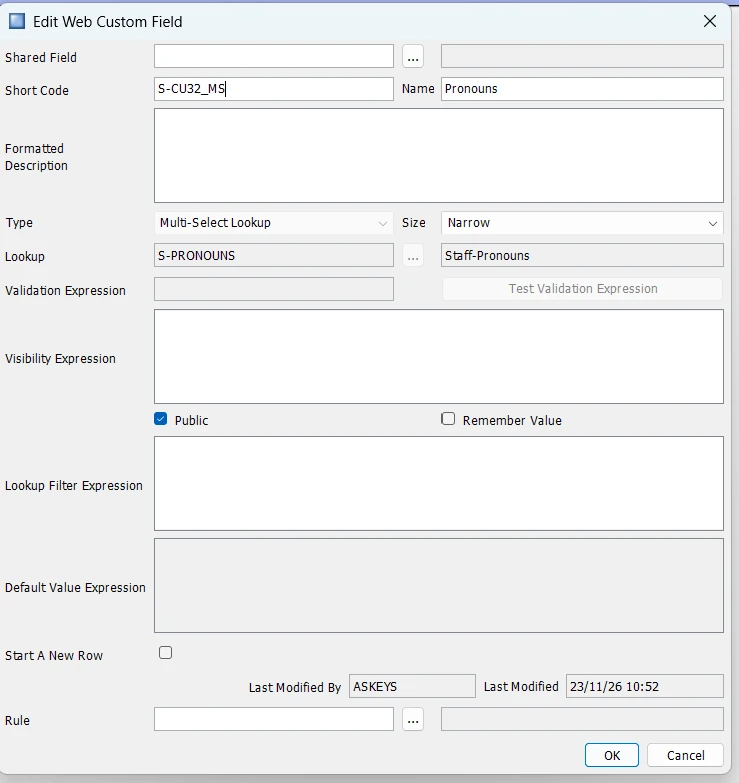
Thank you for this.  The lookup is for pronouns (e.g. he/she/they/them) and has been created as a custom lookup and is set on the Contact User form as:


The values I’m including the the import file are the shortcodes of the selected ones.  By using the heading you suggested (but without the contactUser part), I’m getting the error message:

Error attempting to map to multi-select custom field CUSTOM.S-CU32_MS, array is expected in CUSTOM.S-CU32_MS

I’ve tried various combinations of data values (like “SC_1,SC_2” or [“SC_1”,”SC_2”] or [{“SC_1”,”SC_2}]) but without success.  What am I missing, please?

Thanks, Steven


SGrant89
Hero (Employee)
Forum|alt.badge.img+7
  • Hero (Employee)
  • Nov 23, 2026 11:38 AM UTC

Unfortunately, there is a defect in the dynamic datamapper in generating the correct field mapping for a multi-select custom lookup, so currently this would need a workaround by providing a custom datamapper which correctly sets the field type.

eg:


Is it possible for this import to use a specific Channel/Datamapper rather than the Worksheet channel to implement a workaround like this?